Work IQ | Data, Context, Skills & Tools for Copilot and Your Agents
Microsoft Mechanics
0:02 Imagine AI that understands your individual work
0:05 context without you having to author long,
0:07 detailed prompts, manually upload reference content,
0:10 or query and add business data.
0:12 That's what Work IQ is all about.
0:15 Today, I'll explain what Work IQ is, how it works, and show you what it can do.
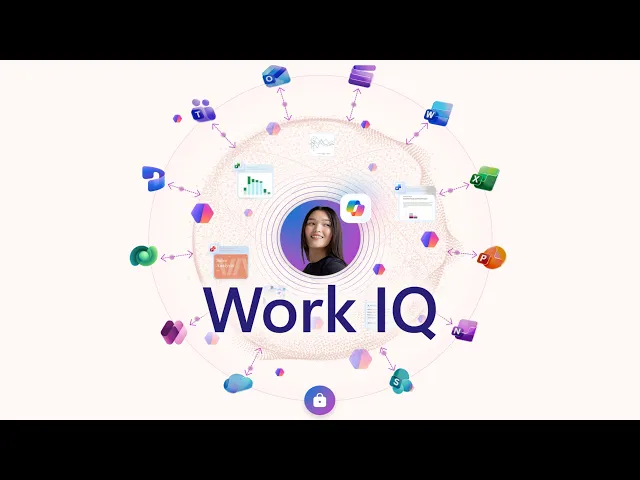
0:19 So, Work IQ is the brain behind Microsoft 365 Copilot and agents.
0:24 It's a built-in knowledge layer that comprises data,
0:28 with secure access to your unstructured work data across SharePoint,
0:31 emails, Teams chats and meetings,
0:34 as well as your structured business data in Dynamics 365 and Power Apps.
0:39 And you can extend Work IQ data even further to securely
0:42 interact with external systems using Copilot and Power Platform connectors.
0:47 Then context adds semantic understanding
0:50 of your business data and relationships,
0:51 like who you work with, work patterns, like projects important to you.
0:56 This context also includes personalization in Copilot,
1:00 consisting of the instructions you provide to format its responses,
1:04 as well as saved memories comprising personal interests
1:08 and important facts that Copilot retains from chat.
1:11 And finally, skills and tools as actions that AI
1:15 can take with specialized capabilities like generating different files,
1:19 workflow automation for business processes,
1:22 scheduling relevant meetings, and more.
1:24 Together, all of these elements are added to your prompts
1:27 and subsequent reasoning steps performed
1:29 to generate more relevant responses and outputs.
1:32 If you're using other AI tools today,
1:34 these are things that you would need to bring in manually,
1:37 sometimes moving files from policy-protected locations
1:40 to services without your security controls or visibility,
1:43 so let me show you a few examples of how this works,
1:46 starting with a few that use data and context.
1:50 So, I'm in Copilot Chat and want to follow up on a recent project discussion,
1:54 so I'm going to I'll prompt it,
1:55 "What did Daichi say about the solar promo timelines earlier this week?"
2:00 Even though this is a vague statement and could be information in email,
2:04 Teams, or a recent meeting,
2:06 Work IQ finds the conversation and its details, then presents those to me.
2:11 It also finds a related meeting series
2:13 in my calendar that Daichi scheduled on the topic.
2:16 And these Work IQ experiences are also available in your apps,
2:19 like Outlook or other Microsoft 365 apps.
2:22 In this case, my calendar is packed with meetings
2:25 and I'm double-booked in three different time slots.
2:29 From Outlook, I can ask Copilot to recommend how
2:32 to resolve conflicts on my calendar for May 12.
2:36 Copilot, using information from Work IQ, analyzes my schedule,
2:39 along with my priorities and past meeting patterns.
2:43 It finds the three timing conflicts on top.
2:46 Then for each conflict, it reasons over the adjacent meetings, my role,
2:51 and work patterns to create detailed recommendations for each conflict time.
2:56 Below that in the summary, it suggests which meetings to reschedule,
2:59 who to notify, and some actions to take.
3:03 And Work IQ can help as you write or edit your files in apps like Word.
3:07 So, here, I want to to write a summary for a project,
3:10 and as you can see, there are no project details in this document.
3:14 It's just a blank page.
3:16 So I'll open Copilot and I'll prompt it to draft
3:19 an executive summary about our expansion strategy that highlights our products,
3:23 the market for outdoor gear, our unique position, and go-to-market strategy.
3:27 Copilot, together with Work IQ,
3:29 finds and pulls in data from relevant project files in SharePoint and OneDrive,
3:33 recent updates from meetings, and relevant emails and Teams conversations.
3:38 You can see that it automatically applied a sensitivity
3:40 label based on my existing information protection policies.
3:44 Then it generates a detailed summary using all
3:47 of the data and context that it found,
3:49 and assembles a fully formatted Word document
3:52 with specific details about our connected outdoor products,
3:55 the market opportunity, go-to-market strategy,
3:59 and our expansion plan with details for carrying it out.
4:03 As you saw, I didn't need to author
4:05 a super long detailed prompt with the project
4:07 details and have to upload any content
4:10 or even directly reference files using links.
4:12 It automatically retrieved relevant content that was aligned with my access
4:17 permissions as well as my company's data security policies.
4:20 Now let me show you an example using intelligent skills and tools.
4:24 In this case, I need to prepare for a customer
4:27 meeting where I need to have several files generated,
4:29 internal briefing document, a customer presentation,
4:33 and data insights in a spreadsheet.
4:35 So, for that, I'll use Copilot Cowork.
4:38 I'm going to paste in my prompt where I'm asking it to create those files.
4:42 Now, I'll kick off the process.
4:44 And now it's using Work IQ data, context, skills,
4:49 and tools to find relevant data and information
4:52 and then generate the files I want.
4:54 Now, this process can run several minutes,
4:56 so I'll speed things up a little to save time.
4:59 As it works, I can even request more
5:01 tasks while it's running using other skills and tools.
5:04 Here, I ask it to schedule prep time with people
5:07 on my team and send an email status update to the account team.
5:11 As it continues working,
5:12 it checks and finds a mutually open time on our schedules,
5:15 and it proposes a meeting with participants with all of the details filled in.
5:20 I can create it right from here.
5:22 Then it uses another skill to author an email to my contact
5:25 on the account team that I can even edit right from here.
5:29 Once everything's done, you'll see that it's created a Zava client presentation,
5:34 a customer briefing doc, and a customer overview Excel file.
5:38 I'll open the briefing document first,
5:41 and it has everything relevant to the meeting
5:43 and uses our standard briefing template.
5:46 Now, I'll open the presentation it generated.
5:49 It explains our work at a glance
5:51 with key metrics from Work IQ and referenced files,
5:54 as well as revenue and growth highlights.
5:56 Now, if I move on to the generated Excel
5:59 file and open that, it's laid out year-over-year performance
6:02 and used that to generate forecasts for this year
6:05 And you can see the growth trends and more,
6:08 all from the data it discovered via Work IQ.
6:11 And like I mentioned, the data can be securely extended
6:14 to systems from non-Microsoft services using connectors,
6:18 allowing you to pull in other information like your online CRM systems,
6:22 content management, databases, ticketing system, and more.
6:25 Now, these can be added and configured under
6:28 Copilot Connectors in the Microsoft 365 admin center.
6:32 The gallery lets you select from dozens
6:34 of pre-built connectors or you can create your own.
6:37 And these can be API-based or MCP server-based.
6:41 API connections are indexed for read operations and MCP
6:45 servers are not indexed and support read and write.
6:48 To add one, like this API-backed connector for ServiceNow Knowledge,
6:52 you'll set up the REST API endpoint,
6:54 provide its namespace and URL to your instance.
6:58 And since I already have a few MCP server connectors configured,
7:02 I'll cancel out of this view and then go to my connections to show you those.
7:06 Now, here, you can see all of the MCP connections
7:08 that I have configured in my tenant for things like financial apps,
7:12 creative suites, collaboration services, and more.
7:16 Once connected, these in turn can be accessed
7:19 via Work IQ by Copilot or your agents.
7:21 In fact, as a developer, if you are building agents,
7:25 you can integrate Work IQ into your code with connections using the Work IQ API.
7:30 Here, I'm using the GitHub CLI.
7:32 It's connected to Work IQ and using its underlying MCP servers,
7:37 plugins, and skills.
7:38 I have my prompt already entered to find a conversation with Ben
7:42 and Darrel asking about the availability of an MCP server from the claims team.
7:47 Now, I want this agent to build
7:49 another agent based on our discussed feature requests,
7:52 so I'm going to kick it off.
7:54 And you can see that it reasons immediately and looks
7:57 for the conversation to find the features that it needs.
8:01 So, after it's found that, it lists out the features and connects
8:05 to the insurance claims MCP server and looks at its available tooling.
8:09 Then it starts to build the scaffolding files
8:11 for the new agent as JSON and text files.
8:15 And then deploys a local instance of the agent to test out with a link,
8:19 so I'll open that and run a prompt to stack-rank
8:22 my open claims by age so I can clear the backlog.
8:26 Then the agent builds a nice claims dashboard
8:28 with a tiled view of each stack ranked claim.
8:31 And below that, it even summarizes my priorities so that I
8:35 can easily focus on what's important and work through the list.
8:39 So, even as you develop new agents or work in other solutions,
8:42 you can use the data, context, skills, and tools from Work IQ
8:47 to power those experiences and save time.
8:50 Work IQ works with Copilot and your agents to deliver personalized, accurate,
8:54 and grounded outputs based on your real work data,
8:58 context, and specialized skills and tools.
9:00 To learn more, check out the latest updates at aka.ms/WorkIQ.
9:05 Keep watching Microsoft Mechanics for latest deep
9:07 dives about AI and what makes it work.
9:09 And thanks for watching.