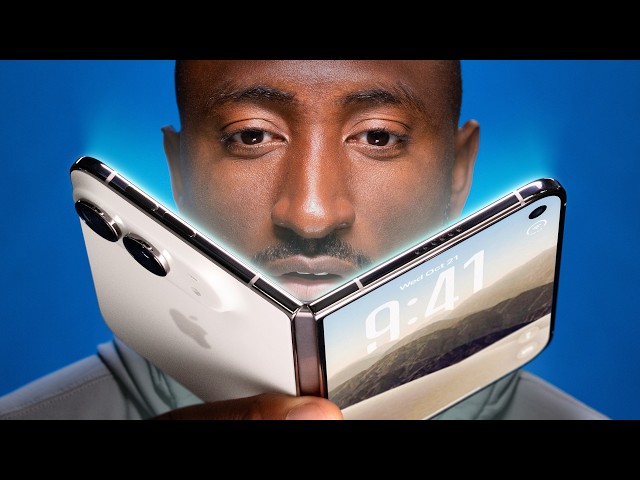
iPhone Duo Review: First Generation Fun!
Marques Brownlee
0:03 First-generation devices...
0:04 are always the most fun to review.
0:07 And for the past, like, month, everyone I talk to has been asking me,
0:10 "What do you think of the iPhone Duo?
0:12 Like, should I get a foldable...
0:14 iPhone??
0:15 Is that for me?
0:15 Who is it even really for??
0:17 You've been testing it for the past week, right??
0:19 Yeah...
0:34 So most new pieces of tech...
0:49 are fundamentally like a solid idea at their core.
0:53 And then they can be a little bit rough around the edges,
0:56 but that'll get better over time.
0:58 The iPhone Duo specifically, as the first folding iPhone, is...
1:03 very polished...
1:05 around the edges, but kind of rough...
1:08 in the middle, if that makes sense.
1:11 Let me explain.
1:16 So Apple does this annoying thing when
1:18 they come out with new products where they kind of ignore the rest of the world
1:22 and pretend the competition just doesn't exist.
1:24 So it can be kind of brutal...
1:25 listening to them go up on stage and pretend
1:28 that they're inventing something and explaining
1:30 something we've never seen before.
1:32 But the honest truth is, for a lot of people, they really...
1:36 actually haven't yet seen this before.
1:38 So we know, like you and I know, that this first folding...
1:42 iPhone is years behind, like eight generations behind...
1:45 the first folding phones we saw back in like 2019.
1:48 But for a whole mass of people, this...
1:51 is the first one they've ever really even considered buying.
1:54 So it kind of forces them to think
1:56 very deliberately about that question and forming a cohesive,
2:00 understandable reason...
2:01 why they should spend $2,000 on this...
2:04 So like this animation everyone's been talking
2:06 about since the launch between the closed...
2:08 and...
2:09 opened Duo's displays, it's not just good because it's smooth.
2:12 I mean, it is smooth, but...
2:14 it's good because it's literally...
2:16 teaching first-time foldable users what is happening.
2:20 My theory, and a lot of people have also shared
2:22 this, is I think it was inspired by this lenticular sheet, which...
2:26 obviously...
2:27 is pretty cool!
2:29 I could be wrong, but it's nearly the exact same...
2:32 visual effect...
2:33 When the sheet is on top of something, you start to lift it up and it slowly...
2:38 diffuses what's underneath it, right?
2:41 So now enter...
2:42 iPhone Duo.
2:43 When you start opening it up, it slowly diffuses what's...
2:47 underneath it, and it's super responsive to the hinge angle as you open...
2:51 or close more for realism.
2:54 Makes sense...
2:55 But not only that, then you get to the open half,
2:57 and all of this reflection and this diffusion...
2:59 implies that there's more underneath that.
3:02 So it's all designed to help people intuitively
3:05 understand that they're opening to reveal an extended display.
3:08 There's a bunch of other super clever,
3:10 really well-considered, polished stuff like that...
3:12 all around this phone that I'll get to in a second.
3:16 But also then the hardware, it kind of, it does feel very first-gen.
3:25 So this is a very pretty phone.
3:26 And even though we've seen folding phones for years,
3:28 it's still pretty striking to finally see a folding...
3:31 iPhone.
3:32 The back glass is one piece...
3:35 and curves up smoothly onto the camera plateau where the dual cameras sit...
3:37 That's nice.
3:37 And the side rails are titanium, very shiny, very premium...
3:42 feeling, also very fingerprinty.
3:44 But then yeah, you open it up and it...
3:46 feels solid because the hinge weight...
3:48 is actually variable...
3:50 So right at the point of opening when
3:52 you're prying the magnets apart, it's really sturdy.
3:55 Then it smoothly opens to like halfway, then it slows down again...
3:59 so it can stop...
4:00 at various half-open states for certain apps,
4:02 which I'll also get to in a second.
4:05 And then the last bit...
4:06 snaps open.
4:07 That's nice.
4:08 And then the same thing when you're closing it.
4:10 There's some real effort required at first,
4:12 and then the reward is that satisfying clap shut with the magnets.
4:16 All that's not even mentioning the IP68
4:18 dust and water resistance rating that this has,
4:20 which is pretty elite for a foldable.
4:22 So I mean, you can splash it, you can toss it in your bag.
4:25 I'm really just treating it...
4:26 like a regular phone at this point, minus I'm never taking it to the beach.
4:31 I think it's clear that these things don't like sand.
4:34 My prediction, by the way, is that Zack...
4:37 bends it slightly?
4:38 but doesn't break it.
4:39 It's my prediction.
4:41 But I'm saying a lot of nice things.
4:43 Why do I also say that this feels...
4:45 very first-gen, right?
4:46 Well, thick...
4:48 and heavy, right?
4:50 So look at this.
4:51 This is the Samsung Z Fold 8...
4:53 Same idea, obviously, passport-shaped foldable, but it's now Samsung's...
4:57 eighth...
4:57 year doing this, and say what you want about Samsung,
5:00 but they've clearly iterated quite a bit on this stuff.
5:03 So this phone...
5:04 is significantly thinner...
5:05 and like 20-something percent lighter, and that stuff makes a...
5:09 big difference in daily use.
5:11 Also, the sides being flatter, I think,
5:13 makes it much easier to pry open than the slick...
5:16 rounded titanium sides.
5:18 The Duo feels significant and solid,
5:20 and that's what you want when you're spending $2,000+ obviously.
5:24 but I'm telling you, after you use this thing for like a week or two...
5:27 you would be happy if it was 20%...
5:29 lighter.
5:30 And I just keep replaying in my head that Time Magazine interview
5:33 quote where John Ternus recently called a bunch of the other foldables "cheap...
5:37 and crappy." And maybe this is the hot take, but making...
5:40 everything metal and glass and heavy doesn't necessarily make it better to use.
5:50 Like, it feels good in the hand,
5:50 but it's like that, sometimes works against them.
5:53 It's just kind of like the permanent Apple design default.
5:55 And that's great for like a MacBook Pro
5:56 or an old Mac tower when you want it to feel...
5:58 metal and substantial, great.
6:00 But it sometimes backfires, like Vision Pro.
6:02 Vision Pro is all metal, super heavy in a world of...
6:06 all plastic VR headsets.
6:08 So does the Vision Pro feel premium and significant to hold?
6:11 Yes.
6:11 Does it kind of, at first glance, make the other plastic ones feel...
6:15 cheap and crappy?
6:16 Kinda, yeah.
6:17 But then when you're wearing it on your face for a while, do you also...
6:20 kinda wish it was lighter?
6:22 Also, yeah.
6:23 And same with over-ear headphones.
6:25 Like, most are plastic for a reason...
6:27 It's lightweight, you're wearing it on your literal head for a while.
6:31 AirPods Max comes along, very premium, feels solid,
6:34 it's metal, very heavy, maybe a little bit too heavy.
6:37 Now you're not wearing an iPhone Duo on your face,
6:39 so obviously it's not as dramatic, but the point still stands.
6:43 This reminds me a lot of the first-generation Pixel Fold,
6:46 just a little thicker and heavier than you're hoping it was, but...
6:49 clearly the right idea.
6:51 Other things I've noticed that are just kind of nitpicky but totally real,
6:54 uh, this is a very right-handed phone,
6:56 so your thumb naturally rests right on the fingerprint
6:59 reader/power button when you hold it this way.
7:01 But then...
7:02 they kept Camera Control all the way down near the bottom right corner.
7:06 It's this little cutout, by the way, and it's a little out of the way,
7:08 but maybe you're also rotating it into taking
7:10 a photo or a video, so it's not bad.
7:12 But then that also means there's not quite
7:14 enough room for the volume buttons on that side.
7:16 So they put them at the top of the phone.
7:19 Again, just slightly outta the way...
7:21 And then in iOS, so this launches with 27.1 out the box,
7:24 you pull down from the right corner for Control Center still.
7:27 You pull down from the middle anywhere, and that's Siri, which means...
7:32 all the way to the left, that top left corner,
7:35 is where you pull down to get notifications.
7:38 And even with big hands, that's just...
7:40 a little bit of extra hand gymnastics.
7:42 And while we're at it, the case situation's also kind of interesting too.
7:45 So Apple made two...
7:46 first-party cases with the...
7:47 iPhone Duo.
7:48 This is the Folio case.
7:49 It's $130 and magnetizes to the back and then kind of...
7:53 slides to expand to cover the front.
7:55 So it's a one-piece case.
7:57 The kickstand is cool, but it leaves the rails totally unprotected.
8:01 They also made their Silicone Case, two pieces, one for the back,
8:04 one for the front, but this one leaves the hinge totally exposed.
8:07 So then there's third-party cases,
8:09 and channel sponsor dbrand has their $60 Grip Case.
8:12 And I might be biased, but I think they've done a better job than Apple,
8:15 at least at making something...
8:16 that's...
8:17 actually protective, 'cause they got the back hinge protection piece.
8:19 And this doesn't use like mechanical parts like most folding cases,
8:23 no moving parts, just...
8:24 one integrated piece.
8:25 So if you're paranoid at all about durability and want
8:28 the cleanest looking case that actually has hinge protection,
8:32 this is probably the best move.
8:33 And hey, since they are the channel sponsor,
8:35 this whole Duo lineup with this case and the Prism
8:38 screen protector is available at dbrand.com/duo or nationwide at Best Buy.
8:42 Now the inside screen...
8:43 is the part of the Duo that does not feel first-generation at all.
8:48 They did an incredible job with it.
8:49 I love it...
8:50 This is a 7.6-inch OLED.
8:51 It's 120Hz display.
8:52 It matches the 3,000 nits of the outside display.
8:56 And this nanotexture finish is so good.
9:00 Obviously, it does a great job
9:02 of hiding the already mostly imperceptible crease,
9:04 but it also, it just feels nice to slide your finger across it.
9:07 I did just for fun put it under a microscope to try to see
9:10 if I could see the micro lenses that make up the nanotexture, but they are...
9:14 absolutely tiny.
9:16 That over there...
9:17 on the right...
9:18 is the cutout in the nanotexture for the under-display selfie camera...
9:20 You can clearly see the nanotexture does slightly diffuse the light,
9:23 so there's a little bit less sharpness when reading text,
9:26 or watching videos, but at no point did I find that bad.
9:30 But speaking of that selfie camera, yeah, that is,
9:33 that is very first-gen and it is bad.
9:36 The photo quality is trash.
9:39 It looks a...
9:40 little better on like a FaceTime call with video
9:43 than just straight up taking pictures with it.
9:44 But yeah, Apple clearly has done the math.
9:46 Like they've assumed people won't use this camera
9:48 very much and they've accepted the trade-off...
9:51 of image quality versus having this big dramatic uninterrupted inner display...
9:55 We'll see if they also bail on that in future generations like Samsung did,
10:00 or if they stick with it.
10:01 Now, other things that are good for a first-generation phone,
10:05 the hinge, like I talked about, with the variable weight, excellent.
10:09 Battery life, this is another thing...
10:11 So we finally actually got the quantity, the size of the battery.
10:14 It's about a 4,900 milliamp-hour combined battery split between the two sides.
10:18 And it's really good.
10:20 Like, if you use this phone, let's say the normal ratio is like...
10:24 75%...
10:24 closed, 25%...
10:26 big screen open, this is gonna be an all-day phone and then some.
10:30 That 2-nanometer...
10:31 A20 Pro chip is doing a lot of heavy lifting and performs great,
10:35 but it's also super efficient.
10:37 It feels right on par with the 17 Pro I came from, and...
10:39 with a ton of high-brightness use,
10:42 I'm regularly ending the day with like 30-plus percent left.
10:45 Now, if you do decide to do...
10:46 way more...
10:47 big screen use, of course it'll be...
10:48 a bit more battery 'cause it's the bigger display, but honestly not much.
10:53 It's a very efficient phone.
10:54 And then the cameras on the back,
10:57 right on par with the rest of the foldables out there.
10:59 So you've got dual cameras back here, one...
11:01 standard 48-megapixel and one ultra-wide.
11:06 I was trying to find out exactly which 48-megapixel sensor they were able
11:08 to fit in this Duo since it specifically needs to be something thinner.
11:12 And you'd think naturally they'd take from something like the...
11:15 iPhone Air because it's so thin, but the literature actually seems to point
11:19 more towards using the same camera as the...
11:21 iPhone 17e, which is not like some insult
11:23 where it's like incapable of taking great photos.
11:25 It is capable of taking really good photos, but it does mean that...
11:29 as lighting conditions deteriorate, this smaller sensor,
11:34 it does have to crank up the ISO earlier...
11:36 and get noisier earlier...
11:37 than...
11:38 those bigger Pro cameras.
11:39 But I have taken a lot of photos and videos
11:41 over the course of the past week and a half,
11:44 and almost none of them have surprised me...
11:47 Like, it's a solid camera, it's an okay camera most of the time.
11:50 The ultra-wide is like...
11:52 baseline useful to have, but it's not gonna take incredible...
11:56 corner-to-corner sharp photos.
11:58 And then not having a zoom does mean that shots past about 4x...
12:01 are just dramatically worse than the Pro phone, which has an actual zoom.
12:06 Side by side with a 17e and an 18 Pro...
12:08 in weaker lighting, it's definitely closer...
12:11 to the 17e...
12:12 in terms of sharpness and noise.
12:14 But guess what?
12:15 I also shot the entire...
12:16 Tesla Roadster reaction video on the...
12:19 iPhone Duo, believe it or not, and there were almost no comments about it...
12:23 Now, that doesn't mean...
12:25 nobody noticed, and certainly I noticed as I was editing what very much...
12:31 looks like...
12:31 iPhone footage, but the Duo, despite having a Pro chip,
12:35 doesn't have any of the Pro camera features.
12:36 There's no ProRes, there's no log,
12:39 it's just good old-fashioned 4K 30, and it generally looks fine.
12:43 It's outdoors, of course the footage is usable.
12:46 This is not the iPhone you would choose if you are the iPhone filmmaker who...
12:51 wants the absolute best possible pro tools and image quality,
12:54 which is a little hard to swallow at first because this is the most expensive,
12:57 therefore most premium iPhone, but yeah,
13:01 it's not targeted at that group of people.
13:02 It is much more like the productivity entertainment...
13:04 iPhone...
13:05 that happens to have good enough cameras,
13:07 and it's good enough cameras that are on par
13:11 with other foldables that are a tier below the slab-style flagships.
13:14 Also, like other foldables,
13:15 it gains the ability to turn on the rear display for the camera.
13:19 So with this button up here, you can fire up the preview,
13:22 which just shows the people you're taking
13:24 pictures of the exact framing that you're using.
13:27 I think I'll call this one spouse mode.
13:29 So when your spouse asks you to take a picture of them,
13:32 they don't have to ask 5 or 6 times.
13:33 They can just give you the instructions to get it perfect the first time.
13:37 Spouse mode.
13:38 And then there's Kid Cue,
13:40 which plays colorful Snoopy-themed animations on the back,
13:42 which should ideally get little kids to kind of look in the general
13:46 direction of the phone when you're taking a picture of them.
13:49 Cool.
13:50 Kid mode...
13:50 But if you flip the phone around, you'll see they've also added this...
13:54 slide-to-open camera control...
13:55 You slide that, and it not only gives you the preview,
13:58 but it gives you all the controls to take the highest
14:01 quality possible selfie with the main camera on the back.
14:05 And it also disables the back display to reduce accidental touches.
14:09 Wow.
14:09 Self-portrait mode.
14:11 They did it.
14:11 Nice...
14:12 Bottom line is the hardware is fun.
14:14 It is really fun.
14:15 What's not fun though, right now...
14:18 is the apps.
14:22 So the app situation on the...
14:23 iPhone Duo...
14:24 is its biggest downside right now.
14:26 Like, right now, as I release this video, at launch.
14:31 See, the idea of the iPhone Duo,
14:33 while it's closed, is it's basically a normal...
14:35 iPhone...
14:35 on the left-hand side, but anything that would typically be at the very top...
14:38 or the bottom is moved over to the right...
14:40 where it's reachable with your right thumb.
14:42 So on the home screen, for example, there's a normal grid of apps on the left,
14:46 but the dock from the bottom moves over to the right,
14:49 and the time and the battery and cell signal, all that stuff,
14:52 is also over to the right in this clever little glyph.
14:54 Makes sense.
14:55 You open one of Apple's own apps...
14:58 and that theme continues.
14:59 The main content is on the left,
15:00 and then the buttons that used to be on the bottom or the top...
15:04 are over to the right where they're reachable.
15:06 So this is a brilliant concept.
15:07 It's cool.
15:08 It's sort of the blueprint for an optimized app.
15:10 The problem is most apps, at least most of the ones I use right now,
15:15 are not optimized yet, which means...
15:17 they look like this.
15:18 Just a regular app with the buttons still at the top and the bottom,
15:22 and then a black bar down the right-hand
15:24 side where the buttons are supposed to be.
15:27 So Spotify looks like this, Google Maps,
15:30 Waze, Discord, and Twitter are all like this...
15:33 Google Calendar is like this...
15:35 Like tons and tons of apps, big apps, most of them...
15:38 are currently like this.
15:39 And then when you open up the phone,
15:41 they're mostly still just small, unoptimized iPhone apps in the...
15:45 middle of this huge screen, which is hilarious...
15:47 Even if you turn it vertical, still very small.
15:50 Very reminiscent of the old...
15:52 iPad days where you could just hit the 2x button and it just made it bigger.
15:56 So some apps...
15:57 are slightly more responsive,
15:59 like they'll partially kind of stretch out across this inner display, but...
16:03 they're still clearly not optimized for Duo yet.
16:05 Like Spotify kind of stretches things, Flighty...
16:08 kind of stretches things, but the general experience...
16:11 has been...
16:12 flipping between a whole bunch of not optimized apps that look...
16:16 pretty terrible on the Duo right now.
16:18 I think in about...
16:19 six months, once developers get a bunch
16:21 of these and start developing the Duo-specific versions of their apps,
16:24 'cause this isn't just an...
16:25 iPad app, it's a Duo app that they have to make, then...
16:29 things will start feeling way better.
16:32 And this is one of Apple's biggest strengths, to be fair,
16:34 like just dragging developers along for stuff like this.
16:37 So I think most of the big ones...
16:38 will...
16:39 come along for the ride eventually, but...
16:41 not all of them will.
16:41 Not all of them are gonna make it.
16:43 Like, I know now that I will have to officially abandon Arc
16:47 Mobile as my browser of choice 'cause they're done developing that for mobile.
16:52 Like, the gym app that I use every day, that's probably not gonna get updated.
16:56 So stuff like that.
16:57 But I really can't wait.
16:58 Like, I'm constantly checking the software updates I have available in the App
17:01 Store 'cause I can't wait for the updated Duo versions of these apps...
17:05 Shout-out to Instagram, just got the update today as I'm filming this.
17:08 And also Carrot Weather, my weather app of choice, they did it.
17:11 They've got all their stuff together...
17:12 Closed screen, buttons are on the right-hand side now, and then open it up...
17:17 and they've got the two columns, buttons are still reachable on the right.
17:21 Hopefully more get on this page soon.
17:23 And I'll also mention, this has been kind of a buggy phone to test.
17:26 I've had a couple of things like freeze up on me,
17:29 not like full catastrophic restart the whole phone freezes,
17:32 but a couple weird bugs, especially in that continuity animation.
17:35 You know, obviously, okay, it's designed to be pretty quick.
17:38 Like, you just open it, close it, that's sort of it.
17:41 But if you slow it way...
17:44 down...
17:44 or even stop halfway and then try to interact with the display,
17:48 it can get kind of confused,
17:49 mainly because there's so many different possible states that it
17:53 could be in that it's trying to figure it out.
17:55 Like the hinge angle and the orientation,
17:57 like should it be StandBy mode, should it be...
17:59 between the apps on the right or the left?
18:01 It can be a little weird...
18:02 But that's also me kind of trying to break it.
18:04 My biggest software gripe with this whole phone though is actually not a bug,
18:08 it's an intentional feature.
18:10 So you know how I said earlier, this is the first...
18:12 foldable phone that a lot of people have seen,
18:14 and so there's a lot of thoughtful...
18:16 consideration and polish with the software to accommodate for that.
18:21 Well, this phone also doesn't have Face ID.
18:23 We knew this, not enough Z-axis space, not thick enough, so fine.
18:26 They've done what all the other foldables have done,
18:28 which is add a fingerprint reader...
18:30 on the power button.
18:31 Great.
18:31 But they've programmed in a massive, not massive,
18:35 but a delay on that fingerprint reader.
18:37 Now, if you've been using phones with fingerprint readers for a while,
18:40 you've already known, like you've developed this behavior where...
18:43 if you just wanna check the lock screen real quick,
18:45 then using your registered finger is actually too fast.
18:50 Like it just unlocks right away and skips the lock screen.
18:51 So...
18:51 to check your lock screen notifications,
18:54 you instead just tap with a different finger
18:56 so it doesn't unlock, and then you can...
18:58 read whatever...
18:58 And then when you do wanna unlock,
19:01 then use the correct finger again and it opens up.
19:04 With...
19:05 iPhone Duo, Apple built in a delay with every single unlock.
19:11 So you can tap with your registered finger, it pauses...
19:13 on the lock screen for a beat, and then if you keep holding, then it unlocks...
19:18 It's technically smart, like it's giving...
19:21 people a chance to check to see their notifications
19:24 real quick before it goes and unlocks it.
19:26 And if they wanna deliberately hold it longer, it'll unlock, but I just,
19:31 as someone who's used to the instant unlocks from Face ID,
19:33 I was like, I need to find a way to turn this off, and I did not find that.
19:37 Like, it just makes the fingerprint reader feel slow...
19:39 when it's not slow.
19:41 Like, this new behavior I taught myself with the Duo
19:43 is you can speed it up by waking it,
19:45 then swiping up, then touching the fingerprint reader,
19:47 and it unlocks basically instantly.
19:49 It's really fast.
19:50 I just wish I didn't have to do all of that every single time.
19:54 I really think Face ID is gonna be
19:55 the number one thing people miss coming from other...
19:57 iPhones.
19:58 Not the zoom cameras, not the thinner and lighter form factors.
20:02 I think it's Face ID.
20:06 So most new products, like I've said, have this good idea somewhere at the core,
20:10 and then they can be a little bit rough around the edges,
20:12 and that will get patched up and better over time.
20:16 iPhone Duo, as I've mentioned, is...
20:18 very polished around the edges.
20:20 All these sleek animations and all this stuff.
20:23 But it is a little bit rougher...
20:24 at the core, like just being a little thicker
20:26 and heavier and having a bunch of apps not look good.
20:29 But there are going to be people who this phone is really good
20:32 for because this phone is really good at a few things, and I've seen...
20:35 those flashes of greatness with it with my week and a half of using it.
20:39 The obvious one is...
20:39 two apps...
20:40 side by side.
20:41 Why would you do that?
20:42 Well, there's actually tons of good reasons to.
20:45 You just have to remember that you can do it,
20:48 and then you'll just start doing it more.
20:50 Like...
20:50 YouTube open on one side and note-taking open on the other side, very useful.
20:55 Or maybe just replace YouTube with something
20:57 else like a video call or anything really.
20:59 Also copying and pasting like an email confirmation code
21:03 from one side into a login portal on the other side, also extremely clutch,
21:07 and just replace whatever copying and pasting you wanna be doing.
21:11 If you have two apps open side by side
21:12 and then tap on the divider in the middle,
21:14 it locks them together in a pair and visually looks like a book.
21:18 And so it sort of intuitively makes sense anytime you open one,
21:21 they both open up together.
21:22 And then you can unpair it the same way.
21:24 And then the back and forth with all the different windows...
21:27 is super intuitive...
21:28 You can go home on one side, not the other.
21:30 Then you can swipe between recent apps...
21:33 on one side, but not the other.
21:34 It's all super clean.
21:36 You can't do a third window...
21:37 and you can't do...
21:38 anything...
21:38 other than two apps side by side, half screen,
21:41 but— That's, of course, still better than a regular iPhone.
21:44 I also had to try, just for the memes,
21:47 to scroll Instagram Reels and TikTok at the same time.
21:52 And technically you can do it, but it actually does...
21:54 kind of bug out a little sometimes 'cause
21:57 it wants to only play the audio from one, and then it kind of gets weird.
22:01 I'm gonna turn the volume on.
22:03 It might get crazy, but this is— Hey Benny the TikTok audio.
22:09 Inversion...
22:10 But then it switches back.
22:11 You see how it switched back to the Instagram?
22:12 if you really start to look at it.
22:13 I mean it is kinda cool...
22:14 That's kind of cool...
22:14 I mean if you just look at the progress So you, you can't hear...
22:17 And then back to TikTok.
22:17 both at once, and maybe that's a good thing.
22:20 Um, but you can, you can— this could,
22:24 this could be you, but don't, don't do that.
22:25 But the other thing it's actually really good
22:27 at, better than a lot of other foldables, is the halfway open state.
22:32 Because this hinge...
22:33 is so sturdy in the middle,
22:35 that it's probably the best foldable at just being partially open,
22:38 and they've planned around that.
22:40 So if you're typing, but then like sort of partially close it,
22:42 the keyboard splits in half to avoid you having to touch...
22:45 the middle.
22:46 There's also apps that let you type or control on one half
22:49 of the screen while you have content playing on the other half.
22:52 We've seen that before.
22:53 But then this is the first iPhone that automatically enters StandBy mode,
22:57 even when it's not connected to power,
23:00 when you just put it up in like a tent formation.
23:02 So when it's vertical, it'll just show two different customizable
23:05 screensavers and when it's in horizontal,
23:08 it'll show one big screensaver, like your clock...
23:10 or weather...
23:11 or calendar or whatever you want...
23:12 It's really nice...
23:13 And the phone has more than enough battery to sort
23:15 of just sit on a desk all day showing notifications...
23:18 and not have any issues.
23:20 And there is, of course, the sort of awesome...
23:22 underglow alarm clock.
23:24 And then I just have to say, it does the continuity thing incredibly well.
23:28 Like the speed that it goes from open to closed,
23:30 and closed to open and picks up exactly where you left off.
23:34 Like, you could be in the middle of writing an email with an attachment,
23:37 this whole big thing, and you realize, you know,
23:39 I want to do a little more multitasking to get this done.
23:41 You just open the phone and keep it going...
23:44 Just picks up right where you left off.
23:46 You could be in the middle of reading something, open the phone...
23:50 mid-scroll, and it finishes that scroll and keeps going.
23:54 It's so good.
23:55 And then the matte inner display, I can't say enough nice things about it.
23:58 It is...
23:58 the hardware highlight of the Duo...
24:01 It's nice to read things on, it's nice to watch videos on, it...
24:04 really blocks reflections super well,
24:05 and it's nice to hold it vertically like an...
24:07 iPad mini.
24:08 Matter of fact, this is the orientation
24:10 that the volume buttons on the side make more sense,
24:12 and I find myself holding it like this, reading
24:14 stuff more than any other foldable I've used.
24:17 But most of all...
24:18 the polish...
24:18 I keep talking about at the edges, it's just,
24:21 it helps people to understand what is happening on the phone.
24:25 So the opening and closing animation, like I talked about, the...
24:28 two apps next to each other animation that I also talked about,
24:30 also the new Dynamic Island animation since it's over here on the side now.
24:34 Did you catch that?
24:36 Also, the inner display selfie camera,
24:37 when you close the camera app, just shrinks up the pixels...
24:41 to hide the camera...
24:42 That is so clean.
24:43 The condensed battery, time,
24:44 and signal strength indicator over in the corner has become very easy to read,
24:48 and I've gotten used to it.
24:49 The dots at the bottom are your cell signal strength...
24:52 It's all very well put together, and it's not a coincidence that the camera
24:56 viewfinder fills up the whole display perfectly with no
24:59 black bars because the camera sensor is the same
25:04 aspect ratio as the outer screen, which is...
25:07 also the same aspect ratio as the inner screen rotated 90 degrees.
25:09 So it always fills up your display...
25:11 Such a nice touch.
25:15 Man, I told you there's a lot with these...
25:18 first-generation devices.
25:19 So, okay, I know that a lot of people, when they see that there are chapters
25:23 in this video and there's a conclusion chapter,
25:25 they're gonna skip right to this part of the video, in which case, hi.
25:29 Shame on you for skipping.
25:31 Watch the rest of the video.
25:32 There's so much other good stuff in there...
25:34 But okay, fine, I get it.
25:35 Your finger is hovering over the order button and you just...
25:38 need someone to tell you if it's good or not...
25:41 Just someone please tell us if we should buy this thing or not.
25:45 Okay, first of all, I do think that by the time you actually get your Duo,
25:51 if you're just now gonna order, in a couple weeks and months,
25:54 there should be way more apps optimized for the Duo, so that's nice.
25:56 But yeah, the idea is really simple in concept, right?
26:00 It's $2,000 to get an iPad mini that can fit in your pocket...
26:04 120Hz iPad mini OLED fits in your pocket.
26:07 Have you ever wanted that?
26:08 They made it!
26:09 They did it!
26:10 Great!
26:11 This is the first generation.
26:12 It's made for you.
26:14 But also, yeah, it is polished but rough.
26:19 Am I making any sense?
26:21 There's gonna be a lot of attention...
26:22 on this phone...
26:24 because it's a new...
26:25 iPhone, and people with other...
26:27 iPhones are always curious if they should be getting...
26:29 the newest iPhone.
26:31 And for most of those people, the answer...
26:33 is probably actually no.
26:34 Like, if you're just a regular person who doesn't do much more than texting...
26:38 and social media...
26:39 on their phone, some occasional web browsing here and there, eh, probably no.
26:44 If you are the...
26:45 iPhone filmmaker who wants the absolute best
26:46 cameras to go shoot their next thing, no.
26:49 If you're the type of person who breaks your phone every like
26:53 nine months 'cause you drop it all the time, yep, probably no.
26:56 But if the $2,000 or the difference between
26:59 35 and 55 bucks a month doesn't mean much
27:01 to you and you just kind of like the idea and wanna jump in, I think after...
27:06 the learning curve and getting used to not having Face ID,
27:10 this is a really fun phone to use...
27:13 And...
27:14 it's really just 'cause that polish,
27:16 that polish around the edges goes a long way towards the fun factor.
27:19 So...
27:20 the awesome animations, the incredible hinge, the...
27:23 wonderful inside display, like all of that is just really nice.
27:28 And it hides a little bit of the rough core,
27:29 like it will feel a little heavy sometimes,
27:31 and not all your favorite apps will be updated right out the box, but it is fun.
27:36 Apple can't completely engineer their way
27:38 around the compromises of this form factor,
27:40 like the slightly worse battery and the slightly
27:43 worse speakers and the slightly worse cameras.
27:46 Like, that's just physics.
27:48 But what they have done...
27:49 is...
27:49 an admirable job...
27:50 with their...
27:51 first generation.
27:53 Now I'm just gonna have to cross my fingers that a second generation...
27:56 actually listens to some of that core feedback, 'cause that...
27:59 could be...
27:59 an amazing phone.
28:00 If you are picking up this first-gen Duo though,
28:02 it's also a good time to pick up some extras while you wait for it to arrive...
28:06 And so of course I have some recommendations...
28:08 from channel sponsor Ridge.
28:09 So first of all, their power bank...
28:11 It's a 5-in-1, 10,000 milliamp hours, MagSafe, built-in cables,
28:15 an Apple Watch charging pad, and it works as a hub while plugged in.
28:19 It'll work with your new phone or your old one.
28:21 And then second, their tracker card.
28:23 It's the size of a credit card, so it slips right into your wallet,
28:25 and it works with both Apple Find My and Google Find Hub.
28:28 The battery lasts up to 10 months per charge, and it charges wirelessly.
28:31 Ridge's Friends and Family Sale is on now, and...
28:34 you know, I consider y'all friends and family, so...
28:37 you can get three power banks for the price of two...
28:41 It'll work with your new phone like the iPhone Duo...
28:42 or 18 Pro...
28:44 or any phone with USB Type-C...
28:44 or Lightning cables...
28:46 Head over to ridge.com/mkbhd to check out that deal...
28:48 before it's gone for good.
28:50 Thanks for watching.
28:52 Catch you guys in the next one.
28:53 Peace.