I Said Yes to Every Email for a Month! (Again)
Marques Brownlee
0:02 So, as a product reviewer, I get a lot of emails,
0:05 some of them normal, some of them with stuff you would never believe.
0:09 And so, I say no to 99% of the emails I get.
0:12 Seriously.
0:13 And so as a result, I miss out on...
0:17 We miss out on a lot of the crazier stuff.
0:22 But what if...
0:23 just for fun, I said yes.
0:27 To everything.
0:29 Again.
0:30 So, I did this a couple years ago because I didn't think
0:33 people would believe some of the stuff that shows up in my inbox.
0:36 That's how we ended up with a casket in the studio,
0:38 which we still have, by the way.
0:40 Top comment on that video is, "We need this segment every year,
0:43 but at random times so they don't know when you're saying yes to everyone." So,
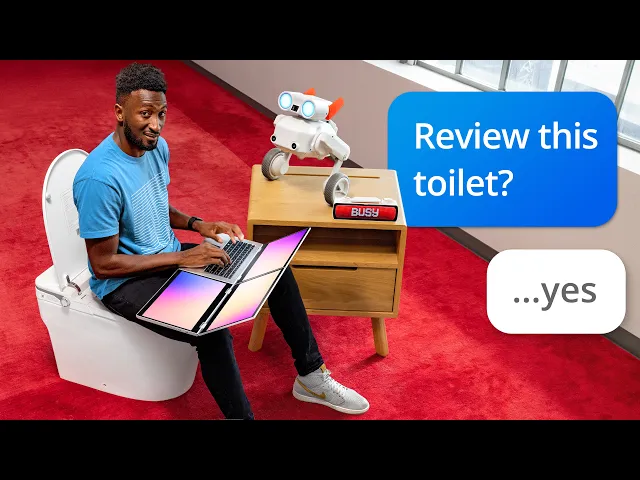
0:46 that's how we ended up here with this toilet.
0:48 Is there a tech angle to this toilet?
0:51 I guess, kinda, yeah.
0:52 The email said, uh, smart toilets are rising in popularity.
0:57 And the Amazon listing reads,
0:59 "Smart toilet with bidet built-in, auto flush, auto open/close lid,
1:04 foot sensor, heated seat, warm water wash,
1:07 warm air dryer, deodorizer, night light, remote control.
1:11 White." Rolls right off the tongue.
1:14 I know.
1:15 I guess that counts as tech, but I don't plan on installing this toilet
1:19 and all of the plumbing and electricity that this requires.
1:22 I'll leave that to the toilet reviewers, I guess.
1:25 But I will mention it does come with this remote, which is tech.
1:29 This remote took 10 seconds to pair to this toilet via Bluetooth, which is nice.
1:33 There's a blinking light on the remote and a blinking light inside the bowl.
1:37 That's how you know it's pairing.
1:39 Uh, this remote also takes AAA batteries,
1:42 which were not included for the $800 price tag.
1:45 That was not nice.
1:46 But yeah, like I mentioned, I am not actually a toilet reviewer.
1:50 So, normally, when this hit my inbox, it would be a pretty quick no.
1:54 But for the rest of these items,
1:55 I will tell you why it would have been a no, in case it's not already obvious.
1:59 So, let's get into it.
2:02 All right, so our next item is called the Xbook laptop.
2:05 And before I show it to you, I just want to throw back.
2:08 Maybe like 10, 12 years ago,
2:10 I got an email from a company from Alaska called the gScreen Spacebook.
2:14 Anybody remember this?
2:15 This is a dual-screen laptop.
2:16 You opened it up, you slid it out, it was two screens.
2:20 I'm a big dual-monitor guy.
2:21 I thought it was amazing.
2:22 I never got my hands on it, but I was intrigued by the idea.
2:26 And this pops in my inbox as a triple-screen laptop.
2:29 Now, you're probably wondering, how is it a triple-screen laptop?
2:32 How do you open it and have three screens next to each other?
2:36 Don't worry about it.
2:37 They've thought about it,
2:38 and this is the best that they could think of for three screens.
2:43 Because you need three screens.
2:44 Okay, here's the first.
2:45 This is the top of the laptop, and this is kind of a little magnet.
2:49 It's gonna make more sense later,
2:50 but you can open it up right here, and boom, there's your first screen.
2:55 Normal laptop.
2:57 Totally normal.
2:57 Nothing not weird about this laptop at all.
2:59 It's got that Intel Core Ultra 7.
3:01 It's got 32 gigs of RAM, it's got a terabyte of storage.
3:04 Don't even worry about the other two screens.
3:06 You don't even need those right now.
3:08 But what if you do need them?
3:09 Oh, okay, yeah, no problem.
3:11 Hold on, just give me a second.
3:13 Just gonna have to pull that over here like that.
3:18 And then, this magnet connects them.
3:22 Perfect.
3:23 And now...
3:26 Now, I have three screens at the same time.
3:28 So, this is pretty insane, obviously.
3:30 Uh, I'm not sure of a lot of things, to be honest.
3:33 One, okay, when would you wanna use three screens in this layout?
3:37 Right now, they're all mirroring each other.
3:39 You can have them extend and have this be display number one,
3:42 display number two, display number three.
3:45 They are all, in fact, touchscreens and all independently will work.
3:48 Uh, okay, I have these mirroring right now and this extending.
3:52 But like...
3:53 Why though?
3:55 If I ever saw someone in a coffee shop with one of these, respect,
3:59 you're clearly doing a lot of work.
4:01 But yeah, this reminds me of the early days of like the Samsung Galaxy Fold.
4:05 Remember the first Z Fold where it was like,
4:08 okay, it was clearly a pretty bad phone,
4:10 but it folded in half, and that was kind of amazing.
4:13 That one interesting technology made it worth overlooking a lot
4:16 of other pretty fundamental downsides that made it a bad phone,
4:20 because we knew we'd eventually get to some place where it was better.
4:24 The fact that you have three different displays and this much, uh,
4:29 screen real estate is kind of cool and maybe worth overlooking the fact
4:32 that trackpad's kind of bad and the laptop itself is not particularly fast.
4:36 Here's, I'll show you the one trick that it has, right?
4:39 Okay, here's a cool trick.
4:40 You can fold this up, fold this down, and like this, right side up.
4:46 It is a regular laptop.
4:47 But if you want dual touchscreen,
4:50 you flip her over, and then you open her again.
4:54 Dual touchscreen laptop on the other side.
4:57 It's an idea.
4:58 It's a 2 out of 10 product.
5:01 But it's an idea.
5:02 All right, this here is the Garmin CIRQA.
5:05 This is a screenless fitness tracker.
5:06 Now, if you've been on this channel for a minute,
5:09 you probably already know that I reviewed
5:11 a certain other screenless fitness tracker and the alternative,
5:15 which is the other Google, Fitbit Air screenless fitness tracker.
5:18 So, this is actually right up our alley,
5:20 and I've spent a couple of days with it.
5:23 We've also had Andrew at the studio spend some time with it,
5:26 and we've talked about it on the podcast.
5:28 So, we are actually very familiar,
5:30 and this is something that I would say yes to.
5:32 And it's interesting.
5:33 Essentially, the conclusion that we've came to on this is,
5:36 so it's $200 outright, no subscription.
5:38 It's clearly aiming at the Whoop to be a puck on your wrist that is comfortable,
5:42 that doesn't have a screen to distract you,
5:44 and that has all the functionality of tracking you all the time.
5:47 And it actually has a couple different extra features.
5:50 For example, there's a button on the side which none of the others have.
5:53 So, a customizable button that lets you start a workout,
5:56 which is super convenient if you don't have your phone in your pocket.
5:59 I also happen to really like the band.
6:01 This is the, the blue band that it came with here.
6:04 There's a couple other colors, but it's soft,
6:06 it's fabric, it's stretchy, and it attaches by Velcro.
6:09 Honestly, I think this product would be much more
6:12 impressive if it came out before the Fitbit Air.
6:14 I think the Fitbit Air actually nails the form factor a little better.
6:18 It's a bit smaller, narrower, pokes off of my wrist less.
6:21 You can watch the whole video about that if you want.
6:24 And it also offers a lot of data without a required subscription.
6:27 So, I'll leave a link below to DC Rainmaker.
6:30 He did a lot of testing about the data and the accuracy of these things.
6:33 So, this versus the Fitbit versus the Whoop,
6:36 and there's a lot more information to dive in there
6:38 if you really care about that sort of thing.
6:41 My conclusion is that I probably wouldn't get or recommend the Garmin
6:44 version because it feels like a slightly less elegant Fitbit Air,
6:48 but as a product, as a whole, like a 6.5 out of 10.
6:51 But speaking of...
6:52 Whoop alternatives.
6:54 I promise.
6:55 Imagine spending $1,000 on a smart toilet when
6:59 you could actually just get the smart toilet top,
7:03 um, and not the whole toilet itself, and measure all...
7:08 kinds of things, uh, for $200.
7:11 I didn't plan this.
7:13 This is the Casana smart toilet seat.
7:15 As you can see, there are some, like,
7:17 electrical leads and a bunch of really obvious,
7:20 uh, pieces of metal on the toilet.
7:22 Because, yes, unlike the other smart toilet that I've looked at in this video.
7:26 Never thought I'd say that sentence.
7:28 Uh, this is gonna measure a whole bunch of things, like your heart rate,
7:32 like heart rate variability, like your breathing rate, your stress levels.
7:36 There's an app on the App Store that shows all this stuff to you in real time.
7:41 There's a stat called duration for some reason.
7:44 Also, important to mention, since it is a Whoop alternative slash competitor.
7:48 This also has a subscription fee.
7:50 Okay, so you pay the $200, and on the website,
7:52 it says for the 199 bucks, you get this and the first year for free.
7:56 And then once that year is over, you pay an additional $10 every month,
8:00 to keep using it and keep getting
8:02 that data even though you already own the thing.
8:05 This is why people don't like Whoop.
8:07 This is not something I normally would have said yes to.
8:10 And as you can tell, I haven't actually connected it and tested it myself.
8:14 But looking at it, I don't think I would want something like.
8:18 I mean, it looks so, uh, the cold metal.
8:20 I just, I don't know if this is, I would rather have the Garmin than to measure
8:25 my blood pressure and heart rate with this.
8:27 Four out of ten.
8:29 All right, so this thing here, this is called the BUSY Bar.
8:35 And it does exactly what it sounds like it does.
8:38 It's a button that tells people— that you're busy.
8:43 And then it tells you how long you're busy,
8:45 and then you can pause it, and then it's, it's actually kind of fun.
8:48 I, I didn't realize how much fun this could be.
8:51 This feels like one of those products that you would get as a gift for someone,
8:55 that you don't know very well, and they kind of have everything already,
8:59 but maybe this would be something fun that they could add to their setup.
9:02 So, it's got this app on the phone where you can
9:05 set yourself to being busy for a certain amount of time,
9:08 and then it will sync with this particular box, which is cool,
9:11 but, obviously, there's a bunch of other things it can do.
9:14 I think it's kind of awesome.
9:15 It's clearly overpriced at $200,
9:17 but I find this button very satisfying to press.
9:20 The animations are nice.
9:22 The screen is nice.
9:23 It's like annoyingly full featured and does a lot of stuff,
9:26 all from the simple concept of just, like a busy button, a Pomodoro timer.
9:31 What I also like is it has smart home connectivity as well.
9:34 So, you can have your Google Home or your Alexa or your HomePod
9:38 talk to this to tell it to say certain things as well.
9:41 Cool gift.
9:42 $200 or so.
9:43 It's pricey, but I don't mind that.
9:45 I'm giving it an 8 out of 10.
9:47 Why not?
9:47 It's fun.
9:48 I think things should be fun.
9:50 All right, here we have now.
9:52 Mondo Robotics, Beni Robot.
9:53 This...
9:54 this is one of those things that made me glad that I said yes to everything,
9:59 'cause this is something I ordinarily would not have said yes to.
10:03 A small...
10:04 friendly camera robot on wheels that will follow you around,
10:08 and then I get the email and I click on their website,
10:12 and it's got a ton of videos that are absolutely insane.
10:15 Videos that don't really look real.
10:18 Some of them look real, some of them,
10:20 honestly to me, like the skateboarding one, look AI-generated as well.
10:25 My red flags are up.
10:26 I'm extremely suspicious but I say yes
10:29 to it anyway because I'm saying yes to things.
10:32 So, this, this shows up, right?
10:33 Uh, and it's got this little controller here as well.
10:36 It's got these little ears, and it has an app.
10:39 And it turns out, uh, it does literally everything it says it does.
10:43 So, just a little bit of a breakdown.
10:45 This is the robot's face/head, but there's a camera up here at the front
10:49 and these eyes will light up in a second.
10:52 This is a Kickstarter,
10:53 so it's not necessarily a completely finished product yet.
10:56 But then on the back, it came with two batteries that kind of just
11:00 pop out like this, just like a drone.
11:02 Double tap.
11:03 Just like a DJI drone.
11:05 Alright, so now, I'm connected to it on my phone, uh,
11:08 which gives me a first-person view of the camera
11:10 and lets me do all the controls.
11:12 I prefer the phone app over the controller, so I'll go ahead and just...
11:16 Fire it up.
11:18 Jesus Christ!
11:19 Okay.
11:19 So, the app is showing me the camera feed.
11:22 I can have the robot look up, look down.
11:24 Uh, typically it's pretty good at tracking a person,
11:27 which we'll get to, but I can also have it jump.
11:29 I'm not even joking.
11:30 I'm gonna press the jump button.
11:33 Jesus!
11:33 Oh, my God!
11:34 Okay, it can do a flip.
11:36 A front flip.
11:37 Sounds cool, right?
11:39 Oh!
11:44 Let's go!
11:45 Let's go!!
11:46 I swear it can do it.
11:47 Wait, wait.
11:48 I've never seen it self-eject in a front flip before.
11:54 Bang!
11:55 Okay, okay, it can do a front flip.
12:00 What?!
12:01 So, it's got the cameras on the front, it can shoot 4K footage.
12:05 It has object avoidance, kind of like a drone.
12:08 So, while it's rolling around and tracking and following a person,
12:12 it will actually avoid the things on the ground in between him and the person.
12:17 Uh, shoots 4K 30, has a different speed modes.
12:19 So, right now, you know, it's on the table in front of me.
12:23 It's in low speed mode.
12:25 I'm not trying to go as fast as I possibly can,
12:27 but Beni in sport mode can go 18 miles per hour
12:31 as it follows either you or a pet or whatever you want it.
12:34 You literally just tap the box over the subject
12:37 in the viewfinder in the app and it just follows it.
12:41 It's also really durable, by the way.
12:43 It's fallen off of this, but it's also like crashed into things.
12:46 It's basically all plastic.
12:48 Uh, it's...
12:48 I've got footage of it slamming into cardboard boxes and table legs,
12:52 which is not what it's supposed to do,
12:54 but it's charming that it can actually survive that stuff.
12:57 There's even times where it's tracking something or I'm, I'm like going.
13:01 It like nicks a leg on a table and it like kind of falls a little bit,
13:05 but then it gets up really quickly.
13:07 So, this whole self-balancing gimbal part, like it seems to very,
13:10 it's very durable and able to recover
13:12 and get back into a normal stuff like that.
13:15 I mean, it's, it's pretty good, man.
13:17 It's generally able to get back on its feet.
13:19 Beni Robot, shout out to Beni.
13:21 Sorry, I shouldn't.
13:23 You're right, I shouldn't pick you up.
13:25 Sit.
13:26 It's a 10 out of 10.
13:27 What else you want me to say?
13:28 I love this thing.
13:29 Clearly I wouldn't have said yes to it,
13:31 but I'm glad I did, and I'm probably gonna get another one.
13:33 All right, next up is...
13:36 A mouse.
13:38 You can tell by the brown,
13:40 and by the fan inside that it's a Noctua mouse, but it's a collab.
13:44 Noctua, as, as some of my nerdier viewers, well know already by now,
13:49 uh, makes PC fans, brown ones, really good ones.
13:52 Uh, and so they've lent their name to this mouse.
13:55 So, Pulsar Noctua mouse with fan in it.
13:58 So, this is a wireless mouse,
13:59 but I'm gonna plug it in 'cause I want to make sure
14:02 it's getting all of the power since it's fresh out the box.
14:04 And I took the little...
14:05 plastic off the bottom.
14:07 Alright, right off the bat, I already noticed it glides really nicely,
14:11 and this is from someone who's used about 10 mice my whole life,
14:15 but it's super, super light.
14:16 42,000 DPI.
14:17 That is insane.
14:18 All right, it says here,
14:19 to turn the fan on, hit side buttons two and three and scroll up.
14:24 You can hear that, right?
14:26 It is full-blowing air onto my palm.
14:29 No more sweaty palms.
14:31 I've never had an issue with...
14:33 sweaty palms.
14:34 Okay, so, this on the box, it says three-step control, off, speed one,
14:38 and speed two, but there's actually five, just from me trying this out.
14:43 Light blue up to dark blue.
14:45 Can you see that?
14:46 Up again to green, and then up again to yellow,
14:49 and that's the fastest fan speed is the yellow.
14:52 I'm not mad at it, and I'm not a mouse reviewer,
14:55 but now that we're here, I'm pretty impressed.
14:58 Sure, why not?
14:59 Put a fan in a mouse.
15:00 I'm gonna give it an eight.
15:02 All right, so next up is this little thing right here.
15:05 This is called the Kardia 6L Max.
15:07 And you might be wondering, what is this little thing?
15:11 What is this tiny little handheld device that you're,
15:14 you're putting on camera here?
15:16 Uh, this is a personal EKG device.
15:19 And so, it does exactly what it says.
15:21 It's a medical-grade personal EKG.
15:23 It's 130 bucks.
15:24 Now, the thing to note here is I am not a doctor.
15:27 Actually, that's not true.
15:28 Technically, I did get an honorary doctorate degree when
15:31 I gave the commencement speech at my alma mater,
15:34 which means I am a doctor, but I'm not really a medical doctor.
15:37 So, it's pretty obvious why I wouldn't say yes to something like this.
15:41 But what I do know is I've taken EKGs
15:43 on other like personal health devices, like Apple Watch.
15:46 I know you can take an electrocardiogram, so that's ECG.
15:49 There is also an app that this comes with.
15:51 So, it basically instructs you on how to do it.
15:53 There's multiple points of contact.
15:55 So, you see these metal contact points on the outside here.
15:58 There's also one on the back.
16:00 So you grip on both sides and then you place
16:02 it on your leg for a third point of contact.
16:04 So it has all this data coming in from all different angles.
16:08 So, when you buy something like this, you get the hardware.
16:11 You also get a one-year membership to KardiaCare,
16:13 which is essentially a way for doctors
16:15 to then get the information from the device.
16:18 So, it's not like you just get this and then do all the work yourself.
16:21 You have the doctors look at the data, and that's how you come together to get
16:25 a better picture of your, your heart health.
16:27 And ideally, if it's as accurate as it says it is,
16:30 then I don't see why it's not an 8 out of 10.
16:33 Again, I'm not a doctor.
16:34 So, then the next thing is the Honor Robot Phone.
16:37 They sent me an email, and their email said,
16:39 "Can we come by the studio and show it
16:42 to you?" It's already been sort of revealed in press images,
16:45 but it looks kind of insane.
16:47 We'd like to demo it and get it in your hands.
16:50 And of course, I said yes.
16:51 So, the idea basically is, imagine if your smartphone camera was also a gimbal,
16:56 'cause on this phone, you slide the glass open on the back,
16:59 and then you can flip open a gimbal with a 200-megapixel main camera and it
17:03 can do all of the things you're exactly
17:05 now picturing that your gimbal camera can do.
17:07 The gimbal itself is also really tiny.
17:10 You've probably seen like the DJI Osmo or something like that.
17:13 This is giving you all of those same benefits, but with tiny, tiny motors,
17:17 and it fits in your pocket obviously when it folds onto the back of your phone.
17:21 So, stabilization modes, being able to turn it and point it wherever you want.
17:25 And then, of course,
17:26 there's also an AI assistant that brings the gimbal to life,
17:30 like a sort of a anthropomorphized face that nods
17:32 along to the beat of music you're playing,
17:35 and wiggles around, and can give you happy and sad expressions.
17:38 It's all a bit much if I'm being honest.
17:40 But, uh, you can also ask it what it thinks of the outfit you're wearing,
17:44 and it will look you up and down and tell you.
17:47 It is like one of those concept phones come to life.
17:49 I've, I've never really actually pictured them
17:52 bringing this to market and shipping it, but now it seems like they're going to.
17:55 They're also doing this in partnership with ARRI,
17:58 which ARRI does a lot of high-end stuff like RED.
18:00 So, they're doing some color science, custom color modes and LUTs on this phone
18:04 that honestly seem to work pretty well.
18:06 You can shoot in Log,
18:07 or you can shoot with pre-stamped LUTs from a bunch of different, uh, profiles.
18:12 Haven't gotten any camera quality samples off of the thing,
18:14 but seems like a good feature.
18:16 I honestly, I want to give it like a 9,
18:18 'cause they actually made it, and it's real and I didn't think they would.
18:22 It's doing too much, which is better than not doing enough.
18:25 So I'm not mad at it.
18:26 So yeah, sure, 9 out of 10.
18:27 All right.
18:28 So the next item here, as you can see, is a chair.
18:33 I'll get to this in a second.
18:35 Uh, but a very adjustable chair.
18:37 And...
18:38 I had a couple suspicions when I first got this email.
18:43 Some of you may know I've been using the same chair,
18:46 uh, for the better part of a decade, decade and a half.
18:49 But when I see this $1,200 AI-powered massaging chair,
18:52 I can't help but have that thought of...
18:54 I don't know, maybe, maybe the grass is a little greener on the other side.
18:59 Maybe I'm missing something.
19:01 Here's what the chair features.
19:03 It has this remote control which does all of the things in the chair.
19:07 So, the chair has cooling element, low vent, medium vent, or high.
19:12 It's cooling my butt right now.
19:14 Uh, it also has a heating element in it as well.
19:17 There's also a massage feature.
19:19 So, this piece right here, which is actually moving right now, uh,
19:23 is the lumbar support, and it has a low, medium, or high massage.
19:28 It's fine, I guess.
19:29 Uh, it's only on the lower back, though.
19:32 It's not on the butt.
19:33 Anyway, then there is the movement of this actual piece itself here.
19:38 So...
19:40 See how that moves, like,
19:42 maybe three or four inches forward, and then moves backwards.
19:45 So, you can manually move it forward or backward.
19:49 But, why would you do it manually when this chair has artificial
19:54 intelligence built in, according to the website, to do it for you?
19:58 'Cause there's an auto smart track feature.
20:01 So, when I turn that on, basically what I feel now is...
20:04 you can hear it also moves forward to, like, meet me where I am.
20:08 I don't know how this is AI-powered or tracking in any way.
20:11 And what's crazy is when you go on their website,
20:14 they have a picture of like an AI chip that I guess is somehow in this chair.
20:18 It also has this.
20:21 Sort of post up like this in the chair.
20:24 But I think my real conclusion that I found with this chair is...
20:29 it is possible to have too much customizability.
20:32 This headrest, for example.
20:34 A little.
20:36 They are like customizable in every single way.
20:39 That's a lot.
20:40 Like get out of the chair, which I, I figure most people get out of the chair.
20:46 I would normally not say yes to this email
20:49 because when I see "AI-powered chair," I kind,
20:51 I kind of know where this is going.
20:53 But I'm glad I said yes to it so I could make that discovery.
20:56 But it is still a functional chair that you can sit in.
20:59 I guess that's not a disaster.
21:02 Four out of ten.
21:03 All right, next up here, we got a pair of headphones.
21:06 This Skullcandy Crusher, uh, 1080 ANC.
21:09 These are brand new and their most expensive headphones yet.
21:13 I don't know if you guys know too much about Skullcandy,
21:16 but I'm a little older and I remember back in my day,
21:19 Skullcandy was the headphones that you got from...
21:22 the fashion store, Forever 21.
21:24 I've never had a particularly high opinion
21:27 on the audio quality of Skullcandy headphones,
21:30 but now they're coming along with a pair
21:33 of $280 active noise-canceling over-ear headphones,
21:36 and they've done it in collaboration with Bose.
21:39 So, there's a lot of big talk about the sound by Bose of these headphones.
21:44 I've taken them out the box already.
21:46 I have not listened to them or tried them yet,
21:48 and I'm about to, but right off the bat, they're actually built really well.
21:52 I guess we'll just...
21:53 jump right in.
21:53 When you turn them on and off, there's, like, a voice that says,
21:57 "Power on." And then when you turn it off, it says, "See ya." Okay, connected.
22:01 There's also, on the side here, a bass wheel.
22:04 So, they're still really into the, the bass
22:08 thing on, on just skull-crushingly powerful,
22:10 loud bass, and you can turn it up or down.
22:15 I'll start it all the way down at the minimum.
22:21 Okay.
22:22 Wow, all right.
22:23 So, so, at its lowest amount of bass, like 9 out of 10 bass.
22:29 Wow, these are strong.
22:31 You turn the bass wheel up all
22:33 the way and it becomes an exaggerated, overwhelming...
22:36 muddying of the entire lower end of just booming, powerful bass.
22:39 So, if the song you're listening to has a bass line or a drum beat or an 808,
22:43 pretty much all you're gonna hear.
22:45 You know, maybe there's,
22:47 there's people for sure who all they wanna do is feel the bass through
22:51 their chest and their skull and they go
22:53 to concerts and that's what they're there for.
22:56 The fun factor is high, but I don't think I would spend $280 for these.
23:00 But nothing else sounds like this.
23:03 So, six out of ten.
23:04 All right, so this next thing has by far the most red flags of anything else,
23:09 uh, that we're looking at today, from the email to the website.
23:14 Even through it actually getting here.
23:16 I still am not exactly sure what's going on with this company,
23:20 but I'll show you, I'll show you anyway.
23:23 Hopefully, it's not a scam.
23:25 It's weird.
23:26 So, uh, it's a...
23:27 thin, portable gaming PC.
23:28 At least that's what this is.
23:31 When you go to their website, you get an email from them,
23:34 you say yes to everything, you go to the website, and you investigate.
23:38 The only two things on their website are this computer,
23:41 and a $10,000 e-bike pod-looking thing that they're saying is street legal.
23:45 Those are the only two things this company sells.
23:48 So, I'm, I'm not really sure what's going on.
23:51 It's grantsinclair.com, this screams like, it's just a guy who has, like,
23:55 two ventures that he's into and maybe both
23:57 of them are working well, I don't know.
24:00 Uh, but he...
24:01 he sent us this gaming PC.
24:02 I fired it up.
24:03 It's less gaming PC and more just like a...
24:06 a couple stacked PCBs with an emulator that can
24:09 play a couple of games and gets kind of warm.
24:12 But, yeah, as you can see by this thing, it's got, essentially,
24:16 these two unlabeled controls which underneath you
24:19 can feel a bunch of different buttons.
24:22 But they're, it's basically like a D-pad
24:24 over here and then like a selector here.
24:27 Uh, there is a microSD card slot at the top.
24:30 There's a couple ports over on the side, one of them being...
24:34 mini HDMI.
24:35 And then there's a USB Type-C port at the bottom to charge it.
24:38 And then there's two speakers at the top.
24:41 So, you open one of these games, Astro Blaze, and you select it.
24:48 Yeah, I'm not very good at this, uh, but there's a lot of enemies here.
24:53 It's weird.
24:53 It has a couple games built in.
24:56 You can add games to it.
24:57 It is very thin and light,
24:59 but I have very little experience with stuff like this.
25:02 It's essentially a Raspberry Pi.
25:04 It's about 150 bucks on their site.
25:06 It's a weird site, man.
25:08 I don't know.
25:08 I said yes.
25:09 I'm not sure if I regret it yet.
25:11 Maybe I will, maybe I won't, but now, we have a tiny gaming PC.
25:15 Five out of 10.
25:16 It's kind of doesn't do anything terribly.
25:18 Maybe the pads on the bottom could be a little stickier.
25:21 So, I could, maybe these should be labeled.
25:23 Eh, 5 out of 10.
25:26 Okay, so this has been behind me the whole time.
25:30 It's a new TV.
25:31 This is the Sony Bravia 9, too.
25:34 This is in my inbox as a true RGB TV.
25:37 That's the pitch.
25:38 This is a very premium 65-inch TV.
25:41 Costs $3,600 but also goes up to like 115 inches or something like that.
25:47 It is not an OLED but Sony is pitching this true RGB
25:51 technology to be almost as good as OLED without the downsides of OLED.
25:56 So, true RGB means independently controlled red, green,
26:00 and blue LEDs instead of passing through filters.
26:02 So really vibrant color and great brightness,
26:05 but also no burn-in like you do get with some OLEDs,
26:08 and that is the headlining technology.
26:10 And it's also a smart TV, so I'm on the YouTube app and I found that right out
26:14 the box it was very obvious that the reds are super saturated,
26:18 and this is just in the standard mode.
26:20 Even when I switch over here to the cinema
26:22 mode or some of the other less vibrant modes,
26:25 it's still a ton of saturation on the reds.
26:27 So, it's just something I noticed right out the box.
26:30 Obviously, it's still a really good-looking TV.
26:33 It's still 4K, still has a ton of resolution.
26:36 But I found that some of the extra stuff around the TV,
26:39 around the image, actually made just as much of an impact for me.
26:43 Specifically, the anti-glare finish.
26:45 You were looking at this TV in front of a massive window right now,
26:49 and the first thing I noticed when looking
26:51 at it is that it reflects almost nothing.
26:54 So, it's got these deep blacks, it's got really, really high brightness,
26:58 it's got saturated colors,
26:59 and you can see everything because the anti-reflective tech is actually good.
27:04 I also really like this little box right underneath the display right here,
27:08 which hides the power cable.
27:09 If you've ever seen those like lenticular uh films that you can put in front
27:13 of a person to sort of make them disappear like an invisible cloak or whatever,
27:17 that's basically the same thing, specifically to make the power cable go away.
27:21 And then also fun fact, this remote is USB Type-C powered.
27:24 You'll never lose the TV remote batteries again.
27:27 I don't know how often you are losing the batteries.
27:29 And I will also say that the spatial reproduction
27:32 from the speakers on this TV was also really impressive to me.
27:35 So, there's this demo when you first set it up to sort of read the room.
27:39 You hold the remote out in front of it, which has a microphone in it,
27:43 and then it plays all these sounds and you can kind
27:45 of hear it figuring out how to set up surround sound.
27:48 But there are directional,
27:50 like firing tweeters that go straight up at the ceiling in the back of the TV,
27:54 and there's a bunch of other larger speakers.
27:56 There's no woofers, it's not the most bass in the world.
27:59 Now, would I have normally said yes to this?
28:02 Possibly.
28:03 This is sort of also right on the borderline,
28:06 if anything, just to see this new RGB, True RGB tech.
28:10 Yeah, I think given the price tag,
28:11 it's hard to give it much more than about like a 7 and a half out of 10.
28:15 It is a quite an expensive TV, uh, but the uh...
28:17 the benefits are pretty clear.
28:19 So, this experience, as you know,
28:21 is me saying yes to a bunch of product review requests.
28:24 And that is a very common type of email that I get.
28:26 But I also get lots of other types of emails
28:29 that weren't included in this video that I didn't say yes to.
28:32 There are things like uh, speaking invitations,
28:35 event invites, uh, ad sponsored requests, things like that.
28:38 So, I'll give a shout-out to the RayNeo AR smart glasses who
28:42 get the award for most times emailing me during this one period.
28:46 They were all asking to do an ad for the product.
28:50 They emailed me six times from six different account.
28:53 Shout-out to them.
28:55 And then there was another certain company who will remain nameless,
28:58 uh, who initially reached out,
29:00 uh, to just send a product, and I replied and I said yes, as I am.
29:04 And I think they were a little taken aback by that.
29:07 And so, they replied, uh, "Actually, can we do a collaboration instead,
29:10 like an ad?" Uh, and I said, "No, I'm not interested in that.
29:14 I'm actually, you know, if you want to send the product for me to check it out,
29:18 I'll do that." And so they said, "Okay,
29:22 never mind but if we can do a collab/ad, then yes." I've never seen that before.
29:30 They said their policy does not let them
29:33 ship out any products without confirmed video coverage,
29:36 meaning they wanted to guarantee that I was going to make a video.
29:40 Fellow creators, that is a huge red flag.
29:43 Do not ever agree to that, but do definitely get subscribed
29:46 to tune back in to when I inevitably do this again.
29:50 And there's also one more thing that I did say
29:52 yes to, which was to Best Buy for sponsoring this video.
29:55 So, I have been answering emails and covering
29:58 tech for the better part of 17 years,
30:00 which is actually more than I have not been doing this.
30:02 But Best Buy has me beat.
30:04 They've been celebrating their 60th anniversary this year.
30:07 So, one of the most fun parts of these Say Yes to Everything videos is, now,
30:11 there's a bunch of physical products that I actually get to get
30:14 hands-on with and test that I ordinarily wouldn't have gotten to try.
30:17 But that is what Best Buy does best is they'll let you
30:20 get hands-on with the best tech
30:22 before you actually make your purchase decisions.
30:24 And they've been doing it longer than anyone else.
30:27 I mean they're one of the only tech stores that has
30:29 been selling cell phones since the start of cell phones, basically.
30:32 So, you can find the tech upgrades you
30:35 need and elevate your daily life at BestBuy.com.
30:37 We'll have a link down below in the description for you
30:39 to check it out but otherwise this has been it.
30:42 Thank you for watching.
30:43 Catch you guys in the next one.
30:45 Peace.