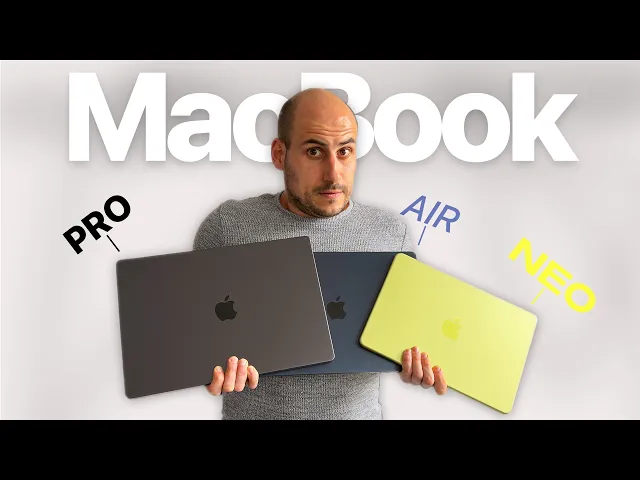
MacBook Neo vs Air vs Pro: Stop Guessing!
AppleDsign
0:00 By if every new Mac here and Apple did something nobody expected.
0:04 They released a $599 US a new MacBook Neo, a new MacBook Air powered by M5,
0:12 and lastly, a new MacBook Pro powered by the M5 Pro and M5 Max chip.
0:17 But, here's the crazy part.
0:19 These three new laptops are not just upgrades.
0:22 They completely change how Apple now segments the market.
0:26 And if you're thinking about upgrading or buying one of these new Macs,
0:29 picking the wrong one could actually be
0:32 a costly mistake for you on the long run.
0:34 In this video, I'm going to precisely break down every single
0:38 Mac and help you decide which is the perfect MacBook for you.
0:42 Let's start with the new MacBook Neo.
0:45 Cuz this is probably the most surprising Mac we have seen in the past decade.
0:50 The MacBook Neo is Apple's entry new Mac.
0:53 It comes in four colorful finishes.
0:55 We have a yellow citrus, we have a pink blush version,
0:59 we have an indigo the classic silver.
1:02 And it's the first Mac ever powered by an iPhone chip,
1:06 the A18 Pro chip, which is the same chip found in iPhone 16 Pro.
1:10 And this chip is actually plenty [music] capable,
1:13 plenty efficient, and a great to power a MacBook, actually.
1:16 It's perfect for browsing the web or watching videos or creating documents,
1:21 which is great for students.
1:23 The MacBook Neo has a 13-in liquid retina display.
1:27 It's made out of aluminum, which is really nice and cool to the touch,
1:31 and also comes with a large multi-touch trackpad,
1:34 [music] which is actually mechanical.
1:36 So, this is different compared to the other MacBooks we have.
1:39 The other MacBooks are force touch or haptic touch trackpads,
1:43 and this is actually the first MacBook that has a mechanical trackpad,
1:47 and you can actually feel this when pressing on it.
1:50 Also, this is the first a MacBook that has a color matching magic keyboard,
1:55 a nice little detail and addition from Apple here.
1:58 It also has a 1080p a FaceTime camera,
2:01 great quality, nothing groundbreaking, but great.
2:04 And two side-firing speakers on the sides on the bottom
2:08 of the Mac that support spatial audio in Dolby Atmos.
2:11 What many people actually don't know about MacBook
2:13 Neo is [music] that it comes in two versions.
2:16 The first version is just the base model
2:18 with a key lock on the keyboard on the top right.
2:21 And the other version is a Touch ID version.
2:25 That one is a little bit more expensive, but more on pricing later.
2:28 Both models come with 8 [music] GB of unified
2:31 memory or RAM and start with 256 GB of storage.
2:36 The Touch ID one, that one is a little bit more expensive,
2:39 starts with 512 GB of storage.
2:42 Both Macs come with a headphone jack and two USB-C ports.
2:47 But, it's important to note that because this is Apple's budget Mac,
2:51 some limitations are there, obviously.
2:54 One, there's no Thunderbolt support.
2:56 Two, there's no MagSafe charging.
2:58 Three, the memory cannot be upgraded,
3:00 so you'll always stay at 8 GB of unified memory.
3:04 And four, actually really important, we have two USB-C ports, one USB 3.0 port,
3:10 and that's the only port that [music] can power an external display.
3:13 And the other USB-C port is a USB 2.0 [music] port.
3:18 Briefly, let me touch on battery life.
3:20 Battery life on MacBook Neo, as Apple claims,
3:23 is 16 hours when you just do normal browsing,
3:26 creating documents, maybe watching some videos here and there,
3:30 some small and light editing.
3:31 So, yeah, 16 hours, and this comes, of course, because of A18 Pro,
3:36 which is a pretty efficient and powerful chip to provide this.
3:40 Next up, MacBook Air now also powered with M5.
3:43 We're already familiar with this model for a while now.
3:46 MacBook Air runs on M5, which is a full-class laptop-powered chip,
3:52 plenty powerful, great for everyday tasks.
3:55 You can even do some great editing with that, some design work, some coding.
4:00 It's an incredibly capable chip.
4:01 When it comes to specs, MacBook Air has 16 GB of unified memory or RAM.
4:07 Now starts with 512 GB of storage.
4:10 In the past, this was 256, but Apple upgraded it to 512.
4:15 And you can upgrade MacBook Air to 4 TB of storage if that's something you need,
4:20 [music] great to know.
4:21 When it comes to sizes, MacBook Air comes in two different sizes.
4:25 We have a 13-in model and a 15-in model.
4:28 Both come with Apple's a liquid retina display,
4:31 have an amazing speaker system, and different to the MacBook Neo.
4:35 MacBook Neo was on the sides.
4:36 MacBook Air and also MacBook Pro are just
4:39 uh front-facing or coming from the keyboard above,
4:42 which is a different experience.
4:44 We have a large glass trackpad,
4:46 which is a force touch trackpad or haptic feedback trackpad.
4:50 We have MagSafe charging on here,
4:51 which means you can use USB-C ports for something else,
4:55 uh maybe add an external SSD on there or connect it to another monitor.
5:00 Apple claims that MacBook Air provides up to 18 hours of battery life,
5:05 which is plenty enough to get you through a day.
5:07 And maybe one of the biggest advantages
5:09 of MacBook Air is the design, the fanless design.
5:13 So, even when you need or performing pretty intense tasks,
5:16 you don't have fan noises disturbing you.
5:18 And lastly, let's go to the ultimate Pro MacBooks we have right now,
5:23 the MacBook Pro now powered by M5, M5 Pro, and M5 Max.
5:28 The MacBook Pro line is for the people
5:30 that really look to get the highest and best performance.
5:33 Obviously, we have these three different chips,
5:36 all performing in a different range.
5:38 But, overall, they're designed for heavy
5:40 professional workloads, like for example,
5:43 8K video rendering or big AI tasks or creating complex 3D renders.
5:50 Unlike the MacBook Air, the MacBook Pro comes with a fan design,
5:55 so not a fanless design, but has a fan integrated.
5:58 And that's done to really keep the system performing,
6:01 to cool the chip and the internals so that MacBook
6:04 Pro can continuously give you the highest performance all the time.
6:08 Now, when looking at the displays, we have two options here.
6:11 We have a 14-in and a 16-in MacBook Pro option.
6:15 They both features Apple's a liquid retina XDR display with mini LED technology.
6:21 These panels, most importantly, deliver promotion,
6:24 which basically means they deliver 120 Hz of refresh rate.
6:29 This is really an incredible experience.
6:31 If you have an iPhone Pro, you'll probably know what I mean.
6:35 And lastly, let's talk about the battery.
6:36 MacBook Pro has the biggest and best battery compared to all the Macs.
6:41 Apple claims you get around 24 hours of video
6:44 playback and roughly around 16 hours of web usage.
6:49 And I briefly want to cover the three different chip configurations.
6:52 So, we have the M5, the M5 Pro, and M5 Max.
6:55 The base M5 chip is only available in a 14-in MacBook Pro configuration.
7:00 It has 10 CPU cores and 10 GPU cores,
7:03 and is actually plenty powerful [music] for most users.
7:06 It's a bit faster than any MacBook Air
7:08 because of the cooling system in MacBook Pro.
7:11 Next, we have the M5 Pro, which is more of the balanced chip here.
7:14 It has an 18-core CPU and 20-core GPU.
7:18 It supports up to 64 GB of unified memory, which is crazy enough for many.
7:24 And then, people that want to have the extreme performance,
7:27 then you need to go with the M5 Max chip.
7:30 That one can include a 40-core GPU, which is not, if you ask me, so much power.
7:36 And it supports 128 GB of unified memory.
7:41 This is really for people that need [music] the absolute extreme,
7:45 the best performance ever, where every second counts,
7:48 where they run multiple models, where they edit a big 8K video files,
7:53 where they have millions of lines of codes,
7:56 or create really detailed 3D graphics.
7:59 Now, let's talk about the prices of each model and help
8:02 you decide which Mac is the perfect one you should get.
8:06 So, MacBook Neo starts at $599 for an extra $100,
8:12 you get the Touch ID version and also 512 GB of storage,
8:18 which is 256 GB more than the base model.
8:21 I personally highly, highly recommend you to get that one,
8:26 so the upgraded version with 512 GB of storage and the Touch ID.
8:31 Important to note is that you can get
8:33 a $100 discount on these Macs if you're student,
8:36 so you basically can [music] get a MacBook for $499.
8:41 And small little tip, if you wait for the Apple back-to-school months,
8:45 you will probably get a Apple gift card
8:48 or even an Apple accessory with your purchase,
8:51 which I think makes this [music] deal
8:53 even sweeter if you're student, for example.
8:55 Then, we have the MacBook Air, which starts at $1099.
9:00 It's the middle ground when it comes to affordability and performance.
9:03 The base model now starts with 512 GB of storage,
9:07 which I believe is plenty enough for most people.
9:10 And it's a personal preference whether you want the bigger display or not.
9:14 You have to pay an extra $200 if you want
9:16 to go from the 13-in to the 15-in MacBook Air.
9:20 And lastly, the MacBook Pro with the M5 chip, that one starts at $1699.
9:26 If you want the M5 Pro, that one starts at $2199.
9:31 And lastly, if you want to go towards the Max chip,
9:34 the M5 Max chip, that one starts at $3599.
9:40 Important to note that the M5 and M5 Pro chip start with 1 TB of storage,
9:45 and the M5 Max chip bumps it up to 2 TB of storage.
9:49 And lastly, to conclude, obviously, here is what I recommend,
9:53 my personal advice when it comes to which Mac to get.
9:57 If you're a student or first-time a Mac buyer just a casual Mac
10:01 user then I highly recommend you to buy the new a MacBook Neo.
10:05 For me personally, I recommend you to also get the Touch ID version.
10:10 It's a hundred bucks more, but yeah,
10:12 you will get Touch ID which is a way more convenient than typing
10:16 in your password all the time and you get 512 GB of storage.
10:20 Next, if you're a creator or professional or somebody
10:23 who is like an all around Mac user,
10:26 I highly recommend you to get the MacBook Air then with M5.
10:29 I believe MacBook Air with M5 is the best Mac you can get.
10:34 Actually, it's the best Mac for 80% of the people.
10:38 When friends or family come towards me and ask for advice,
10:41 I recommend 80% of the time to get the MacBook Air now with M5.
10:46 It has everything you need.
10:47 You can do video editing, all your AI stuff basically, work in multiple apps.
10:52 M5 MacBook Air also has a great design which is fanless, really portable.
10:57 And lastly, if you really want to push things to the max and to the limit,
11:01 then you need to go towards the MacBook Pro line with M5, M5 Pro, and M5 Max.
11:06 The M5 is actually plenty powerful for most demanding tasks.
11:11 But yeah, if you want to step it up a bit,
11:13 M5 Pro just gives you that extra boost.
11:16 If you're editing maybe 8K footage or do more 3D rendering work
11:20 or have complex AI models to work with, then go with M5 Pro.
11:24 And if time is absolutely worth [music] everything to you
11:29 or you need to really work with extreme workloads,
11:32 then M5 Max is the chip you should get on your new MacBook Pro.
11:36 There you have it.
11:36 I know pretty long video with plenty of details,
11:40 but really important for you if you want to decide which Mac to get.
11:44 I hope this really helps you make a more informed and better
11:47 decision which in the end on the long run will be worth it.
11:51 Thanks for being here and see you in the next one.
11:53 Peace.