This Might Replace Your Entire Storage Setup
Armando Ferreira
0:00 We just finished filming our short film and everything
0:03 that we just shot is on this card.
0:06 Now, if something were to happen to this card, we'd be in trouble.
0:09 Now, typically on larger productions,
0:11 we have someone called DIT who's in charge of wrangling all the data,
0:15 whether it's from video, audio, or even BTS.
0:18 Now, on my productions, I would say 90% of the times,
0:21 I just don't have that luxury and I have to do it myself,
0:24 which means I have to bring a bunch of hard drives, card readers,
0:28 and even computers to be able to download all of that data.
0:31 And again, it can get messy.
0:33 So, over the past few months, I've been testing something interesting.
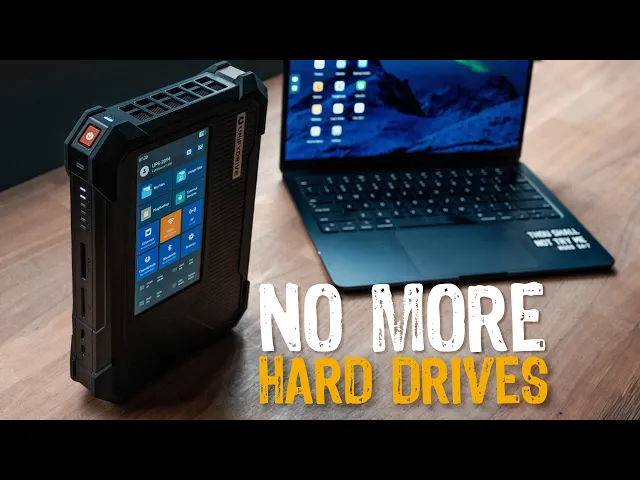
0:36 This is the Unify Drive UP6.
0:39 It's basically a portable NAS server for filmmakers.
0:42 And the idea is that it can replace your hard drives,
0:46 your card readers, and even part of your DIT workflow all in one box.
0:51 Now, for full transparency, Unify Drive did send this out for me to test out.
0:55 However, everything you're about to see is based
0:57 on my experience using it on a real productions.
1:01 Now, there's two standout features that really impressed me.
1:04 Uh the first one being is the fact that you
1:06 can actually just pull the card out of your camera,
1:08 create like an auto backup with this, just pop it in there,
1:11 and it begins to backup.
1:12 Now, before we get into all of that, let's
1:14 talk about what this thing can actually do.
1:16 Now, the UP6 is a portable NAS.
1:19 For those of you that don't know, NAS stands for network attached storage,
1:23 which basically means that this is a storage
1:25 server where multiple devices can have access to it.
1:29 And typically, you find NAS servers in an office,
1:32 in a studio, attached to a network.
1:35 The difference is this one is portable.
1:37 You can take this on the go.
1:38 You can take this on your shoots.
1:40 You can take this basically anywhere,
1:42 and the beauty of it is that there's a little tiny computer inside.
1:46 Now, inside, there's an Intel Core Ultra processor,
1:49 which can support up to 96 gigs of RAM.
1:53 You also have six NVMe SSD slots, which can support up to 8 TB,
1:58 so a total of 48 TB of storage,
2:01 which is honestly kind of insane for something this small.
2:03 And because it is using NVMe storage,
2:06 it's actually designed to be fast enough so
2:08 that you can edit directly from the unit.
2:11 So, you can kind of think of it like a portable server for your footage.
2:16 Now, physically, this thing feels pretty solid,
2:18 and I like that it does have these little rubber edges on each side,
2:22 which means that if you were to accidentally drop it, it should help protect it.
2:26 It also means that you could probably just toss this in your backpack,
2:29 and it should be fine.
2:30 However, it does come with a carrying case,
2:33 which does have room for all of your power cables,
2:35 your HDMI cables, and other little accessories
2:38 and knick-knacks that you want to throw in there.
2:40 Now, in terms of IO, you have a CFexpress Type B.
2:45 You also have an SD card slot.
2:47 You have two Thunderbolt 4 ports.
2:50 And then on the backside, you have a USB-C.
2:53 You have USB-A.
2:55 You have an HDMI port, a 10 gigabit Ethernet port,
2:59 and then you have your DC barrel for power.
3:02 Now, the main way that I've been using the UP6 is when we're finished filming,
3:05 I'll take the card out of my camera.
3:07 I'll pop it in here, and then you'll hear this little sound,
3:10 and it'll prompt me to backup.
3:12 Because this has a touchscreen, all I have to do is just tap on backup,
3:16 and it will automatically start to backup.
3:18 And the great thing about it is I no
3:20 longer have to bring a CFexpress Type B reader.
3:23 I don't have to bring an SD card reader.
3:25 I don't have to bring cables.
3:26 I don't have to bring hard drives.
3:27 Now, because it does have a touchscreen, I can start my backups,
3:30 I can monitor the transfers,
3:32 and I can even verify that everything transferred correctly.
3:36 So, technically, I don't even need to bring a laptop,
3:39 and I can do it all with just one device.
3:42 Now, as you guys have seen, this does have a 6-in touch display,
3:46 and you can monitor the health drive.
3:48 You can transfer files.
3:50 There's a lot of things that you can do here.
3:52 It'd be a whole different video if I went through every single setting,
3:55 but something that really impressed me is the fact that you
3:58 can preview the files that you just backed up on this drive.
4:02 So, for example here, if I go to my files, I can select the NVMe,
4:07 and then here, we did something with the Nikon Z R.
4:09 So, if I go here to plug backup, I just navigate through the directory,
4:13 and I'm just going to pick a random file here,
4:15 whichever one looks cool, maybe this one here.
4:17 And you can see here, it starts to play back what we just filmed.
4:21 And if I tap here, I can go into landscape.
4:25 So, check that out.
4:27 I am now previewing what we just shot, which is pretty freaking wild.
4:32 Now, this does have an HDMI port, and I have my Video Village monitor here,
4:36 so I can technically plug this to my Video Village,
4:39 and let's say, "Hey, did we get that shot?
4:41 Can we go back and look at the card?" I can literally just show
4:44 them on this drive using the HDMI cable or just directly from the unit.
4:49 Another way that I've been using the UP6 is editing directly from it.
4:53 So, I have my MacBook here connected via
4:56 Thunderbolt 4 on one of the front ports.
4:59 And what's cool is when you have it
5:00 connected like that, it actually even charges the laptop,
5:03 so you don't need external power for it.
5:06 But, I'll show you the speeds.
5:08 Check this out.
5:09 I have Blackmagic app connected here,
5:11 and I'm getting roughly 900 MB write and about 900 MB read.
5:17 Very consistent via Thunderbolt 4.
5:19 Now, keep in mind, this is based on my RAID configuration.
5:23 If I had more drives and I configured it differently, I would be getting 2,500,
5:28 3,000 plus read speeds, but this is plenty of of of speed uh to be able to edit.
5:34 And just to give you an idea, most people have these Samsung T5 drives.
5:39 So, if I was to change the target drive here,
5:42 and let's say I go to Samsung T5, go ahead and hit open, and then run this test,
5:49 you'll notice that I'm going to be getting anywhere between 3
5:52 to 400 MB read and 3 to 400 MB write speed.
5:58 So, editing from the UP6 is at least twice as fast than editing from a T5 drive.
6:05 So, you're definitely getting SSD plus speeds whenever you're utilizing
6:10 this via Thunderbolt 4 or even using the 10 gigabit E connection.
6:15 Another standout feature with the UP6, if you haven't noticed,
6:18 is the fact that this has a built-in UPS battery.
6:22 And what that means is if I were to disconnect the power,
6:25 Unify Drive claims that this will hold up to 2 hours of battery life,
6:30 and this is excellent for protection.
6:32 Especially right now,
6:33 I am literally powering this whole DIT station with a DJI power bank.
6:38 So, with this power bank, if it were to die, I still have an additional 2 hours,
6:43 which is plenty of time for me to figure out what I want to do next.
6:47 Because the last thing you want to do is be on set,
6:49 you're transferring something, and then the battery cuts off.
6:52 Ooh, that means trouble.
6:54 Another reason I like that this has a built-in battery is,
6:56 let's say if I'm filming in a remote location, I can charge this overnight,
7:01 and then I know that 2 hours is plenty of time for me
7:04 to backup all of my footage that I shot for the day.
7:08 Speaking of filming outdoors,
7:09 let's say you're in an area that has zero internet access.
7:13 This has an AP mode, which stands for access point.
7:16 So, you're basically creating a local area network where now
7:20 the director or people on set can now access the server.
7:24 So, let's say you're on your phone,
7:26 and you want to preview something that was just backed up.
7:28 You can go in there, download it to your phone, and preview those files.
7:32 People that are shooting BTS can also transfer files to the server.
7:36 It's actually extremely useful,
7:38 and it basically turns into a portable media server.
7:41 Now, the UP6 has some pretty advanced AI features.
7:44 Oh, no, he said AI.
7:46 Look, guys, I know AI gets a bad rap,
7:48 but some of the things that you can do with this are actually pretty cool.
7:51 Now, I don't think anybody's going to be buying this for its AI features,
7:55 but I do find them pretty useful.
7:57 So, whenever you do a backup, you can actually search for things.
8:00 So, let's say for example, I have a photographer,
8:02 which actually does happen, where I'm on set and I say,
8:05 "Hey, I'm reviewing a bunch of products." With the advanced AI features,
8:08 I can actually search for, let's say,
8:10 the person with the red hat or the car that I wanted to be filmed or shot,
8:14 and I can actually just find those items and then put them in a separate folder.
8:18 So, being able to find these things quickly without me having
8:22 to look it through all of the photos or video files, I think it's pretty useful.
8:27 And there's also other stuff that you can do with it,
8:28 but I'm not going to go into too much into that.
8:31 So, after using the UP6 drive on several of my shoots,
8:34 I'm going to let you know what I liked about it and what I didn't like about it.
8:37 First of all, I think this is
8:38 a very interesting device for filmmakers because it
8:41 combines a lot of the tools that we are already using into one portable device.
8:47 Things like card readers, external storage, and NAS systems, backup protection,
8:51 and power redundancy, which is all packed into one unit.
8:55 Now, I understand that this is not for everyone.
8:57 First of all, it's very expensive.
9:00 The unit itself with no hard drives is $1,600.
9:04 And as you know, as of filming this video,
9:07 NVMe or just drives in general, storage is very expensive.
9:11 So, depending on how much you want,
9:12 you can go anywhere from 3,000 up to 10,000 dollars.
9:16 It can get pretty expensive.
9:17 Second, there is a learning curve.
9:20 If you've never set up a NAS server before,
9:22 the initial process can be a bit technical.
9:26 But once everything is configured and set up,
9:28 it actually [music] works pretty smoothly.
9:31 So, who does this actually make sense for?
9:33 Well, I think this is well-suited for film crews, DITs, commercial productions,
9:39 travel filmmakers who are utilizing a ton of footage,
9:42 basically anyone who needs reliable backups on location.
9:47 Now, I don't think this is going to be
9:49 something that most YouTubers are going to want,
9:51 but for productions where footage is literally irreplaceable,
9:56 something like this makes total sense.
9:58 I think what makes the UP6 interesting is that it offers
10:01 a lot of professional production tools into this small portable device.
10:05 Kind of like a little mini DIT station in a backpack.
10:08 And although I don't think it's going to replace every workflow,
10:12 I do find it to be one
10:13 of the more interesting portable solutions for filmmakers.
10:17 But I want to know your thoughts.
10:18 Will you use something like this on your productions?
10:21 Let me know in the comments section down below.
10:24 My name is Armando.
10:25 Thanks again for watching, and you will catch me in the next one.
10:28 Adios.