13" Portable Creator Powerhouse - ASUS ProArt PX13 GoPro Edition
MrAlexTech
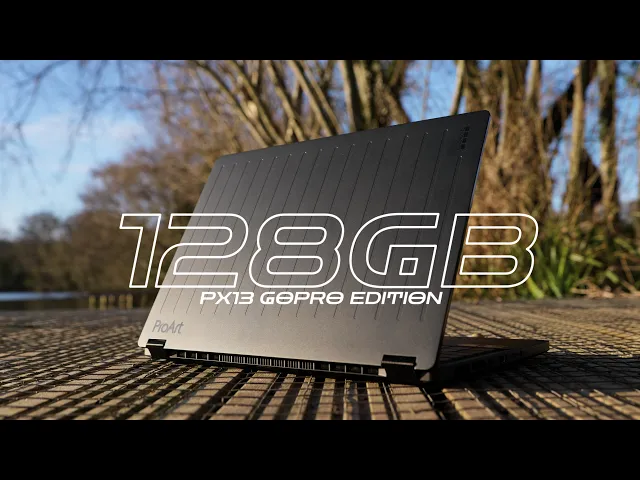
0:00 This is the Asus ProArt PX13 GoPro Edition.
0:04 A go-anywhere 13-in Windows laptop designed for creators on the go.
0:09 Big thanks to Asus for getting this PX13
0:11 over to me and for sponsoring this video.
0:14 And while it may look pretty similar to the previous model on the outside,
0:18 on the inside, it's a different beast entirely.
0:22 Because gone is the dedicated Nvidia GPU, and in its place,
0:26 we've got the Ryzen AI Max Plus 395
0:29 with its monstrous integrated GPU, the Radeon 8060S.
0:34 And that's coupled with a massive 128 gigs of shared unified memory.
0:40 And yes, you heard right.
0:41 It's a collaboration with GoPro.
0:44 So, not only do you get 12 months of GoPro Premium Plus included,
0:49 but you also get some pretty snazzy goodies included in the box.
0:53 The laptop itself comes in this swanky box, which is actually really useful.
1:00 As it's full of these foam inserts that you can customize to your liking,
1:04 meaning you can use this box going forward
1:07 for storing or transporting any of your other camera gear.
1:10 Smart.
1:11 We also get this chunky protective sleeve.
1:14 Ignore the fact that mine's covered in mud.
1:17 I've been putting it to some good use.
1:19 It's handy for throwing in the laptop and any
1:20 of your other GoPro accessories while you're out and about.
1:24 Comes with these snazzy shoulder straps as well.
1:27 We've also got the 200 W charging brick, which is smaller than the previous one,
1:31 and the new and improved Asus Pen 3 with its new wireless charging dock.
1:37 No actual GoPros included in the box, though.
1:41 But, the laptop itself does have some GoPro branding sprinkled throughout.
1:45 We've got these GoPro inspired slats on the back alongside the new GoPro logo.
1:50 On the inside, we've got a dedicated GoPro button
1:53 on the F8 key for quickly jumping into the GoPro player.
1:56 And this time around, the backlighting on the keyboard is blue.
2:00 But, besides those small cosmetic changes,
2:03 it's the same 13-in chassis weighing the same just under 1.4 kilos.
2:08 Which does mean it's pretty teeny tiny and pretty lightweight.
2:12 So, it's nice and easy to lug around,
2:14 shove in your bag when you're going out on your adventures.
2:17 Open it up, which you can do so with one finger, which is always a bonus.
2:21 And on the inside, you'll see we've got the same 60 Hz Asus Lumina OLED display.
2:26 Yes, it's the same panel as the previous one.
2:29 And while it is actually a really
2:30 nice-looking 500 nit 3K OLED display covering 100%
2:35 of the DCI-P3 color gamut with a Delta
2:38 E rating of less than one, touchscreen, too, either for when you're poking at it
2:42 with your greasy fingers or using that included Asus Pen,
2:46 it is still hindered a little bit by the fact that it is,
2:49 unfortunately, only 60 Hz.
2:52 Which is going to be a sticking point for some.
2:54 And yes, 120 Hz would have been nice.
2:57 But, in day-to-day usage, I can't say it ever bothered me.
3:01 Normal day-to-day tasks are fine at 60.
3:04 Even video editing is fine at 60.
3:07 And let's be honest, no one's doing any competitive gaming on a 13-in laptop.
3:12 An anti-reflective coating, however, would have been a nice addition.
3:15 However, maybe I'm just a bit spoiled
3:18 because I've been using the Asus ProArt P16,
3:20 and the display on that thing is almost perfect.
3:23 The touchscreen does work well, though, and it does feel responsive.
3:26 And the new Pen 3 is much improved.
3:29 Because this time around, we've got haptics.
3:32 So, it kind of vibrates and makes the noise of pen on paper,
3:35 which is kind of hard to explain, but in usage, it just feels much nicer to use.
3:41 And as you can see here, it feels really responsive.
3:45 Underneath that screen, we've got the keyboard,
3:48 obviously, which I actually really quite like.
3:51 There's plenty of travel, it feels nice, it's well laid out,
3:54 and for a relatively small keyboard, it's actually pretty nice to type on.
3:58 The same can be said about that trackpad,
4:00 which is a nice size and it works well.
4:02 It's not haptic, but it has all
4:03 of your usual multi-finger gestures and palm detection.
4:07 Swipe down from the right-hand corner to activate the Asus dial pad,
4:10 which this time around has been decorated with these little lines.
4:14 You can use the dial pad in things like Photoshop to adjust your brush
4:17 size or in DaVinci Resolve for zooming
4:19 in and out or whipping around your timeline.
4:21 Or, on the desktop, for simply changing your screen brightness or volume.
4:25 It's actually pretty useful, and I never found it to get in the way.
4:29 So, it's a nice to have, even if I don't find myself using it all that often.
4:33 Down here on the left, we've also got this nice little rubber ProArt nipple,
4:39 which I really like playing with.
4:44 Anyway, in terms of ports,
4:46 we've got two USB 4.0 Gen 3 Type-C ports, one on either side,
4:50 which is handy, both capable of 100 W charging
4:53 and up to 40 gigabits per second transfer speeds.
4:56 We've also got a USB Type-A port for any of your older stuff,
5:02 and a HDMI 2.1 port alongside your standard headphone combo jack.
5:07 Now, we've also got a microSD card slot, and usually,
5:10 I'd be a bit mean about microSD, but on this thing, it actually makes sense.
5:16 Because all of your GoPros, action cameras,
5:18 drones, pocket cameras, they all use microSD.
5:21 And they're the sort of cameras that this thing
5:23 is designed for, but it does mean that you will
5:25 have to have a full-size SD card dongle with you
5:29 if you're using a big camera to do other stuff.
5:33 Oh, and the power button is over here on the right-hand side, too.
5:36 Now, for something that's designed to be
5:38 thrown around and taken with you on adventures, it needs to be well-built.
5:42 And it is.
5:43 It feels premium, it feels solid, and it feels really well put together.
5:46 It actually has the military standard 810H rating,
5:50 which essentially means it's been tested for extreme temperatures,
5:53 altitude, dust, humidity, drops, and all that kind of stuff.
5:56 However, I would definitely put it in the sleeve before
6:00 throwing yourself down a hill or whatever you plan on doing.
6:05 The speakers are pretty small, and they are downwards-facing,
6:08 but they're plenty decent enough for just catching
6:10 up on YouTube and that sort of thing.
6:12 They're also quite loud.
6:14 But, if you are doing any serious editing or want to blast some music,
6:17 you're better off connecting some headphones,
6:19 either via that combo jack or via the Bluetooth 5.4.
6:22 We also do have Wi-Fi 7, which is great for future-proofing.
6:26 And don't forget you've got your 1080p 30 webcam,
6:29 which looks something like this in relatively decent lighting,
6:34 and something more like this in less than ideal lighting.
6:37 There's a little LED status light,
6:39 which will light up when the webcam is in use.
6:41 Now, there's no physical cover,
6:43 but you can slap the F10 key to make sure that camera is turned off,
6:46 so you can make sure no one's spying on you.
6:49 Oh, and before I forget, storage.
6:51 This one comes with 2 TB NVMe SSD.
6:54 Now, there is only space for one,
6:56 so you can't open this up to slap another one in.
6:59 Although, hopefully, you might not need to, as that included GoPro Premium Plus
7:04 gives you unlimited cloud storage for all of your GoPro footage,
7:08 and you can access that footage through Asus's own Storage Cube app.
7:12 You can easily download your media from the GoPro cloud,
7:15 even viewing the 360° footage directly in this Storage Cube app.
7:25 Storage Cube uses AI to intelligently sort
7:27 and organize all of your footage by time, device, location, and even activity,
7:33 allowing you to find exactly what you need when you need it.
7:37 You can even select it directly within Storage Cube and drop
7:40 it into your video editor of choice like DaVinci Resolve.
7:44 Now, if you fancy learning more about the GoPro and Asus collaboration,
7:47 simply click the link down in the description below.
7:50 So, what about performance?
7:52 Well, it's really good, and it scales really well across different power levels,
7:58 making it feel really quite unique for a Windows machine.
8:01 Asus provides three power modes by default, whisper, standard,
8:05 and performance, with performance mode only being available while plugged in.
8:10 There's also an additional custom mode for those that want the absolute max.
8:13 I'll be honest, though, maybe I'm just getting old,
8:15 but I found myself using this in whisper mode 90% of the time.
8:20 The performance is still really impressive,
8:22 but it stays quiet and cool, and gives you longer battery life.
8:26 It also means I never had to take the charging brick with me
8:29 because I could make do with this 100 W Type-C charger instead,
8:33 which is a big plus for me because it means I can take this alongside
8:37 this and then this, which has just got a bunch of other goodies in it,
8:40 and that's all I need to do pretty much everything I need to do.
8:44 Plugged in in performance mode, Cinebench 2024,
8:47 we scored 116 single core and 1,677 multi-core.
8:53 That's a 64% multi-core improvement over last year's PX13.
8:57 Under load, the cooling fans suck in from the bottom
9:00 and vent out the back and sides.
9:02 Now, it can get warm under usage,
9:04 but all of that heat stays around the top area here,
9:07 so your palm rests never get too warm.
9:10 Running a benchmark, we do hit 96°, but we never thermal throttle.
9:15 And while those fans do get reasonably noisy, they quieten down really quickly.
9:20 In standard mode on battery, it's much quieter and much cooler
9:24 while still managing a really respectable score.
9:27 So, as those numbers would suggest, it's a really solid performer.
9:31 And of course, you've got that 128 gigs of memory to play
9:34 with, which means it blasts through all of your everyday tasks with ease.
9:38 Apps all load really quickly, you can have a bunch of them open at once,
9:43 and you can even get really crazy with as many tabs open as you like.
9:47 This thing will just gobble it all up.
9:50 Now, talking about that 128 gigs, you can split it up between system memory
9:55 and video memory pretty much as you like.
9:57 All you need to do is to hop
9:59 into the My ASUS app and you can configure it from there.
10:02 You will need to do a quick restart if you make any changes.
10:05 Out of the box, it comes set up as a 64 64 gig split.
10:09 Now, having all of that memory is great for all of your everyday tasks,
10:13 but it's also great if you want to start
10:14 messing with AI and running your own local LLMs.
10:18 Now, that's not something I've played with personally,
10:21 but it is something I'd like to explore in the future.
10:23 But, all that memory is also great for video editing.
10:27 So, I put together this 12-minute
10:29 timeline in DaVinci Resolve using GoPro footage.
10:32 Color graded, lens correction, some titles,
10:34 a very standard GoPro kind of project.
10:37 On battery on the Whisper profile, the timeline was buttery smooth.
10:41 Cutting, moving stuff around, color grading, it all just worked.
10:44 And rendering that timeline out when plugged in, 3 minutes 20.
10:49 On battery, standard mode, 3 minutes 22.
10:52 Battery in Whisper mode was a little bit slower,
10:55 but still pretty quick doing the entire thing in just 5 minutes.
10:59 So, as you'd expect, it handles the GoPro kind of workflow really well.
11:04 This one, a very standard YouTube kind of project for me,
11:07 5 minutes mixed footage with some titles and some fusion.
11:11 This one popped out in 3 minutes and 53 seconds.
11:14 Using this much heavier 6K footage de-squeezed on a big 4K anamorphic timeline,
11:19 and the footage still plays back in real-time.
11:23 It's only when you've got a heavier grade with some
11:25 film look creator applied that we start to drop frames.
11:29 However, knock the timeline resolution down to half,
11:33 and we're back to real-time playback once again.
11:35 This chip doesn't hardware accelerate 422 10-bit footage,
11:40 which is exactly the same as the previous 4070 NVIDIA GPUs,
11:45 both laptop and desktop.
11:47 It's only the new 50 series of GPUs which do hardware accelerate 422 10-bit.
11:52 However, it handled this 4K timeline full of 422 10-bit footage just fine.
11:58 It was reasonably smooth,
12:00 not quite as smooth as with the other footage as you'd expect,
12:03 but still pretty smooth and perfectly usable.
12:06 And it rendered the 8-minute timeline out in a little over 2 minutes,
12:10 which is not too bad at all.
12:12 Now, I also wanted to see how good this thing was at generating proxies.
12:16 Let's say you're sat in a cafe, having a cup of coffee,
12:18 you're plugged in, you're going to hit the road,
12:20 so you blast through, create a bunch of proxies,
12:22 so when you are out and about, you're running on proxies instead.
12:26 Generating 1080p H.265 proxies out of this 4K
12:29 GoPro and drone footage, and it was rapid.
12:32 Magic Mask 2 performs pretty much in line with my MacBooks, including my M4 Max.
12:38 Generating transcriptions is quick,
12:40 reaching anywhere between 20 to 40 times real-time,
12:44 but adding noise reduction in 4K can result in some dropped frames.
12:48 Overall though, it's pretty solid even with that heavier footage.
12:53 Now, having all of that memory does make a big difference,
12:56 but it's kind of hard to show you exactly what it's doing.
12:59 What I will say though, is everything just works.
13:03 Everything feels really smooth.
13:05 I never hit any memory errors as you'd kind of hope.
13:09 It all just sort of works.
13:11 Opening up a chunky project for the very first time,
13:14 it dumps 30 gig into RAM and 20 gig into the video RAM.
13:18 Nearly all of the laptops and even desktops at this point
13:21 would have to start swapping things in and out of the memory.
13:25 Well, this thing just gobbles it all up.
13:27 Even smaller projects, as soon as you open them,
13:29 bam, 12 gigs straight into the video RAM.
13:32 The same thing can be said for other creative endeavors.
13:36 Photography, Lightroom, Photoshop, Affinity,
13:38 they all work really well even on battery and when using large raw files.
13:43 Gaming is equally impressive as well.
13:45 The performance actually being really similar to the previous RTX 4070.
13:50 Shadow of the Tomb Raider at its highest settings,
13:52 native 3K, 60 frames per second is no problem at all.
13:56 I've been jumping in and out of Helldivers 2, again, 60 frames, no problem.
14:01 I've also been jumping into a combination of some
14:04 new and older games like Warhammer Space Marines 2, Divinity: Original Sin,
14:09 the Tomb Raider Remastered series, SnowRunner, Arc Raiders.
14:13 Everything just works, and it looks great on that OLED display,
14:17 but I've also been plugging it in via the HDMI
14:19 into my TV for some couch gaming as well.
14:22 Cyberpunk is a great example.
14:24 Native 3K resolution on the medium settings,
14:27 a whisper shy of 60 FPS when plugged in on the Whisper mode,
14:32 and almost 90 in performance mode.
14:34 Knock the resolution down a little, still on medium,
14:37 and you've got 90 frames in that Whisper mode,
14:40 which means while I did run those tests using the 200-watt power brick,
14:44 any of the Whisper and standard modes will perform just
14:48 as well even when plugged in with a 100-watt USB-C charger.
14:52 Right, we're playing this locked at 60 FPS.
14:57 Now, I'm just going to pause it a sec.
15:03 The fans are going, but you can barely hear them.
15:06 We're charging via a type-C cable, and if you have a look,
15:10 we are running at 2880 by 1800 quality
15:14 render scale with the graphics preset of medium.
15:18 And if we switch over to HWinfo, we are also charging the battery.
15:24 And that's where the convertible mode actually start to make even more sense.
15:28 Either folding it back on itself like so, or putting it into its tent mode.
15:33 Connect an Xbox controller and plug in with a little type-C charger
15:36 like this, and you've got yourself a pretty sweet little portable setup.
15:40 In fact, it's meant that when I'm traveling,
15:42 I don't even need to take this with me alongside a larger laptop.
15:47 I can just take this with an Xbox controller, and I'm good to go.
15:51 Just don't expect to get too many hours of gaming when running
15:55 on battery because it still can be a little bit power hungry.
15:58 Even with the 73 watt-hour battery,
16:01 which is pretty chunky for a device of this size,
16:04 running any gaming in the standard mode and you
16:06 will be out of juice within an hour or two.
16:08 But, doing your general day-to-day tasks on Whisper mode
16:11 and you'll easily get 6 to 8 hours out of it.
16:14 As of writing this script, sat in a cafe,
16:17 I'm currently showing 39% battery with 3 hours and 40 minutes remaining.
16:21 With video editing sitting somewhere in the middle of the extremes,
16:25 you won't get all day video editing, but you will get a good few hours.
16:29 So, while it's not exactly an endurance monster,
16:32 if you're sensible with it, it will do pretty well.
16:35 Overall then, I really quite like it.
16:38 It's a small, portable, but surprisingly powerful little 13-inch laptop.
16:43 But, does it actually make sense,
16:45 or would they have been better by throwing in a discrete NVIDIA GPU again?
16:50 Well, I think it totally works.
16:52 I think this makes for a better solution for people buying a 13-inch laptop.
16:58 Plugged in, top-end performance in gaming and video editing
17:00 is mostly on par with the previous 4070 version.
17:04 But, away from the socket,
17:05 where this thing is designed to spend good amount of time,
17:08 you get way better scalability and customization.
17:12 In fact, I don't think this 395 Max makes
17:14 as much sense in a 15- or 16-inch device.
17:18 There's just too many alternatives.
17:20 But, 13 inches like this, iPad territory, I think it works really well.
17:25 So, how much is this thing going to set you back?
17:28 Well, it's priced in the UK for this GoPro edition at 2,999 pounds.
17:33 Now, that is of course a good chunk of money.
17:36 So, whether that's worth it to you, only you will know.
17:40 The new ASUS ProArt PX13 GoPro edition.
17:43 Let me know your thoughts and feelings down in the comments below.
17:46 Thanks for watching.
17:47 Take it easy.
17:49 I'll see you next time.