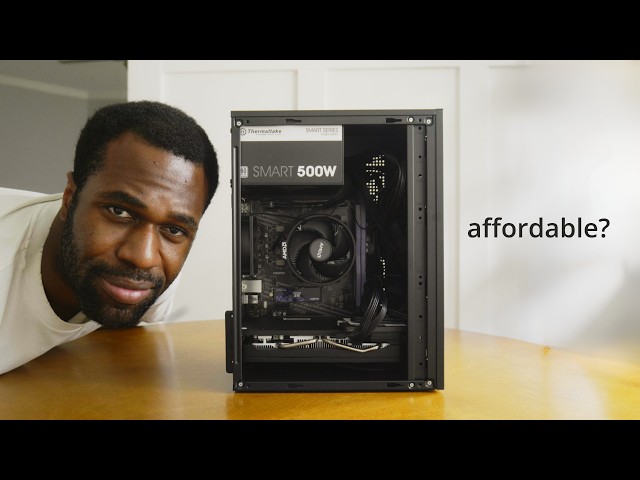
Can I build a $350 PC on Amazon?
OzTalksHW
0:00 Real quick, this video was recorded in October of 2025.
0:05 Obviously, a lot has changed since then,
0:08 but I still think this video was a fun project that's worth watching.
0:12 So, keep that in mind and enjoy.
0:16 What's up, guys?
0:17 So, a few days ago, I was decluttering and I finally unboxed this one
0:22 case that I bought maybe about two and a half, 3 years ago.
0:27 And at first glance, it's a pretty simple case.
0:30 There isn't much to it.
0:31 It's it's essentially just like a a black metal box.
0:35 But I've actually seen some of these cases on Amazon,
0:38 probably drop shipped, for like $32 or so.
0:43 And that got me thinking,
0:44 can we actually build an Amazon gaming computer that can
0:48 play modern games for a super cheap price, like $350?
0:55 That would be my goal.
0:56 And I think that would be pretty legendary.
0:58 Let's give it a shot.
0:59 Yeah.
1:03 All right.
1:05 So, this whole process ended up being
1:06 a little bit tougher than I expected because I
1:09 had several instances where I could have spent
1:12 $5 to $10 more for a superior product.
1:17 We'll talk more about alternatives later in the video,
1:19 but this ended up being a pretty interesting build.
1:24 All right, this is what Amazon has to offer for the fastest,
1:29 cheapest new gaming computer available.
1:33 And a great addition to any gaming computer is a nice setup to match.
1:37 That's where Huana and their iconic Nitroglide dual monitor arms come in.
1:42 I used Huana for a couple of years when I had my dual monitor setup.
1:46 So, when they reached out, I was super excited to work with them.
1:49 They're one of the few highquality and affordable dual monitor arms out there.
1:54 They were sturdy and easy to adjust when I had them.
1:57 Practically, my WO monitor arms gave me greater adjustability,
2:02 flexibility, and desk space compared to traditional monitor stands.
2:06 Their Nitroglide dual monitor arms use a standard phase amount,
2:10 75 mm and 100 mm, so they work for most modern displays.
2:16 And the model that I have can support up to two 40in 26lb displays.
2:20 The instructions are incredibly clear and it doesn't
2:23 take too long to actually set everything up.
2:26 The arms themselves are really thick and come with a wide base,
2:28 so they're super stable even on a cheap foldable desk like the one I use.
2:34 The base itself has two USB ports for easy
2:37 access to charge your phone or plug in a peripheral.
2:40 The monitor arms have full range of motion for raising,
2:43 lowering, swiveing, tilting, and rotating.
2:47 And this allows me to put them in pretty much any orientation.
2:51 Like any orientation.
2:54 That's actually pretty cool.
2:56 If you guys need high quality and affordable
2:58 monitor arms for your dual monitor setup, definitely check out Juano.
3:03 I've been a customer and it's only been a positive experience.
3:06 and they're great for both budget builds like
3:08 this one and for high-end builds as well.
3:11 Link is in the description.
3:13 Thank you guys so much for sponsoring this video.
3:15 And let's go talk about this computer right here.
3:20 Yeah.
3:21 Yeah.
3:22 The CPU in the cooler is the Ryzen 5 3600.
3:27 Bought this for $74 and this is still so tried and true.
3:33 And I'm so shocked that this is still being sold brand new.
3:36 Now, I'm pairing that processor with the cheapest
3:39 AM5 motherboard that I can find, the A520M8 Pro.
3:43 Now, I decided to forgo one that had Wi-Fi
3:45 and Bluetooth built in just so we can save money.
3:48 You know, when the one of the features is 4K
3:50 support onboard video that this motherboard doesn't have much to offer,
3:55 but it gets the job done.
3:56 And I think this one was how much was it?
3:59 This one was $65.
4:01 Now, RAM was the part that really spooked me.
4:03 Um, mostly because of the price because last I checked DDR4 memory,
4:08 16 gigs, it was maybe 30 to $35.
4:12 This one was 51 bucks.
4:14 It was the cheapest one I could find on Amazon at the time.
4:16 So, RAM prices are just generally up and I think
4:19 that's because of AI and high demand, so prices go up.
4:23 It just kind of is what it is.
4:25 And so, uh, yeah, 16 gigs of RAM, 51 bucks.
4:29 As far as long-term storage goes, I got this Kingspec 512 gig uh PCIe3 SSD.
4:37 Uh that's enough storage for what we need
4:40 and to at least get some games up and running.
4:42 Powering everything is the tried andrue Thermaltch Smart series.
4:47 This one is the 500 W model.
4:49 I've used this in so many different budget builds.
4:52 We could have gone cheaper technically,
4:54 but we couldn't have gone cheaper and safer.
4:58 This power supply is about $40.
5:00 So, a little bit more expensive than I would like,
5:02 but still reasonable enough for what it offers.
5:06 Okay, this one is the fun one.
5:10 This is basically the case that I was mentioning earlier.
5:13 It's a near identical model and it is the G Peruan TGD Gamer.
5:22 And this one was $32.60, 60, which is honestly more expensive than it really
5:29 should be simply because the Cooler Master Q300LV2,
5:34 although it's not a great case,
5:36 it's only three bucks more and I think I would prefer that over this.
5:41 But for the sake of trying to be as cheap as possible
5:44 and really having this case be the centerpiece around this build,
5:50 I still wanted to give it a shot.
5:51 And I do really like the form factor.
5:53 It's smaller than the Q300L or other competitors.
5:57 That is a pro here.
6:00 So, and lastly, but not leastly,
6:02 the part that most of you are probably wondering about, the video card.
6:06 We have the RX 580.
6:11 The gift that keeps on giving it just won't die.
6:14 It's the 2048 SP edition with 8 gigs of VRAM.
6:17 It actually performs more like an RX 570 and it's the cheapest new,
6:25 it's not technically new, but more so like refurbished and repackaged,
6:29 repasted card on Amazon that is actually worth the price.
6:34 The only downside about this card is
6:36 that it's not getting game ready driver updates anymore.
6:40 Newer games just may not work on it.
6:43 We'll have a video later that will discuss just uh alternatives in this computer
6:48 build that I think would actually be uh better than these brand new parts.
6:53 But we're going to save that for later and just
6:55 continue with this experiment and see where it leads us.
8:18 We did it, Joe.
8:21 We did it.
8:22 Fully Amazon built computer using technically brand new parts.
8:27 Take a look.
8:30 What do you think?
8:32 Is it nice?
8:32 Is it cool?
8:33 Is it clean?
8:34 kind of like it.
8:35 I like the small form factor.
8:36 It has a really cute kind of uh simple and yet kind of elegant design.
8:42 I think the darker colors actually complement it well.
8:44 But the thing is more importantly how it performs.
8:47 And the even bigger thing after that is if you don't go with Amazon,
8:50 how much better performance can you actually get?
8:52 We'll answer some of those questions in this video,
8:55 few of them probably in a future one.
8:58 Let's get to testing.
9:02 You know, the crazy part about all of this is I don't even know if it works yet.
9:05 So, let's power it on and hopefully uh this computer is functional.
9:11 Yeah.
9:11 Moment of truth.
9:12 And my battery's about to die, so let's make it quick.
9:25 Let's go.
9:28 Computer's built.
9:30 It works.
9:31 Yeah.
9:33 Yes.
9:33 Yes.
9:34 Yes.
9:35 Okay.
9:36 Just to recap, this computer is rocking a Ryzen 5 3600 with the stock cooler,
9:42 an A520M motherboard, 16 gigs of RAM,
9:46 a 512 gig SSD, the Thermaltch Smart 500 W power supply,
9:52 an RX 58 GB GPU, and a pretty generic case.
9:56 And the total was $4160 before tax.
10:01 And I'm going to say something kind of controversial,
10:05 but I actually prefer how this case looks versus the Q300L.
10:11 And I think I would choose this case again stylistically.
10:17 Shoot me.
10:18 Maybe it's crazy.
10:20 My honest thoughts, my honest opinions.
10:23 So, so not quite the $350 that I was hoping,
10:27 but there are ways to actually get down
10:29 to that price that we'll talk about later.
10:31 But how does this perform?
10:35 Cool.
10:34 Okay, to put it simply, the newer the game,
10:38 the worse this $400 computer performs.
10:42 Rainbow Six Siege Counter Strike 2.
10:44 Uh, both of these games are almost a decade old with Counter-Strike 2 getting,
10:48 I guess, a pretty big update.
10:50 But we were able to clear over 100 FPS on average, even with high settings.
10:56 Rainbow Six Siege definitely felt smoother than Counter-Strike 2,
10:59 but both games were still totally fine,
11:01 and I was able to actually increase my average to 154
11:04 FPS in Counterstrike 2 when I lowered the settings down to low.
11:08 The only hiccups I experienced were when I first loaded into the match,
11:13 but after maybe about 10 seconds,
11:16 the computer quote warmed up unquote, and everything was fine.
11:21 Black Desert Online is about 10 years old as well,
11:24 and we were averaging about 60 FPS using medium settings,
11:28 even when there were lots of mobs on screen,
11:31 and there was tons of flashy effects.
11:33 Now, I imagine that this would lower if
11:35 I got into a large scale fight or battle,
11:39 but in terms of playing it almost like a single player, it was totally fine.
11:44 Now, as we get into games made within the last couple of years,
11:48 things start to look a little different, but there were still a few surprises.
11:52 Hell Divers 2, for example, played a lot better than I expected.
11:56 Even though the average was fairly low, we were about 41 FPS,
12:01 it felt buttery smooth, and I even forgot that I was benchmarking.
12:05 Balders's Gate 3 ran better than I expected once
12:08 I adjusted to the lower textures and lower graphics.
12:13 Uh, I was actually able to enjoy the experience.
12:15 I averaged about 48 FPS in the opening scene and about
12:19 71 FPS in ladder scenes with less going on on screen.
12:24 Now, even though there are some really cool surprises,
12:26 this computer really does start to show its age
12:29 with games dropped within the last year or so.
12:32 Even esport titles.
12:34 Smite 2, for example, which now uses Unreal Engine 5, uh,
12:38 was only able to average about 41 FPS with the lowest settings.
12:43 Now, this is with native 1080p.
12:45 Smite 2 is also in open beta.
12:47 So, it can really only improve from here performance-wise,
12:51 but it's really not a great look for this computer because
12:55 this is a game that's meant to run on most modern hardware.
12:58 It's meant to be as farreaching as it possibly can be in this day and age.
13:03 Marvel Rivals was the most interesting one of the bunch.
13:06 It's technically playable, but I did not have a good time.
13:10 Just want to say that.
13:11 Did not enjoy it.
13:12 With low settings, I averaged around 33 FPS.
13:16 Now, I was able to increase that to about
13:17 56 FPS with some pretty intense upscaling, but the game just did not look great.
13:24 Upscaling introduced noticeable blur and jagged edges,
13:28 and for fast-paced games, it negatively impacted my performance.
13:33 And I'm not just saying that because I was like bad at the game.
13:37 The jagged edges, the blurry haze effect definitely didn't help.
13:42 Some of the negatives from Marvel Rivals did transfer over to Blackmth Wukong,
13:48 like the blur whenever my character would move
13:51 or the heat haze effect and the very jagged edges.
13:54 There's just really no way to avoid that when
13:58 you're working with a computer of this caliber.
14:01 But I was a little bit more lenient here because this was a single player game.
14:06 I was averaging a little over 50 fps when I had heavy upscaling,
14:13 but I actually prefer the more
14:15 consolelike 33 fps experience with higher graphics.
14:19 In a slower RPG like this, it's a lot more forgiving,
14:22 and I prefer a prettier 33 FPS than a smeary 55.
14:30 And now we have Battlefield 6, one of the newest games out right now.
14:33 And I was pleasantly surprised by this.
14:35 It's optimized to run well enough on a mid-range video
14:39 card from 2017 that no longer gets major game driver updates,
14:44 and that's pretty impressive.
14:46 It's not good enough for competitive play, but totally fine for casual matches.
14:50 I was even able to get a kill while I was playing, and I think that says a lot.
14:54 So, for the most part, this computer can actually play games,
14:58 but I don't recommend it for a number of reasons.
15:01 For one, cooling just isn't great.
15:04 The GPU hit about 80° C at its peak with about an hour of gaming.
15:09 That's totally fine.
15:10 A more aggressive fan curve and undervolting the video card would help.
15:14 And 80° isn't even hitting that thermal limit where it starts throttling,
15:18 but it's just a little bit hotter than I would like.
15:21 But I did see the CPU peak at about 90 degrees C.
15:25 It didn't happen often, but it happened enough where I was a little concerned.
15:29 And unfortunately, the A520 doesn't have very many undervolting options.
15:34 Secondly, the video card is just too old.
15:38 I think we're at the point where the RX 580,
15:40 unless you want to play older games or potentially are using Linux,
15:46 might just need to retire.
15:47 It doesn't have any driver updates from Windows anymore.
15:50 and that can actually prevent you from playing certain games.
15:54 Spider-Man is a culprit of that.
15:57 And Indiana Jones and the Great Circle also a culprit of that.
16:00 And for $100, you can get something a lot better.
16:04 So, if I had to switch some things around and make this computer a better value,
16:11 I would get a GTX 1660 Superhand for like $90 on eBay.
16:17 I would pocket the extra $10 to whatever $15
16:21 that I have and I would put that towards
16:24 a case with either better thermals or I would
16:27 buy a case fan pack with a fan splitter.
16:30 And there are also other video card
16:31 options around $100 secondhand that would work better.
16:36 RTX 2060 Super if you can find it at a decent deal on eBay or locally.
16:40 And then the RX5700.
16:42 They have about the same amount of VRAM,
16:44 but at least 25 to like 40% faster than the RX 580,
16:50 and they're still supported with Game Ready drivers.
16:54 So, let me know what you guys think about this computer,
16:56 this build, um, any ways that you would actually improve it yourself.
17:01 Thank you guys so much for watching, and I'll talk to you guys in the next one.
17:04 Peace.