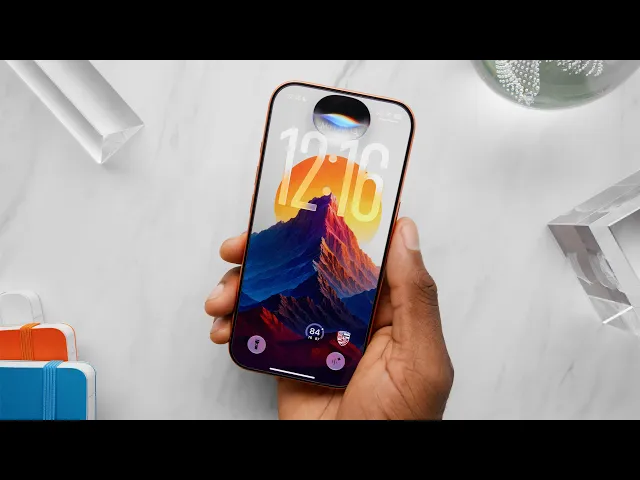
iOS 27 Hands-On: Top 5 New Features!
Marques Brownlee
0:02 All right, it's time to talk about iOS 27...
0:05 coming to an iPhone near you.
0:07 So I've been running the latest beta of iOS
0:10 27 for a little while now, since WWDC.
0:12 Basically, the public beta is out now, too, which means you can test it as well.
0:16 And this...
0:16 is the update...
0:17 of refinement.
0:18 Like, there are a lot of...
0:19 there's no big sweeping changes.
0:21 There's a lot of little things in here
0:23 that we've been waiting for for a long time.
0:25 You'll see what I mean.
0:27 What's crazy is that this has been among the most stable, like,
0:30 best set of developer betas I've tested in a long time from Apple.
0:33 Not that that really means anything for the everyday person who's
0:36 gonna wait till September when it officially drops on everyone's phones,
0:39 but it's a good sign.
0:40 It's just...
0:40 it's nice to see from where I'm sitting.
0:42 Anyway, this is the top five features of iOS...
0:45 27, in my order...
0:46 of how good they are...
0:47 Also, if you haven't already gotten subscribed to this channel,
0:51 make sure you get subscribed to be among the first to see the new
0:54 iPhones that this launches on when that comes out in a few short months.
0:59 So number five is the new photo editing features...
1:01 So in the Photos app now,
1:03 when you open a photo and you go to edit, there's two new tools.
1:06 Clean Up was already there for erasing background items,
1:09 and it's actually gotten noticeably better.
1:12 But now there's also two new ones: Extend...
1:15 and Reframe...
1:16 I've been playing with these a lot.
1:18 Extend is pretty intuitive to me.
1:20 It's basically going to use generative AI to extend the edges of a photo,
1:24 no matter what camera it was taken on, in any direction.
1:27 And it seems maybe a bit silly at first,
1:29 but this is actually a pretty commonly used tool, at least for me in Photoshop,
1:33 when I just want to change the aspect ratio of something...
1:36 Maybe I shot something in portrait,
1:38 but I want to make it landscape for this video instead...
1:40 Okay, you can just extend and pinch out,
1:42 and it does a pretty great job of reconstructing...
1:45 more of whatever was on the outer edges of the frame.
1:48 Obviously, it works best with...
1:50 more consistent patterns and abstract stuff,
1:52 but it's also been shockingly good with...
1:54 whole entire objects, too.
1:56 Just sort of creating more of it from scratch.
1:59 But definitely the crazier one that we haven't seen before...
2:02 is this Spatial Reframe feature.
2:04 So this one is going to let you drag around
2:07 and morph the perspective from which it appears a photo was taken.
2:10 So it's like kind of being able to move where the camera was in physical space.
2:16 And then it takes some time and generates all
2:19 these new pixels that it wasn't originally able to see.
2:23 And yeah, it does it.
2:25 Now, I would say the quality of these reframes...
2:28 isn't quite as good.
2:29 Like, it definitely degenerates a bit more quickly than the extends.
2:33 But it is kind of insane that it works and that Apple is just...
2:36 letting you do this to your photos.
2:38 I think there's clearly a little bit
2:40 less practical uses for this Spatial Reframe.
2:42 It's a very cool tech demo, but I do think it's kind of convenient
2:45 for the stuff where you're trying to, like, line it up perfectly.
2:48 Like one of those perfectly symmetrical shots where...
2:51 you kind of just get the snap, like 96% right in person...
2:53 And then you want to post it, but you want it to be perfect.
2:56 So you get those last few percent by reframing it and getting it just right.
3:01 Is that still a photo that you took with your phone?
3:05 In my opinion, no, but who's counting?
3:09 Also, it will not let you extend...
3:11 or reframe the same photo more than once.
3:13 So it'll let you do it once and then says, "All right,
3:16 that's enough." But you can also sort of screenshot it and get
3:19 your way around it and hack
3:20 your way into multiple extends and multiple reframes.
3:22 Also, both of these features require an internet connection,
3:24 so if you try to do this while you're offline or in an airplane,
3:27 then it will give you an error message.
3:29 'Cause you need those bigger models on the cloud to actually pull this off.
3:32 All right, so then number four is
3:34 what I'm calling the "frickin' finally" section.
3:36 'Cause it's about...
3:37 time.
3:38 Each one of these things was like Apple
3:40 stubbornly refusing to do it for some reason,
3:42 to the point where it became a meme.
3:44 Like, it's been years, but now for iOS 27, they've found the time.
3:49 So finally, separate alarm volume from the rest of system volume in iOS 27.
3:54 Fricking finally, bro.
3:55 This has been an Android feature for like 20 years at this point.
3:59 And honestly, I still think Android manages
4:01 this better with the separate volume toggles.
4:04 And it makes it very clear.
4:06 But...
4:06 hey, at this point, I'll take it...
4:08 I don't care.
4:09 It's about time.
4:10 Also, better management of switching off
4:11 of weak Wi-Fi networks back to cellular.
4:13 This is something I've dealt with for years.
4:15 I'm sure a lot of other people have had this.
4:18 You're leaving your house and you pull up
4:20 maps to like navigate to work or wherever
4:21 and just want to see traffic for like the first two blocks every single time.
4:25 I have like a tree that I know that I have
4:27 to get to where it's not going to know what the instructions are,
4:30 it's not going to know the traffic.
4:31 Until I pass it.
4:32 It gets off of my house's Wi-Fi and...
4:34 and then it connects to cellular...
4:36 But I've noticed it actually being better on iOS 27.
4:39 Just leaving, just going straight to cellular.
4:41 In CarPlay, in iOS 27, in the Now Playing, you can finally scrub the media back
4:48 and forth that you're actually playing on the timeline.
4:53 Finally.
4:54 What's taken so long?
4:55 And then AirPods are finally getting custom EQ!
4:59 What?!
5:01 Finally!
5:02 This point, it's been so long.
5:04 I was convinced they were holding back on this on purpose for some weird reason.
5:08 But...
5:08 okay, it's here now, at least for AirPods with an H2 chip or later...
5:12 And it's only a three-band equalizer, but...
5:15 still, it's crazy to see...
5:16 I'll take it.
5:17 It's about time.
5:18 I don't know who had to lose a bet over there for this stuff to happen,
5:21 but thank you for losing that bet.
5:23 It's about time.
5:24 I appreciate it.
5:26 Moving on.
5:26 So number three is the aesthetic tweaks, because there are a ton of little
5:31 aesthetic improvements everywhere throughout this update.
5:33 Obviously, iOS 26 was the big one with liquid glass...
5:36 That's not going anywhere.
5:37 But right from the jump on iOS 27, you can see like the home screen,
5:41 the icons are just, you can tell they're a little bit different.
5:44 The text and the shadows are just a little bit easier to read.
5:48 They're a little crisper...
5:49 If you look at Apple's stock apps,
5:51 they've actually updated a couple of their icons and they've
5:54 actually finally caved and added a new appearances tab...
5:57 And in this tab, right at the top is a literal
6:00 slider to dial in exactly how much liquid glass you actually want.
6:04 By default, it's in the middle,
6:06 which I found is just a tiny bit more opaque than before...
6:09 But then you can go all the way to the right,
6:11 which makes it way more opaque and frosted.
6:13 Or all the way to the left, which makes it way more glassy and transparent
6:17 for you real liquid glass sickos out there.
6:19 It's basic stuff, but I definitely appreciate it.
6:22 I think a lot of you guys will too.
6:24 Also on the lock screen there's this new compact clock option.
6:27 If you just wanna shrink that thing...
6:29 all the way down.
6:30 But they've also completely redesigned the home
6:33 screen swipe-down search, which is now...
6:36 combined with Siri, which conveniently brings me to number two, which is...
6:41 the new Siri, AKA...
6:43 Siri AI.
6:43 So, okay, I would say the bar was very low for Siri before...
6:47 Like the last 10 years of Siri, it's been borderline useless.
6:50 I would say...
6:51 probably have been more accidental triggers of Siri than intentional ones.
6:56 But now with the help of Google,
6:57 it's gotten this complete overhaul from the ground up.
7:00 It starts with this new animation so you
7:02 can hold down the power button like before...
7:05 and it expands out of the Dynamic Island and it's this half see-through,
7:09 half-opaque sort of crystal orb thing that moves as you talk and then
7:13 once it pops up your answer as an overlay, you can actually...
7:16 drag the bottom down to turn it into this...
7:18 full overlay conversation window.
7:21 And then you can even full-screen it to open
7:23 it alone in its brand new standalone Siri app.
7:25 So it goes from being an overlay to being in the Siri app.
7:29 And this app actually does keep a history of your requests.
7:31 It's not every single request, but it's most of them and you know,
7:34 keeps the bigger ones that you might want to revisit.
7:37 It also has a new voice that is much more expressive and human-like...
7:40 and is actually customizable.
7:42 I appreciate that you can make it talk faster.
7:46 Hi, let's find the right voice for you...
7:48 Hi, let's find the right, let's find the right voice for you.
7:52 Hi.
7:53 Hi, let's find the right voice for you.
7:55 Hi, let's find the right voice for you.
7:57 Let's find the right voice for you.
7:59 Hi, let's find the right voice for you.
8:01 So that's pretty sweet.
8:02 Uh, and yeah, it just,
8:03 it generally feels like they've caught up to the basic functionality...
8:08 of...
8:08 say, Gemini on an Android phone.
8:10 It's more conversational now,
8:11 so you can ask it like follow-up questions about something
8:13 and it will retain that context and keep it going.
8:16 It has broad world knowledge that it actually uses now instead of just saying,
8:20 hey, I looked this up for you,
8:22 or I Googled it and it has on-screen awareness now
8:24 so you can ask it things about whatever you're looking
8:27 at on your iPhone as long as you use the right language
8:30 because there's no UI to get it to look at the screen.
8:32 But I'd say its biggest new capability is being able to dig into...
8:37 the data and the personal context that's actually on your phone.
8:41 So I'm talking about like your iMessages, you,
8:44 your emails, your calendar events and your photos.
8:47 So when you first get this update,
8:48 it actually indexes in the background for a while.
8:51 It'll say it's optimizing for the new Siri.
8:52 For me this was a couple of days actually.
8:54 But once that's over, you can ask it things like...
8:57 what was that watch Dave sent me?
9:01 Dave Lee sent you a message about the Light Meter Watch,
9:05 LMW-V1, from Kickstarter.
9:06 He mentioned that he thought David Imel and Brandon would like it.
9:10 So see, that's coming straight from my messages...
9:12 or...
9:12 where was I two Saturdays ago?
9:15 Two Saturdays ago on June 27, 2026, you were in Greensboro, North Carolina...
9:20 You stayed at a hotel in a rural area and mentioned playing in a game that day.
9:25 So if you pull down, you can see this is pulling from my wallet transactions,
9:30 my messages, and it seems like geotags from photos I took on those days.
9:34 So it's pretty comprehensive and it actually lets
9:37 you dig up stuff from your personal history.
9:40 As long as it's gone through...
9:42 one of these Apple apps.
9:43 It's similar to what Google is doing with Gemini,
9:46 which is going to the cloud and pulling from your Google services...
9:50 like Gmail or Google Calendar.
9:52 But in my opinion, this one's better.
9:54 It's faster because it's locally indexed and it's a much more visual display...
9:58 and it's also multimodal.
9:59 So like I said, it can answer visual questions about what's on your screen.
10:03 But also...
10:04 they just added a new mode to the camera app.
10:06 it's one swipe away and it just says Siri...
10:09 So you can now take a photo in Siri mode and then ask Siri about that image...
10:13 So kind of like what you might have done with Google Lens a few years ago,
10:17 it's honestly pretty good.
10:19 I'd say it's caught up to what you would say is like the base expected...
10:23 functionality from an AI assistant on your phone in 2026.
10:26 It's no longer a cellar-dwelling shadow of an AI assistant.
10:30 Now here's the thing about this new Siri.
10:33 No third-party app ties...
10:34 yet.
10:35 So this is the thing I was talking about in my early coverage of it,
10:38 which is like, okay,
10:39 of course it's gonna work best if you're using a bunch of Apple services,
10:43 iMessage, Apple Photos, Apple Calendar, all that stuff.
10:46 Like when I asked about the texts with Dave, that's from iMessage.
10:49 Right.
10:50 But what about my conversations I've had in WhatsApp...
10:52 or Telegram or Gmail, or any of these other things?
10:56 It doesn't know anything about any of those conversations.
10:59 So my understanding now is basically that these developers or these app
11:03 developers will be able to push an update to their app...
11:06 that allows Siri to look into their data...
11:09 and basically find stuff that is flagged for Siri to find it specifically...
11:13 So things like third-party messaging apps will be able to tell Siri, "Hey,
11:17 this is more messages here," and other things like
11:20 calendars and even a bunch more other types of apps.
11:23 And that is really cool to me.
11:25 There's even little tiny hints of them starting to trickle out now.
11:28 Like...
11:29 when I ask what's the battery status of my car...
11:31 It then actually asks me, the user,
11:33 if I want to enable Siri to look into these other apps.
11:36 And so I selected one.
11:37 And when I said yes to Porsche's, it was able to tell me,
11:40 although you can see Rivian's app is right
11:42 there on my home screen with the widget,
11:44 but that doesn't show up in the list for me.
11:46 So clearly they haven't pushed an update yet.
11:49 Basically, now it's a waiting game to see how many of these developers...
11:53 will actually update their apps to let Siri...
11:55 look into their data.
11:57 And I think we'll probably start to see
11:59 a lot more of that stuff around September when,
12:01 you know, the new iPhones come out and everybody gets iOS 27 at once...
12:05 But for now it's a TBD on how much this sort of access...
12:09 levels up Siri to being this little agent that crawls
12:11 around your phone and finds a bunch of stuff.
12:14 Also, in the comments under the like button, let me know if you want a review...
12:18 just on the new Siri against...
12:19 like Gemini on Android, because I think there is a lot more that I...
12:23 could talk about that I have opinions on, from like sourcing...
12:26 to how it displays data and when it shows
12:28 your transcriptions and the UI and all this other stuff.
12:31 But that's a whole separate thing.
12:33 Let me know what you think.
12:34 I just...
12:35 For now, Siri's pretty good, so that's why it's my number two feature.
12:39 But real quick, before the number one, I also have some honorable mentions,
12:43 some things that I would like to show you,
12:45 but that didn't quite make my top five.
12:47 So if you open a picture of food in the new photos app in iOS 27,
12:51 Siri will not just identify that it is food, which it can already do,
12:55 but then it also surfaces a lookup nutrition button that will tell
12:58 you on a sliding scale of how healthy it thinks that food is.
13:02 Nothing super detailed like trying to guess
13:04 calorie counts or anything like that.
13:06 But yeah, I guess that's potentially interesting information when it's accurate.
13:11 The passwords app now also can do
13:12 the thing where it goes through and agentically...
13:15 automatically logs in and fixes all of your weak or compromised passwords
13:18 and and then I guess makes you an official password zap relier.
13:22 Insane.
13:23 You can also describe a brand new Siri shortcut with natural language and it
13:27 will make it for you from scratch and let you edit it after the fact.
13:31 That is incredible.
13:32 And you can also now do threaded replies in iMessage with Android users...
13:36 finally.
13:36 But the number one best new thing in iOS 27...
13:39 is that everything...
13:41 is noticeably faster.
13:43 So this is crazy.
13:44 I know they said a bunch of like huge crazy numbers on stage, like...
13:49 70% faster...
13:49 photo loading into the gallery after you take a picture,
13:53 or 30% faster app loading across the board, or 80% faster AirDrops.
13:57 Just like massive changes.
13:59 and the numbers on stage are one thing, but actually using the phone and feeling
14:03 it being noticeably smoother and snappier...
14:05 is actually pretty sick.
14:07 Now.
14:08 Okay, on a brand new iPhone 16 or 17 or 18,
14:10 this is a bit more subtle, obviously.
14:13 I feel like that's already a pretty fast phone.
14:15 I do notice the faster AirDrops, but where this really shines...
14:19 is older phones.
14:20 Because for all that talk about iOS updates like slowing down your phone,
14:24 it's pretty refreshing to see compatibility for this software
14:27 go all the way back to iPhone 11...
14:29 back from 2019.
14:31 And with this new optimized CPU scheduler,
14:33 it's really kicking in and making an even bigger
14:36 difference for this older phone to feel much newer again.
14:39 And I'm personally all here for an update
14:41 that doesn't have to make many visual changes,
14:44 but actually addresses a lot of the behind-the-scenes
14:47 bloat and inefficiencies to just make everything...
14:50 run that much more smoothly.
14:51 So there you have it.
14:52 iOS 27, I think when this update hits your phone,
14:56 download it, install it, do it.
14:57 I know that there's real people that hit me up when software updates come out.
15:01 They're like, I don't, I don't really want to install this one.
15:04 I feel like...
15:05 it's going to mess things up.
15:06 But...
15:06 this one, you should, you should install it, do it.
15:10 Thanks for watching!
15:11 Catch you in the next one.
15:13 Peace!