H.264 codec vs MP4 container: Difference explained | Lex Fridman Podcast
Lex Clips
0:02 We mentioned codecs, but I don't think you mentioned containers.
0:06 So, what what's the actual containers for some of the stuff we're talking about?
0:12 So, people are familiar with MP4 uh MKV.
0:18 So, anyway, what what are containers versus uh the thing that goes inside?
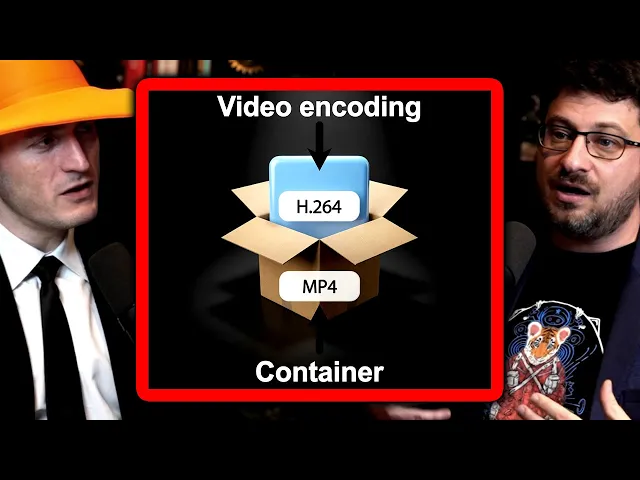
0:23 So, the container is what we call also the moxer, right?
0:25 When I say demoxing, it means decontenizing, right?
0:28 So actually if you look MX mean multiplexer and de multiplexer
0:34 right MX and demox are those and same codec is actually coder
0:38 decoder right um and um so containers are this collection of multiple
0:45 tracks right so it's a what normal people call the file format
0:49 but it's a bit more um subtle than that but the most
0:53 known one of course is MP4 but uh when I started
0:56 it was AVI right as the the video format from from uh
1:00 Microsoft and uh move which became MP4 was a format from Apple.
1:05 Um in the open source community one of the person that is
1:08 still active on video land is called Steve Lom and started
1:11 this Matroska format which is like a bit more complex
1:15 and and more feature proof um and um there are so many others.
1:20 So I mean there's it's a pretty common thing and maybe it'll
1:23 even happen in this conversation that people
1:25 confuse container and the codec right.
1:28 So confuse MP4 and H.264 for example.
1:32 Is that a horrible violation?
1:33 No it's not because technically the name of H.264 264 is
1:38 ME 4 part 10 because ME 4 is actually a meta specification
1:44 which has several things in it right there is the part two
1:48 uh so there is like audio codecs right AEC is the factory
1:52 is MP4 audio something there is actually several video codecs right inside
1:57 the ME 4 specification one of them is ME 4 part 10
2:01 called also AVC called also H264 right So it's completely the fault
2:07 of the industry to to to to make things difficult to understand.
2:11 So that's very difficult so that people
2:13 then don't understand why sometimes you talk
2:15 about me 4 part 10 where you mean H.264 and why it's not MP4.
2:20 So you can technically shove in all kinds
2:22 of different codecs inside containers and horribly so.
2:26 But broadly speaking though MP4 is understood
2:29 to generally be H.264 plus AAC audio.
2:33 99% of the time that's that and that the the rest
2:37 are dimminimous the small effects you know edge effects really compared
2:40 to that so it's not the end of the world
2:42 that there are people who do get annoyed by that but also
2:45 in reality something like VC just to point out the file
2:49 may saympp4 but it may be something completely different and that's
2:52 one of the challenges both ffmpeg and VC have is the real
2:56 world is a completely different place to a threeletter file format
2:59 and this is very important to say right like for example
3:02 in VC and ffmpeg We discard the file format, right?
3:06 We we look into the file to understand what's in it
3:09 because so many people like they say, "Oh, it's a video.
3:13 It must be MP4, but technically it's an MOV or maybe it's a MKV, right?" So,
3:17 we analyze in real time everything that we have
3:21 and we don't trust uh the the the format.
3:24 So, what information does the fact that it's MP4 give you?
3:28 It helps, right?
3:28 It gives you a hint, right?
3:30 just like oh it it's finished by MP4 I will start first
3:34 by opening probing it with the MP4 container demoxer to see well
3:40 it should be that but I don't trust it and if I'm
3:43 lost I say okay maybe I'm going to try to so it bumps
3:46 the priority of the module so how do you get to uh
3:50 just to take a bit of a tangent there you know the dumb
3:54 thing is if you try MP4 but it turns out it's a different
3:58 codec than you would have expected Uh most players just break there.
4:04 Yes.
4:05 Yes.
4:04 So how do you not break?
4:06 There's just a philosophically I'm sure
4:08 there's a bunch of stumbling blocks along
4:10 the way where you it's easy to just break and stop, freak out.
4:14 That's it.
4:15 How does VC not?
4:16 This is why VC is popular.
4:18 Um but the reason is because actually VC was
4:22 is just a client of a streaming solution called videoland
4:26 from from from very long time ago from the late
4:29 '9s and when you're playing video which are on UDP right
4:34 in network they might be damaged right so you don't
4:37 trust your inputs and this is very important in today's
4:39 security is that you don't trust your inputs so everything
4:43 in VC is prepared to um work with broken files.
4:47 Mhm.
4:48 And it's a philosophical idea from the beginning and everything
4:52 is engineered into that and it's a culture, right?
4:56 And so, for example, NVLC became very popular on that because
4:59 a long time ago when people were pirating content,
5:02 um, which they do a lot less today um, and none of us ever have.
5:06 No, of course not.
5:07 Um, the metadata to play some files like AVI
5:11 is at at the end of the file, right?
5:14 And when you're downloading, you don't have that, right?
5:16 So VC was just like, "Hey, this file is broken,
5:19 but I'm still going to try to interpret it." And this was very useful.
5:23 We hinted at the awesomeness of the various different stages.
5:27 We hinted at the awesomeness of codecs,
5:29 the depth and the richness and the complexity of everything involved there.
5:33 What let's try to define what is a video codec?
5:37 What what's involved there?
5:38 What what does it mean to compress something?
5:40 You already started to hint at it, but can can we elaborate a little bit more?
5:43 So there's a huge amount of redundancy in any video uh both spatial
5:48 and temporal and the point of any video codec is to remove this redundant data.
5:52 Use mathematical properties as part of this reduction process.
5:56 So more often than not using several
5:58 orders of magnitude more compute to compress
6:01 because that's more costly versus both
6:03 costly both financially and in CPU resources versus the decompression.
6:07 So it's asymmetric in that respect.
6:09 Often the case because compression is done once
6:11 but there could be lots of viewers of another file.
6:15 So to take that information and compress
6:16 it by 100x 200x removing redundant information
6:21 and using mathematical properties to make that small
6:24 but also have properties such as error resilience.
6:27 So as as JB suggested VC in the beginning was was
6:31 used to play UDP network feeds and UDP network feeds lose packets.
6:35 And so some of the design goals of a codec is also to be recoverable.
6:40 You you need to actually be able to join a stream.
6:42 It's not necessarily a file.
6:43 You need to join get on the decoding process and start decoding.
6:48 And and to give a more image to to to to people who are not familiar, right?
6:53 Like when you're going to see any type of movie, right?
6:56 You're going to see the camera is going to pan, right?
6:58 and and and travel and you realize that for example all the background
7:02 is the same from for like a minute right or 30 seconds right
7:06 so you can reuse the cloud that you see uh on the background
7:10 you can reuse that from a frame to another right and so it's
7:14 gets the more the more memory you have the more power
7:18 the more comparisons you can make right and so the more
7:21 compressed you can be and most of the modern codecs are
7:25 basically doing that so just to make it even more explicit.
7:29 So what is video?
7:31 Video is a bunch of pixels off an RGB have three values
7:38 and you have a grid of pixels and you have let's say
7:41 24 or 30 or 60 of frames a second and you just
7:46 have all these pixels repeating and showing different stuff 30 times a second.
7:52 And so the question, the philosophical,
7:54 the technical question is how can I compress
7:58 all of that, store all of that at 100x or 1,000x, right?
8:05 1,000x.
8:05 The target is 1,000x, right?
8:06 And the goal is when you say redundancy, what is redundant?
8:11 Meaning stuff at best that humans wouldn't notice if it was missing.
8:17 So for example, you have a picture of a cloud, right?
8:20 and from the next frame there's still going to be the same cloud.
8:23 So it's redundant.
8:23 You could just put it once and not do it right or you have a a [clears
8:27 throat] black background behind me for example
8:29 the black is the same on the whole picture.
8:31 Right?
8:31 So you can say well you know in this picture take the pixels that you have
8:35 on the top left and the one on the top right I'm not going to give the value.
8:38 I'm just going to tell you it's the same at the top left.
8:41 And then you can say for frame one um reuse something from the previous
8:46 frame or the previous previous frame and so on and so on.
8:48 Right?
8:49 So you could basically it's unlimited but then it's limited in terms of memory
8:55 or in terms of compute power because for example if you need to compare pixels
8:59 on 200 frames in the past on 4K resolutions it's a huge amount of compute
9:08 and then when you're showing it you have to do the decompress of all of that.
9:12 So is it the codec the has the encoding
9:16 and the decoding is is a coupled process that you're developing.
9:20 Exactly.
9:20 Right.
9:20 And those are two different um uh trade-offs.
9:23 Right.
9:24 Are you going to compress more uh but then
9:26 it might be more difficult to to to decode?
9:29 Um are you going to comp to make it a codec
9:32 that is more complex to encode and easier to decode?
9:35 Are you going to make a codec that is
9:37 easier to encode because you need to be fast.
9:39 But then the the client side the player is going to spend more time.
9:43 That's why you have so many different type
9:44 of codecs is that it's not always easy.
9:48 And to make it even more complex,
9:50 modern code decks like AV1, AV2 or VVC are actually not codecs.
9:54 They are a collection of tools, right?
9:56 There are multiple tools, multiple codecs in the same codec to depending
10:01 on the image get the more compression.
10:03 So just to elaborate codecs like AV1, VVC have a much wide have a wide audience.
10:10 It could be a screen share content.
10:12 It could be video.
10:14 It could be animation.
10:15 All of these require different coding tools.
10:19 So what happens these days is a collection of tools are put in and called AV1,
10:24 called AV2, called DVC to allow for different use cases.
10:28 So you may be on Zoom and sharing your PowerPoint
10:31 and then you need to show the audience a video.
10:34 That codec needs to start changing its tool set
10:37 depending on the content to compress in a different way.
10:41 And like you said, there's a bunch of incredible engineers behind each part
10:45 of that, each part of the tools that make up AV1, for example.
10:49 Sure.