Stop Overthinking AI: Use This 4-Step Framework
Tiago Forte
0:00 Most of the AI frustration I see comes from one specific mistake.
0:05 People tend to choose, let's say, chat GPT or Claude.
0:08 They use it for a few days or a few weeks using
0:10 the most basic vanilla offtheshelf setup and then it doesn't go too well.
0:15 They think it's not very useful and they set it aside and don't come back.
0:19 The real issue is not the tool.
0:21 It's the stack underneath it.
0:23 The environment and the tools that you build around it.
0:27 You don't just think, "Oh, I want to get a Toyota and then buy a Toyota." No,
0:31 you choose the make, then you choose the model, then you choose the trim.
0:35 There's so many small decisions to get
0:38 to the exact configuration of car that fits your needs.
0:42 The same applies to AI.
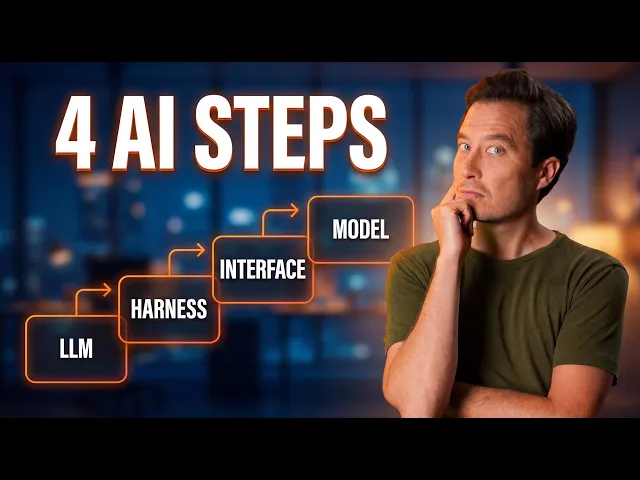
0:44 Here's what you need to consider when choosing your AI stack.
0:49 It's not just picking an LLM.
0:51 There are three other choices to make.
0:53 Here's the first decision you'll need to make.
0:56 Which AI is better?
0:58 Claude, Gemini, or Chat GPT?
1:00 These tools weren't just built differently.
1:02 They were designed for completely different kinds of people, different markets.
1:07 OpenAI is very clearly pursuing the classic consumer playbook.
1:12 Make it feel magical.
1:14 Make it sticky so you can't turn away.
1:16 Have zero setup so you can get started just like that.
1:19 Make memory automatic so it's not something that you have to think about.
1:23 It's designed to delight that novice user
1:26 that arrives at AI really not knowing anything.
1:29 Anthropic is really targeting professionals.
1:32 It has opt-in memory for those who are privacy conscious.
1:36 It's highly reliable.
1:37 It doesn't have features such as image generation that are a little bit wonky.
1:41 It's built for more complex knowledge work and business use cases.
1:46 It's designed really to be trusted by professionals.
1:49 And then you have the third major player,
1:50 Google's Gemini, which has massive context windows,
1:54 which it can do because it has all that big Google infrastructure.
1:58 It's highly multimodal,
2:00 so it's really the best at translating between different formats like text,
2:04 video, audio, software.
2:06 Gemini is really best in my opinion if you really live inside
2:10 Google's ecosystem and you want the integrations
2:12 with all the other Google products.
2:14 So decision number one isn't which eye is best at a kind of universal level.
2:19 Really it should be which AI tool was built for someone like you.
2:25 Do you value convenience and accessibility which would be more
2:29 open AI or control and reliability that would be more claude?
2:34 Right there you can understand why I've
2:36 really chosen claude from the very beginning.
2:38 My usage of AI is primarily in my work and I can see over really
2:43 years many decisions that Anthropic has made
2:47 that really align with that focus on doing better, faster, higher quality work.
2:52 Once you've made your choice, that's decision number one done.
2:56 But now there's a second decision.
2:58 And this one is in a way even more important
3:01 for how much the AI tool can do for you.
3:03 Decision number two, which harness?
3:07 See, the same underlying AI model can operate in completely different modes.
3:14 Think about the difference between an assistant
3:16 that can just answer your questions and a colleague,
3:19 a collaborator who can actually move forward projects on your behalf.
3:23 For Claude, the AI tool that I use the most, there are three harness levels.
3:29 Chat, co-work, and code.
3:31 Chat, GPT, and Gemini have direct analoges of each.
3:35 The names change product to product, but the three categories are the same.
3:39 From here on, I'm focusing on Claude.
3:42 For day-to-day small questions and tasks,
3:44 or especially if I'm on my iPad or my phone, I just do the standard chat.
3:49 It's the easiest to use.
3:50 It's the fastest.
3:51 It loads instantly.
3:52 I get my response right away.
3:54 That is fine for probably 60 or 70% of my interactions.
3:58 If I have something a little more complex, I'll often move from chat to co-work.
4:03 Co-work is kind of an intermediate step.
4:05 I have more power, more control, more reliability,
4:08 more thoroughess, higher quality, I can trust the results more.
4:12 And then when I do have something that is really challenging,
4:15 really subtle and sensitive, really high stakes,
4:18 and I really need every bit of capability that cloud has to offer,
4:22 then of course I do go to cloud code.
4:28 Decision number three is where you interact with AI.
4:31 Let's look at the options.
4:33 The first one and by far the most common is inside the web browser.
4:37 You go to, for example, claw.ai or chatgbt.com.
4:41 And this is a great place to start.
4:43 It's where all of us started.
4:44 It works anywhere on any device.
4:46 There's no installation necessary.
4:48 It's fantastic for that occasional casual use.
4:52 But you'll find it's a really big step up.
4:54 I really recommend everyone who uses any LLM to download the desktop app.
4:59 They're now available for all the major AI platforms.
5:02 And this is what I use every day, all day.
5:05 The desktop app 4:00 on my Mac.
5:09 It actually has three separate tabs across the top.
5:12 So with one click, I can switch between chat mode, co-work mode, and code mode.
5:17 And there's still other options.
5:19 A lot of people don't realize this, but there's
5:21 something called claude code on the web.
5:23 And I know this is a bit confusing because cloud code
5:26 on the web is not referring to using it in a browser tab.
5:30 What cloud code on the web allows you to do
5:32 is to open up your phone and basically fire off requests,
5:36 fire off tasks using the full power of cloud code,
5:39 which then are completed on anthropic servers and then the result,
5:43 the output is sent back to you on your phone
5:46 or on your computer or really any device.
5:48 Returning to the options for interfaces, there's still a couple more.
5:51 There's one called the CLI which stands for command line interface.
5:57 This is a much more advanced mode of using cloud code or any of the LLMs.
6:02 It's really designed for software developers or people in technical roles.
6:06 And finally, there's a fifth interface which
6:09 is the which stands for integrated development environment.
6:14 Overall, my take is you should really be
6:16 using at the very least the desktop app.
6:20 Moving from the browser, which again is what the vast majority of people do,
6:24 to the desktop app, the native app on your computer is an absolute game changer.
6:30 Decision number four, which model?
6:32 I want to show you something that I see constantly.
6:35 Someone asks an important question, nuanced,
6:38 high stakes, that needs careful reasoning.
6:40 They get back a mediocre or even just a wrong answer.
6:44 But here's usually the mistake they're making.
6:45 They sent a complex important request to the fastest, cheapest model.
6:51 Within any major AI platform,
6:54 there are multiple models that you can choose from.
6:57 For Claude, there's three main options.
7:00 There's Opus, Sonnet, and Haiku.
7:03 Each one of them is built for different situations.
7:05 The Opus model is the most powerful, but that also means it's the slowest,
7:10 it's the most expensive, and it burns through your tokens the fastest.
7:15 Sometimes that's worth it for high stakes decisions, for complex analysis,
7:20 for important, nuanced writing, big decisions that have a big impact.
7:25 Sonnet is kind of the middle ground.
7:26 It's a good balance of performance, speed, and cost.
7:30 This is what I typically tend to use on a day-to-day basis for most tasks.
7:34 And then you have Haiku, the fastest, cheapest, least powerful model.
7:38 But for things like looking up simple information, short replies to questions,
7:43 low stakes tasks, where speed is really what you care about, it's perfect.
7:48 For most use cases, I use Sonnet.
7:50 Like I said, it's a nice balance of performance and speed and cost.
7:54 If I am, say, on the go on my phone and I just need a really fast answer,
7:58 I might switch over to Haiku.
8:00 And then if I have something that's really big or complex or high stakes,
8:04 I'll often use Opus for that.
8:06 Even though it's more expensive and uses more tokens,
8:09 if I'm say creating a new app or I'm getting feedback on some
8:14 of my more complex writing or I'm
8:16 making a strategic decision about our product portfolio,
8:20 I really want every bit of juice that it has to offer.
8:25 It's almost like we now need to configure our own AI
8:29 exoskeleton and it looks different
8:31 for every person depending on their temperament,
8:33 their needs, their goals, their strengths and weaknesses.
8:36 That's really what I hope you take away from this.
8:38 That the level of customization is both needed, it's necessary,
8:42 but it's also tremendously empowering once you do it.
8:45 And if you want to see what Claude Code specifically looks like in action,
8:50 I really think it's the most powerful harness in the stack,
8:53 I made a beginner's guide that walks you through everything.
8:57 That one's up next.