Framework Laptop 13 Pro Unveiled: 20+ Hours of Battery Life & CNC Aluminum
PCMag
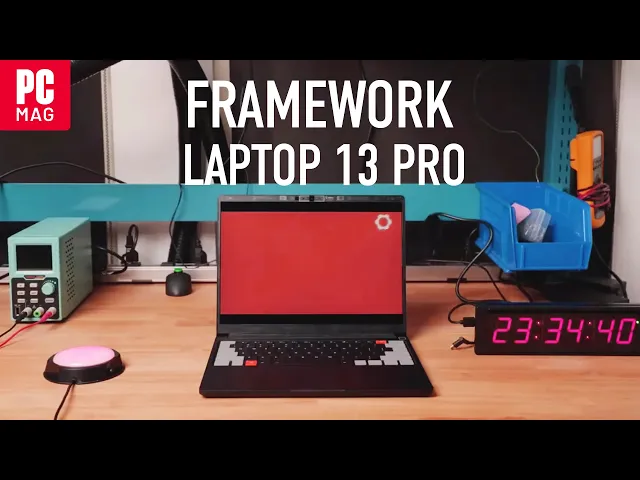
0:00 This is actually a live battery life test.
0:03 This computer's been running in our headquarters nearby
0:06 for almost 24 hours now and it is still going.
0:10 This specific test is local video playback actually for copyright reasons.
0:15 But we're also achieving over 20 hours of Netflix 4K streaming.
0:21 Wild, right?
0:22 It's a long time.
0:24 [applause] That's over 12 hours longer
0:30 than our last generation framework laptop 13.
0:33 And we've not only caught up to the 14-inch
0:35 MacBook Pro M5 in a number of use cases,
0:39 in this specific one, we're actually surpassing it.
0:43 Wild.
0:44 Wild, wild battery life.
0:47 We know battery life claims from device makers are usually totally bogus.
0:53 So, we're actually going to be publishing fulllength videos and setup
0:58 descriptions to our framework YouTube channel over the coming months.
1:01 So, you can actually repeat the same tests that we're running.
1:05 So, what is the product that delivers this?
1:11 What we're excited to announce today is the Framework Laptop 13 Pro.
1:21 [cheering] [applause] Yes, we actually did call it that.
1:29 This is a complete blank slate
1:32 redesign and we've overhauled the entire experience.
1:35 We took all of the expertise, all the resources,
1:38 and all of the partnerships that are now available
1:42 to us to build the perfect laptop for developers,
1:46 power users, and anyone who just wants more out of their computer.
1:50 So, how do we get that massive leap in battery life?
1:54 We optimize efficiency all throughout the system,
1:57 but there are three core areas of improvement.
2:01 First, the battery.
2:03 This is now 74.45 W hours.
2:05 And we've achieved that both by making the battery physically larger
2:10 and by increasing the energy density to 850 W hours per liter.
2:16 We also have a new 100 watt power adapter to support that larger battery.
2:21 Next, we move to Intel's latest Core Ultra Series 3 processor platform.
2:28 Yeah, [applause] it's great.
2:30 This offers a massive leap in efficiency over the last generation
2:37 and over anything that we've shipped in a framework laptop before.
2:41 We're also using LP Cam 2.
2:43 Whoa.
2:43 Okay.
2:44 We got some LP Cam stands in the crowd.
2:48 Apparently, [laughter] this gives you the efficiency
2:51 of LP DDR5X in a modular form factor.
2:54 We've got capacities with up to 64 GB.
2:58 And in today's environment when memory prices are just crazy high,
3:01 that means you can pick up just the memory you need today,
3:04 knowing that you can always upgrade in the future when you need to.
3:07 We've got three configurations of Intel processors available.
3:11 The Core Ultra 5, X7, and X9.
3:16 A laptop isn't just about performance and efficiency.
3:19 It's about the entire experience of using it.
3:23 The chassis, the display, the input system, the audio.
3:28 We've reset every part.
3:30 This is now a fully CNC aluminum chassis.
3:33 The top cover, input cover,
3:35 and bottom cover are all machined from extruded blocks of 6063 aluminum.
3:40 And you feel it immediately.
3:42 This is more rigid, more refined, and just feels more solid in your hands.
3:47 Just like we do for all of our laptops,
3:50 we've released open- source ID Surface CAD,
3:52 so you can also start 3D printing your own accessories.
3:56 We've also introduced this new finish that we're calling graphite.
3:59 I think it looks great.
4:01 And if you have a framework laptop 13 already,
4:04 we also have all of the new 13 chassis
4:06 parts available in a silver color way as well.
4:10 Since we started from scratch on this product, for the first time,
4:15 we designed an entirely custom display specifically around the use
4:19 cases that you want most from Framework Laptop 13.
4:23 This is a 13 1/2 in 2880 by 1920 panel with a 3x2
4:29 aspect ratio that gives you more vertical space for code and productivity.
4:34 We kept an LCD for maximum power efficiency, but this is no ordinary LCD.
4:40 This has up to 700 nit brightness, 1,800 to1 contrast,
4:46 and a novel anti-glare map polarizer that makes
4:48 it work great in any lighting condition.
4:51 It has perunit color calibration for accuracy
4:54 and it supports variable refresh rate from 30 to 120 hertz so that everything
5:01 from scrolling to animations just feels smoother.
5:04 And finally, this is a touch screen.
5:08 [applause] It's one of those features that completely changes
5:17 how you use a computer from day to day.
5:20 We also redesigned the touchpad.
5:23 This is now a PZO based haptic touchpad using
5:27 the same technology we just introduced on framework laptop 16.
5:31 We know that touchpads are where Windows
5:34 Linux laptops have typically fallen behind MacBook Pro.
5:37 So, we put a ton of focus on this.
5:40 We've spent months really tuning and perfecting the feel,
5:43 and we can't wait to see what you think of it.
5:45 On the keyboard, we kept the same same great mechanical key structure,
5:50 that 1.5 millimeters of key travel.
5:53 It actually feels even better now in that CNC chassis.
5:56 We also added something new here that's a lot of fun.
5:59 We've got keyboards available in different colorways.
6:02 I think this looks awesome.
6:04 And as always, keyboards are available in a wide range of languages and layouts.
6:10 We also improved the audio.
6:13 We now support Dolby Atmos with stereo sidefiring speakers.
6:17 [applause] The Atmos algorithms really level up the audio experience.
6:26 It's both louder and clearer than before.
6:30 Even with this complete overhaul, this is still a framework laptop.
6:35 We've got customizable bezel colors, hardware privacy switches,
6:40 and expansion cards that support Thunderbolt so you can choose your ports.
6:44 And of course, it's still a repable and upgradeable computer,
6:48 and we still include a screwdriver right in the box.
6:54 Even though we developed an entirely new chassis,
6:56 the main board is still backwards and forwards
6:59 compatible with every Framework Laptop 13 that we've shipped.
7:07 [applause and cheering] That means you can take the framework
7:12 laptop 13 you already own going all the way
7:14 back to that original 11th gen Intel Core and drop
7:17 in the latest Intel Core Ultra Series 3 processor.
7:21 That is a massive leap in performance all in the laptop that you already own.
7:27 You can also upgrade your original Framework
7:29 Laptop 13 piece by piece to get access to every one of those new refinements
7:34 and features that we've introduced on the Pro.
7:37 This is a Framework product.
7:38 We're living up to the promise of longevity.
7:40 You own it.
7:41 You can do what you want with it.
7:43 In addition to Intel Core Ultra Series 3,
7:46 we also have versions of Framework Laptop 13
7:48 Pro with AMD's Ryzen AI 300 series processors.
7:53 The choice is yours.
7:55 Pre-orders open today for DIY edition starting
7:58 at $11.99 with pre-built starting at $14.99.
8:02 Shipments begin this June.