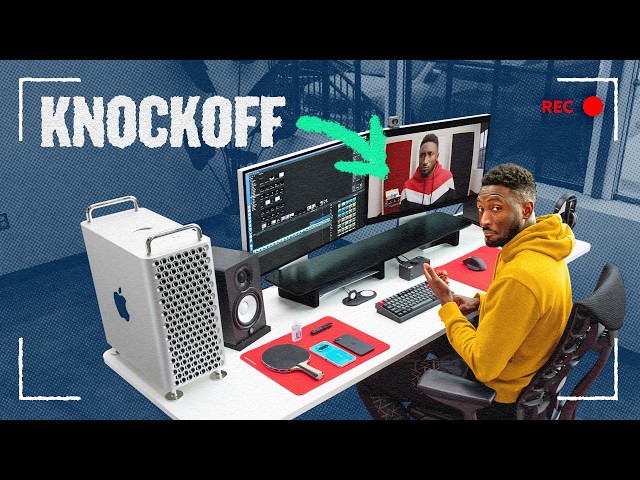
MKBHD's Desk Setup, But For Normal(ish) People
The Studio
0:00 This is MKBHD's hyperfunctional and very expensive desk,
0:04 and this is a functioning replica complete
0:06 with a computer that's 10 times cheaper,
0:08 two knockoff Pro Display XDRs, and one item Marques is now daily driving.
0:13 The biggest difference?
0:14 This entire replica, including the desk itself,
0:17 cost less than just one product that Marques is currently using.
0:20 But before I can show you the full knockoff,
0:22 let's have Marques give us the full tour of his setup.
0:24 All right, so it is Tuesday, January 27th, 2026,
0:28 and this is my current desk setup to start the year.
0:31 So, this desk surface itself is [music] huge,
0:35 and it is a custom-sized Next Desk Air.
0:39 The top is white aluminum, it's thin,
0:42 and it's really supported all the way [music] across,
0:43 so it doesn't bow or anything like that, and it is
0:45 a big enough surface to hold all of the things on my desk.
0:50 Yep, safe feet.
0:52 [snorts] The chair I've been sitting on for years now,
0:54 I've talked about these since probably 15, 20 years ago.
0:58 This is a Herman Miller Embody.
1:00 I don't know if I've had this exact one as long,
1:02 [music] but I've had a Herman Miller Embody at my desk since college,
1:09 and I graduated from college a decade ago.
1:13 Oh my god.
1:16 I'm so old.
1:17 So, I've got [snorts] a bunch of accessories,
1:19 uh, peripherals, and little tiny things on my desk,
1:22 so I'll get to the main stuff in a second, but I do have two mouse pads.
1:26 One of them for the mouse, one of them for the accessories and tech
1:30 that I keep in temporary ways at my desk.
1:33 But it's a red Artisan mouse pad, it's kind of like this perfect wine red,
1:39 and this is the phones that I have not wiped yet that I
1:42 may switch back to that I'm testing or using in some way.
1:46 So, all the other phones that I'm not testing or using anymore are in storage,
1:51 but I still have my Pixel 10 Pro,
1:53 my iPhone Air, and my Samsung Galaxy Tri-Fold over
1:56 here face down on this nice soft mouse pad surface.
2:00 So, I've got two power related accessories here.
2:03 One is this Belkin charger under my monitor stand,
2:08 which just has a magsafe charger,
2:09 another wireless charger, [music] and an Apple Watch charger.
2:12 Uh this kind of just slides under here.
2:14 Most of the time I'm not using it.
2:15 I'm just out of the way.
2:16 And then I have a This is pretty old, but it's a wireless charger.
2:20 I think Oppo makes this.
2:22 It says Airvooc, so [music] it's got to be, yeah.
2:23 Oppo makes this.
2:24 It's just a generic wireless charger,
2:26 but it's up so that more variety of sizes of devices
2:32 can work on it and I don't have to align it.
2:34 So, this is a daily driver setup right here in front of me.
2:37 I've gotten a lot of crap for this, but it
2:39 looks a little weird and I'm fine with it.
2:41 It's my keyboard, my mouse, and my trackpad.
2:44 So, how do you know I use a Mac?
2:47 Uh this is the Apple wireless trackpad.
2:49 It's USB type C now, and it's black, but I have them both going on at the same
2:54 time because I usually use the mouse over here,
2:56 which is my Logitech MX Master 4.
2:59 Uh and then when I'm editing,
3:00 I specifically use the trackpad to do my horizontal
3:04 scrolling and to do my swiping between [music] spaces.
3:08 Uh so, I do a lot of the gestures on the trackpad and the clicking on the mouse.
3:12 And the keyboard in the middle,
3:13 which is my Keychron Q1 Max with a couple custom keycaps on it,
3:18 and it's nice and heavy.
3:20 It sits in the middle of my desk, and it sounds like this.
3:25 This webcam up here is my Opal C1.
3:28 I discovered them right around COVID because everyone
3:31 got really into webcams because of remote work.
3:33 I actually invested in the company.
3:35 I think they're great.
3:36 This is a really good webcam.
3:37 I recommend it, obviously.
3:39 So, now we get to audio stuff,
3:40 which I've had maybe [music] the longest term out of anything at my desk.
3:44 We've got the studio monitors on either side of my displays.
3:47 These are Yamaha HS8s.
3:49 I love them dearly.
3:50 They're sitting on these [music] Auralex like foam pads,
3:53 and they're pointed at my ears.
3:54 And the HS8s are the best.
3:57 They're simply the best.
3:59 They were the best 20 years ago, therefore they're still the best.
4:02 And then they have [music] I have my headphones over here,
4:04 which are my editing {slash} open-back studio headphones.
4:08 These are Sennheiser HD 650s.
4:10 I like open-back because I'm in a studio environment [music] where I can like
4:13 turn around and talk to people and then turn around and get back to work.
4:17 And they both plug into my Apollo Twin by Universal Audio.
4:22 That's my DAC.
4:23 That's also my giant volume knob.
4:25 It's very satisfying and convenient.
4:27 And let's me change between the headphones and the studio monitors.
4:31 So then the center of the desk, what I look at every day is it's two displays.
4:36 It's been two displays for a long time and the two
4:38 of them are right above this I think Grovemade makes this.
4:41 It's But I don't put the stands on top.
4:43 I slide them underneath and then I lower the monitors so I
4:46 can store little trinkets and stuff like pens and Sharpies in here.
4:50 But these are our Pro Display XDRs as of right now.
4:53 I can I could name every monitor I've had in this spot for the last 20 years,
4:58 but Pro Display XDR has gotten the job done
5:00 for regular daily use and a lot of video editing.
5:04 All the way on the far left, actually on top of my desk,
5:07 is the computer I'm using now, the Mac Pro.
5:09 It's weird.
5:10 I think Apple's done with the Mac Pro.
5:12 They kind of stopped updating it years ago.
5:14 This is an M2 Ultra chip.
5:17 They have since made an M3 Ultra Mac Studio.
5:20 And when they eventually make an M4 Ultra and an M5 Ultra,
5:24 I don't know if they're going to make a Mac Pro with that in it.
5:26 I keep using it because I also have like
5:27 90 terabytes of storage in a PCI slot in there.
5:31 So yeah, as of 2:25 p.m.
5:33 on January 27th, that is my desk setup.
5:36 I've also been told that Andrew wants to do
5:39 something with my desk for some sort of surprise.
5:42 And I green-lit it.
5:44 So I guess I have no choice.
5:45 Uh Take it away, Andrew.
5:49 Eric and I came up with this video idea like 3 months
5:51 ago where we wanted to create Marques's desk as cheap [music] as possible.
5:55 Like almost look identical, but be like a third, a fourth, a fifth of the price.
6:02 [music]
6:01 And that all comes down to today.
6:03 So, one really important thing with this build though is I'm not just
6:06 trying to make a cheaper [music] version of a desk that Marques can use.
6:10 I'm trying to make a cheaper version
6:12 [music] that is identical to Marques's desk.
6:14 Okay, so we all know Marques's desk [music] is like way way too expensive.
6:19 So, I replicated it for way cheaper.
6:22 Stick around, I'll tell you the price at the end,
6:24 but Marques hasn't seen [music] this yet.
6:26 So, I'm going to go grab him.
6:29 Any context I should know?
6:30 Nope, you can just check it out.
6:31 Okay, it's chilly in here.
6:32 Oh, it's my desk.
6:36 My whole desk, but remixed.
6:39 First of all, what do you think the purpose of building this desk was?
6:42 To build my desk for cheaper.
6:44 Yeah.
6:45 Exactly.
6:45 Yeah, I mean the Mac Pro is a Mac Pro,
6:47 so that's expensive kind of no matter what.
6:49 Mhm.
6:49 But from there you've got This is a keyboard.
6:51 This Kind of like this keyboard.
6:56 Wireless, sounds good.
6:59 So, this is the Rainy 75 light and then I bought
7:02 a pair of $30 keycaps from Keychron
7:04 because they matched the aesthetic perfectly.
7:06 That keyboard's cheaper than just the keycaps on your keyboard right now.
7:09 That's good.
7:10 This is a really good This is like the OnePlus uh, 7 of keyboards.
7:16 [laughter]
7:15 The really funny story about this is I built the keyboard,
7:19 it was perfect, and I hid it in a box that said,
7:22 "This for studio video,
7:23 do not open." And then we come back from Christmas break,
7:27 and there's Marques with a new keyboard on his desk.
7:30 I notice the keycaps are different and I go, "Where'd you find that?"
7:34 Okay, so you've got this little Grovemade knockoff desk stand,
7:37 [music] but honestly they all do the same thing.
7:39 Just has to hold stuff.
7:41 All right, for the monitor stand, I think the company's called Kivi.
7:45 For $100, this still came warped.
7:48 It's kind of like bowed in the middle.
7:49 The mouse I was looking at Okay, so it's matte black.
7:52 I'm not going to say it's a knockoff of the MX,
7:54 but it is borrowing some of the features like the side scroll here.
7:59 It's ergonomic, it's tall, and it fits in my hand well.
8:01 It's a little narrower.
8:02 This gets like close,
8:04 but I still I just feel like if you just spend the extra 70.
8:07 [music] I think Marques wasn't the most fond of it.
8:11 I still think this is kind of a good price.
8:13 It's ergonomic, it's super light, Bluetooth and 2.4 GHz dongle.
8:18 The materials aren't the best, but you're also paying half of an MX Master, so
8:23 Honestly, I like that more than Marques liked it.
8:25 This mouse pad is red.
8:27 Honestly, it's probably just as good as my mouse pad.
8:30 I just like my very specific Artisan mouse Your mouse pads are nicer.
8:34 The two mouse pads Marques are using are pretty ridiculous.
8:37 They're like very sought-after in the gaming community
8:40 because of the more controlled texture they have,
8:42 and they're like 70 bucks a piece.
8:45 A company called Pulsar that I think is one of the most
8:48 underrated gaming mice companies out there has two red ones for 20 bucks.
8:52 Mouse pads, thumbs up.
8:54 I like them.
8:54 Okay, so there's a wireless charger I've always had in the middle.
8:57 It's adhesive to the desk.
8:59 like full adhesive.
9:00 It's like a sticky material to prevent sliding.
9:02 To prevent it from sliding.
9:03 I actually actively slide mine under the mouse
9:06 pad and slide it back usually, but still
9:09 Some of these things are a little harder to find the the cheaper
9:11 versions of because some stuff on your desk isn't so wild.
9:14 Yeah, the bucket's probably not ridiculous, but webcam
9:18 Yes.
9:17 You have the Opal C1.
9:19 That's a $300 webcam.
9:21 My goal here was to a high-quality webcam
9:24 that still had the square aesthetic that [music] you had.
9:27 This is the Obsbot Meet 2.
9:30 I don't know a ton about webcams,
9:31 but I watched a review from Random Frank P who showed this off.
9:35 It does have 4K recording.
9:37 It's 99 bucks.
9:39 It's got a nice little magnetic stand and it's really compact.
9:41 So, I actually think it's a pretty [music] solid choice.
9:44 I don't have super big demands from my webcam.
9:49 Yeah.
9:48 So, and obviously the Opal C1 is a pretty premium web
9:51 It is.
9:52 I believe this is I'm just checking real fast.
9:54 I think this is 99 bucks.
9:55 Yeah, that sounds about right.
9:57 Opal's $299.
9:58 We've got headphones and DAC over here.
10:00 I've never seen this DAC before.
10:03 Mhm.
10:02 But this is it says Evo 4 on it.
10:05 By a company called Audient.
10:06 I was really glad when you did your desk tour,
10:08 the one thing I focused on was maybe I can't get it look to one to one,
10:11 but I want a big knob.
10:15 Yeah.
10:14 For an audio interface, Marques uses the Apollo Twin.
10:17 It is really expensive.
10:19 So, I reached out to Rufus and Ellis,
10:21 both of them said Audient was a good company
10:23 and Audient has so many different interfaces in different price points.
10:27 So, I picked one of the cheaper ones and I think we got the vibe going for it,
10:31 maybe not the perfect replica, but Marques seemed impressed by it.
10:35 The question is always how good does it sound?
10:37 Like noise floor questions, compatibility questions,
10:40 even bugginess questions cuz the Apollo Twin is quality,
10:43 but it is so buggy sometimes.
10:46 I suspect this would do just fine for me and I would say good deal,
10:49 but I would want to test it a little more.
10:51 H Oh, HD 6XX.
10:53 So, these are going to be very similar.
10:55 This is probably the Massdrop thing.
10:57 So, the HD 6XXs are from a company called Massdrop,
11:00 which you might know as Drop right now.
11:03 Previously, they used to reach out to tech
11:05 brands and do some sort of collaboration
11:07 with them to make X product but with Y feature to fit on their website.
11:12 And somehow these are still available.
11:14 They still have the OG Massdrop logo on the side of them.
11:17 They're available on drop.com and they're like half
11:20 the price of the HD 650s that Marques uses.
11:23 So, it was a no-brainer.
11:26 Incredible.
11:26 So, I I can vouch for these already.
11:28 They're so good.
11:29 I love my Sennheisers.
11:30 They're open-back.
11:31 They look sweet.
11:32 They're lightweight.
11:32 They're comfortable.
11:33 These are HS5s?
11:36 Mhm.
11:35 Right?
11:35 Five.
11:36 So, HS5s versus HS8s.
11:37 That's going to be There's are still great.
11:39 get the one-one replica knockoff vibe we were
11:41 going for, there's only really one option for speakers,
11:44 and that's the HS5s instead of Marques's HS8s.
11:47 I asked Rufus and Ellis,
11:48 and they had a bunch of different ideas for really good,
11:51 really well-priced speakers,
11:52 but I think overall we just decided to go
11:54 with these because otherwise they just didn't look the same.
12:01 These uh displays are glossy and Oh, they're Pro Displays.
12:04 Wait, no, they're not.
12:05 Are they Pro Display or knockoff?
12:07 Yeah, oh no.
12:07 [laughter] What's a Pro Display knockoff?
12:10 With HDMI and DisplayPort.
12:13 And USB-C.
12:14 So, they're still
12:15 They're The monitors are what started this whole idea because they
12:18 were just so kind of absurd of looking exactly like it, but being way cheaper.
12:22 These monitors, spec-wise, aren't that different from a Pro Display XDR.
12:26 They're 6K, 32-in IPS, like for a fifth of the price.
12:30 If you really want something that looks like a Pro Display,
12:34 this is really the only other option there is.
12:36 The monitors here, I feel like are How much do you think they are?
12:40 I'm really interested in how expensive [music] you think they
12:43 I think these are $400 monitors.
12:47 Oh, no, they're [music] more expensive.
12:49 They're It's 700.
12:51 1,700 each.
12:52 1,700?
12:53 Mhm.
12:54 [music] Don't get these.
12:55 That's Studio Display is cheaper.
12:57 Cheaper, okay.
12:57 Studio Display is 1,600.
12:59 I would get a pair of Studio Displays
13:01 for your Mac before I would get a pair of these.
13:05 Okay, there's a couple things we haven't touched on yet.
13:07 Yeah, okay.
13:07 Let's talk about the desk first.
13:09 It is I really like this aesthetic of a desk.
13:12 It's kind of divided into three sections,
13:14 which may just be because that's cheaper than having a huge piece,
13:18 and then you maybe put [snorts] it together when you get it.
13:20 So, there was two things I needed in order to replicate Marques's desk.
13:24 Sit-standing, white top, black legs,
13:26 but also needed to be wide enough to fit two monitors,
13:30 two speakers, and a Mac Pro, which is not easy.
13:33 This is a lot of weight on top.
13:35 Yeah.
13:34 Your desk is extremely heavy.
13:38 Yep.
13:37 I'm fairly impressed.
13:38 It's slow.
13:39 It does move pretty solidly.
13:42 It wobbles though.
13:43 Your desk has four legs.
13:44 This has two legs.
13:47 Underrated.
13:46 This is a wobbly desk.
13:48 Yeah.
13:49 I And I that's why I got the the huge surface obviously holds a lot of stuff,
13:52 but the four legs keeps it from like shifting and wobbling.
13:55 I assume if you grab them with a more standard size top,
13:59 it probably wouldn't be too bad, but the motors seem good.
14:01 It's from a company called Vivo, and it was I mean,
14:05 a fraction fraction of what Marques's desk costs.
14:08 The two biggest things we're missing, first of all, the chair is just a chair.
14:11 I don't love recommending chairs that aren't very good
14:15 and so expensive cuz your back is super worth it.
14:19 Yeah.
14:18 Um there is something called the IKEA Markus for like 300 bucks.
14:21 I just put a Herman Miller in here.
14:24 Last but not least.
14:26 Let's check out this computer,
14:27 and there's a hint in the back to see what's actually happening.
14:30 Okay.
14:30 You said it's not a Mac Pro?
14:32 This is not a Mac Pro.
14:34 It's a Mac mini.
14:37 Mac mini that I have this?
14:40 Um the problem with opening it is the cables are in the way,
14:43 which actually made it really hard to install because I have to put
14:47 the case halfway on to get the wires in and then plug in.
14:50 But, I did 3D print a piece so that it you can push
14:54 on it and you still can access the power button from the back.
14:56 So, the reason I did this is because I
14:58 have found on eBay parts-only Mac Pros for under $100.
15:04 So, if you really, really, really want the MKBHD aesthetic, You can.
15:09 you can find a case, and you can put a Mac mini in there.
15:12 recommend this though.
15:13 No, this is I can recommend something different though.
15:15 It just didn't have the same vibe.
15:16 We 3D printed Oh, that's cool.
15:19 this Mac mini case.
15:21 The Mac mini in a Mac Pro's ridiculous.
15:23 If you kind of like that silly vibe to it,
15:25 just 3D print or buy someone 3D printing.
15:28 This is a Mac mini case to make it look like a cute
15:31 [music] little Mac Pro and this is way This is way cooler.
15:35 Can you give me a visual score out of 10?
15:39 It's over an eight.
15:40 It's got to be like an eight and a half.
15:42 I have a spreadsheet.
15:43 Your full desk and this full desk and final prices.
15:47 So, that's everything not including the chair and not
15:50 including random phones and stuff on your Mac.
15:53 So, the total Total price.
15:54 Total setup cost minus the chair and then my And your desk.
15:58 Let's guess your desk first.
16:01 Uh, okay.
16:02 Okay, so desk plus computer is already 15.
16:07 Both Pro Displays, which are both matte
16:10 and both have the thousand-dollar stand, so that's like probably 800
16:14 Seven, seven, 14 27,000 dollars.
16:21 You're very close.
16:24 [laughter] It is higher than that.
16:25 It's I have 33,330, which is a hilarious price.
16:32 Woah.
16:31 Yeah.
16:31 How much do you think everything right here costs?
16:34 Again, not including chair, not including the couple things on this mouse pad,
16:38 but every other thing you see here.
16:40 So, 63,60 500.
16:48 Very close also.
16:48 It comes in like just under 6,000.
16:52 Okay.
16:51 So, this whole desk costs less than one of your Pro Display [laughter] XDRs.
16:55 That's crazy.
16:56 Um, [music] I hope people watching this can get
16:59 a sense of like some of these are really
17:01 awesome and some of these, if you're willing
17:03 to spend a little extra for aesthetic purposes, is cool.
17:06 [music] Yeah.
17:08 Nice.
17:09 Well, thanks for watching and if you guys enjoy
17:10 the behind the scenes of stuff like how we work,
17:12 then you'll probably really enjoy our massive year
17:15 in the life documentary [music] that I'll put right here.