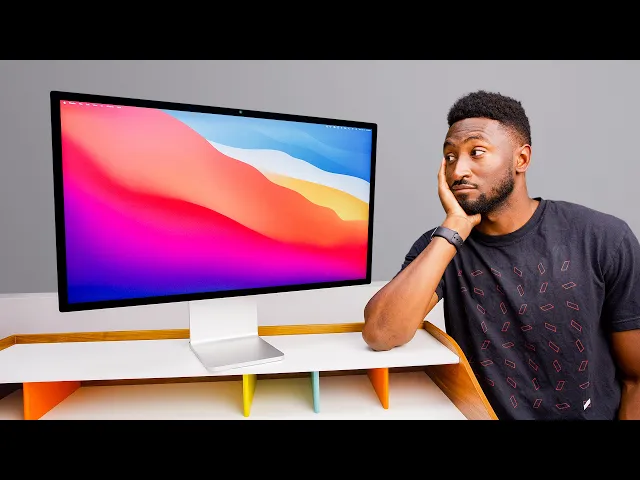
Apple Studio Display XDR Review: We're All Pros Now!
Marques Brownlee
0:01 [music]
0:04 Maybe maybe we're all pros.
0:06 Maybe that's what this means.
0:08 Yo, what's up?
0:09 MKBHD here and this is Apple's new Studio Display XDR.
0:14 Probably can't tell just by looking at it on camera, but this is the new one.
0:16 I've been testing it, staring at it for a few days now.
0:18 This is not the most important product that's come
0:20 out in the past couple weeks, let's be real,
0:22 but I've been watching Apple and covering them for a while
0:25 and the decisions that they make and the decisions that they don't make.
0:29 And I think the existence of this monitor as it sits
0:32 actually tells us a lot more about what Apple's doing right now.
0:36 See, this past week was actually a tale of two brand new displays from Apple.
0:40 They dropped a barely updated regular Studio Display, which is the same design,
0:45 same stand, same chassis, same 11-year-old panel, 27-in 5K IPS LCD panel,
0:52 but now with the new processor inside and new Thunderbolt 5
0:56 ports on the back and it's for the same $1,600 price.
1:00 It's a weird, good-looking, but weird monitor.
1:04 And then this one, this is brand new.
1:05 This is the Studio Display XDR and so it's an upgraded,
1:09 higher-performing version of that.
1:11 So, it's still a 27-in 5K monitor with the same great stand,
1:16 but the panel oh, the panel.
1:18 This time it's finally a mini LED display with 2,000 nits of peak
1:23 HDR brightness and 120 Hz max refresh rate with adaptive sync support.
1:28 And this display replaces the Pro Display XDR.
1:33 Hmm.
1:34 So, the Studio Display replaces the Pro Display.
1:38 Studio replaces Pro.
1:40 Okay.
1:41 Write write that down.
1:42 Write that down.
1:42 So, turns out there's not really that much else to say about the panel itself.
1:46 It is an awesome display and at a technical level it's
1:49 actually better in every single way than the Pro Display XDR.
1:52 It gets much brighter.
1:53 It'll do 1,000 nits full screen in regular SDR mode.
1:58 The Pro Display could only do 500.
2:00 And it'll do up to 2,000 nits peak
2:01 brightness in HDR versus the Pro Display's 1,600.
2:04 And the mini LED backlight is giving us way more contrast control.
2:09 2,000 local dimming zones versus the Pro Display's 576.
2:13 You can see it in a dark room with a black background video.
2:16 The difference is insane.
2:18 There's way less blooming, higher contrast ratios.
2:21 It's actually not even really close.
2:23 And then it also gains the extra Thunderbolt 5 port on the back,
2:25 which is sneakily extremely useful.
2:28 And it also adds a webcam and speakers
2:30 that the Pro Display didn't have and it's cheaper,
2:33 which isn't saying much cuz you remember the Pro Display was $5,000 and then
2:36 the stand was an extra $1,000 and then the nanotexture was another $1,000.
2:41 But this better display starts at $3,299 and includes that stand.
2:46 And nanotexture is only $300 more.
2:49 Side note, the nanotexture thing they've been doing for some years now.
2:53 I think it's just progressively getting better and better.
2:55 It started on the Pro Display XDR a decade ago and it it was effective,
3:01 but extremely difficult to clean.
3:03 Like I can't touch my Pro Display XDR
3:05 without fear of leaving permanent marks on it.
3:07 It's kind of insane.
3:08 That also birthed the infamous Apple polishing
3:11 cloth and its constantly updated compatibility list.
3:14 But then they started bringing nanotexture to other displays.
3:17 The MacBook Pro, for example, got nanotexture and that's a little better.
3:20 You could use different cloths on it and effectively clean it pretty well.
3:24 And then they brought it to the iPad.
3:26 So, there's an iPad Pro with nanotexture and that's obviously a touchscreen.
3:29 So, anyway, this is the nanotexture version on the desktop 10 years later.
3:33 It did actually come with a note and a separate cleaning cloth
3:37 and the note says to only use this including polishing cloth to clean this.
3:42 And it is a different polishing cloth than the previous Pro Display.
3:46 So, I I think I can probably use other microfibers and not have any issue.
3:51 And don't worry, if you're wondering Apple did update the compatibility
3:54 list for the old polishing cloth to include the new Studio Display.
3:58 I know you were all holding your breath for that one.
4:00 But last time I reviewed the Studio
4:02 Display I remember specifically pairing it again
4:06 with my MacBook Pro and saying that even
4:08 though this monitor is made for the Mac,
4:10 it doesn't actually feel like it makes a great pair
4:13 with the MacBook Pro because they don't match that well.
4:16 The MacBook Pro is this nice high refresh rate mini LED
4:19 display and then your Studio Display is a 60 Hz LCD.
4:24 But now the Studio Display XDR specifically is
4:27 a much better pair with the MacBook Pro now.
4:29 Now, there are, as always, lots of other options for monitors that you
4:33 could get to pair with your Apple computer.
4:36 But the reason that a lot of people end up choosing the Studio Display,
4:40 the Apple Display, is because of how well it pairs with and works with the Mac.
4:44 And that's not just aesthetics,
4:46 though obviously being silver and metal is going to be a factor,
4:49 but it's also the one cable life.
4:51 Like plugging in a single Thunderbolt 5 cable into the display
4:55 at your desk and getting all your accessories to light up.
4:57 Everything else connected to all the other ports on the back of the display,
5:00 including if you want another full speed Thunderbolt 5
5:03 port to dock some really fast storage to the thing.
5:06 You can even connect through that port to another Studio Display.
5:10 So, you can daisy chain up to four Studio Displays or two Studio
5:14 Display XDRs together to the same MacBook Pro all through one single cable.
5:19 And then they'd all be matching as high refresh rate,
5:22 high brightness mini LEDs across the board and it
5:25 would be charging the MacBook Pro at 140 W.
5:28 So, what do I mean when I say we're all pros now?
5:31 What does that mean?
5:33 Uh well, I did earlier say that Studio replaced Pro.
5:37 You wrote that down, right?
5:38 So, this is the new Studio Display.
5:40 But if you go to Apple's blog post announcing this thing,
5:43 they literally still call it the world's best Pro Display in big text.
5:48 So, they couldn't be more clear about Studio replacing Pro.
5:51 Uh but more importantly, this great display now is packaged like this, which
5:57 is clearly an upgrade to the base version.
6:00 There's the Studio Display and then the upgraded Studio Display.
6:03 And that is easier to sell and easier to explain.
6:07 It's easier to understand.
6:08 And you know how much Apple loves their price ladders.
6:11 Anyway, my main theory is that I don't think
6:13 Apple really is interested in targeting the real pro,
6:17 the professional market anymore.
6:19 And this is probably a debate they've had many times internally,
6:22 but that professional market is super small,
6:25 it's super picky and it is the least
6:29 likely to be interested in their ecosystem stuff.
6:32 So, they'll dabble in really pro stuff once in a while.
6:35 Mac Pro, sure, it exists.
6:38 The Pro Display, obviously, but that's not really their bread and butter.
6:41 Like they they use the word pro,
6:42 but most of the stuff that has the word pro in it,
6:44 like the iPhone Pro or the MacBook Pro,
6:47 is really high-end consumer devices that have like pro-level capabilities.
6:52 And so, the natural extension of this theory is that Mac Pro is doomed.
6:59 Of course it's doomed.
7:00 Uh like I said, like you wrote down.
7:02 Studio replaces Pro.
7:04 And we already have a Mac Studio now
7:06 getting more regular updates than the Mac Pro.
7:09 Mac Pro hasn't been updated since M2 Ultra back in 2023.
7:12 And I'd be willing to bet that it doesn't get any more updates.
7:15 But that's a tangent for another day.
7:17 The point is the word Studio replaces the word
7:21 Pro at the very top of Apple's lineup.
7:23 That is the most pro of any of the stuff you'll
7:25 get from Apple is when you see the word Studio on it.
7:28 So, as someone who's been using a MacBook Pro
7:30 and a Pro Display XDR since they came out,
7:32 the immediate first thought when I saw these announced was should
7:35 I be switching to the Mac Studio and the Studio Display XDRs?
7:40 You know, I've gotten really used
7:41 to these huge Pro Displays with more real estate,
7:44 but you know, 27-in 5K with slightly thicker bezels is not a disaster.
7:48 It's still a lot of screen.
7:50 So, since everything else about it is better, I probably should be switching.
7:54 But for everyone else out there who doesn't already have a Pro Display
7:56 and is looking for the best display to pair with say their MacBook Pro,
8:02 this is about as good as it gets.
8:03 Like as a video creator in this little studio we have here,
8:06 this is more than pro enough for me.
8:08 Like I know there are Hollywood movie studios
8:10 that don't even need a webcam built in and they
8:12 don't even need speakers built onto their monitor cuz
8:15 it just lives in an editing den all day.
8:16 Never does any FaceTime calls or any gaming or YouTube watching.
8:20 But this is more of a mixed-use product that is sometimes used to edit videos,
8:25 like the one you're watching, and edit photos, like the thumbnail of this video.
8:28 But then other times it's used to make a video call or get on a virtual meeting.
8:32 And then the perfectly average 1080p Center Stage
8:35 webcam is nice to have in that case.
8:38 And sometimes it might actually be used to just watch videos,
8:40 listen to music, do other random stuff.
8:42 And the speakers in here are still surprisingly good at that.
8:45 They're like 16-in MacBook Pro level,
8:47 like impressive speakers for in this tiny chassis.
8:50 You should probably still get dedicated speakers though.
8:53 They're not even going to be in the same planet.
8:55 But then the 120 Hz max refresh
8:56 rate is great for animations and scrolling around, even gaming if you wanted to.
9:02 Something an actual professional reference monitor
9:05 would almost never be used for.
9:07 There really isn't much for me to compare this to.
9:09 Like I would love to look at other options for a 27-in 5K
9:14 2,000 nit HDR mini LED display with high refresh rate, but there aren't any.
9:21 So, when I also point out that the Thunderbolt 5
9:23 cable that it comes with is kind on the short side.
9:25 It's like 3 ft long.
9:27 Eh, doesn't really seem to matter.
9:29 Like I'm sure the other reviews will also point out that the top
9:31 gets just a little bit warm once it's been on for a little while,
9:35 partially because it's a really big bright display,
9:37 also partially because there's literally an A19 Pro chip in here
9:42 with 12 gigs of RAM just to run the webcam and speakers.
9:46 There's no question other people will bring up that even though
9:48 the power supply is built in, the power cable is still non-removable,
9:54 which is still super strange and will make it a pain to get replaced.
9:57 But at the end of the day,
9:58 I do feel like if you want the best possible display to complement the MacBook
10:02 Pro for that one cable plug-in and come to life desk setup, it's this one.
10:09 Now, Apple, if you could just update the Mac
10:11 Studio with like a M4 M5 Ultra soon as well,
10:17 that would be very much appreciated.
10:19 But either way, we got a lot more coming up in Tech-tember, I mean, March.
10:23 Somehow this became Tech-tember or Tech-March-Tarch.
10:27 It's Tarch.
10:28 Stay tuned for many more videos coming soon because it's Tarch season.
10:33 Catch you guys in the next one.
10:34 Get subscribed.
10:36 Peace.